English
 Deutsch
 Espanol
 Français
 Portuguese
 中文
中文 한국어
한국어 日本語
日本語
Comprehensive Azure cloud services monitoring

Get end-to-end visibility into your Azure virtual machines, hosted applications, and cloud infrastructure to help you pinpoint the root cause of performance problems impacting the end-user experience.
Trusted by leading companies


Performance assurance for
Azure cloud environments
eG Enterprise is a total performance monitoring solution for the Microsoft Azure cloud environment. Whether you have production applications running in Azure cloud or are in the process of migrating applications to the cloud, eG Enterprise gives you the visibility you need to ensure top performance, availability, and excellent user experience.
Providing unified monitoring of cloud, on-premises and hybrid IT infrastructures, eG Enterprise delivers deep performance insights, availability metrics, resource utilization trends, and historical analytics to diagnose and resolve all performance issues that can impact your business services. Our comprehensive Azure monitoring tools simplify your process for monitoring data across your entire IT system, ensuring that no particular service degradation goes unnoticed.
eG Enterprise delivers end-to-end Microsoft Azure monitoring:
- Get correlated visibility of Azure VMs, hosted applications, and the cloud infrastructure
- Auto-baseline your Azure environment and get alerted to performance deviations
- Monitor your customers' digital experience as they access your cloud applications
- Using built-in analytics and reports, prepare for a smooth migration to Azure
- Integrate with your existing IT management ecosystem, such as Microsoft SCOM, ServiceNow, and more

eG Enterprise for Azure monitoring

Now Available on

eG Enterprise provides you peace of mind when deploying key business applications in the cloud and the Azure ecosystem:
- Monitor Azure VM resource usage to determine which VMs are consuming the most resources
- Measure the performance of applications running on Azure and trace business transactions
- Performance problems are correlated between IT infrastructure and applications to find the root cause and not the secondary problems that ripple out from it
- Resource utilization trends and historical analytics help forecast future capacity requirements
With eG Enterprise, more than 70% of the time we can respond to an event and resolve the issue before the customer engages support. That results in about a 15 to 20% cost avoidance for us. eG Enterprise drastically improves our performance from an SLA standpoint.


Features
In-depth Azure performance diagnostics
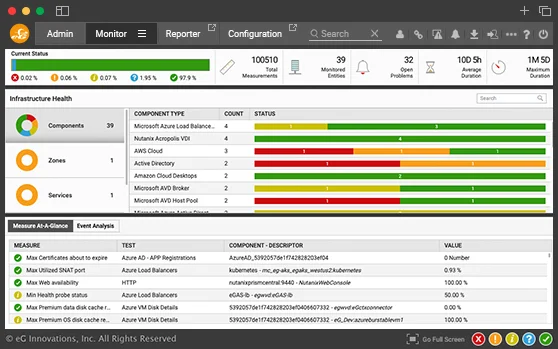
eG Enterprise leverages Azure APIs to gather in-depth performance diagnostics and presents them on an intuitive web-based dashboard for performance analysis and problem resolution.

Monitoring Azure virtual machine performance
eG Enterprise, one of the sophisticated Azure monitoring tools, provides deep visibility into the performance and resource utilization metrics of Azure VMs (Windows and Linux).

Application performance monitoring in the cloud

Smart alerting and problem detection using artificial intelligence

Frequently asked questions (FAQs) about Azure monitoring
Azure monitoring focuses on tracking the health of all the key IT services hosted on Azure Cloud. Problem detection and alerting, root-cause diagnosis, reports, and analytics are also included in our advanced Azure monitoring tools. Features include a thorough data collection of Azure monitor metrics and logs to ensure complete oversight.
Yes, the cloud service provider does monitor the health of the key infrastructure they use for delivering their cloud services. But problems you may face on Azure could be unique to your instance, or your database instance. The cloud service provider SLAs are only around the uptime of their service, not around performance, and will not help you diagnose problems with applications you have hosted on Azure. Moreover, traditional Azure cloud monitoring tools may not provide the specific insights needed for such unique problems, especially when it comes to detailed performance data and log analytics. Here’s a whitepaper on 6 myths of cloud performance monitoring that explains it further.
Azure Monitor is Azure's native monitoring tool that can monitor your applications hosted on Azure and the Azure infrastructure. Azure Monitor can be used to get useful dashboards and reports, but setting up the monitoring can be time-consuming and challenging. Manual setup is needed, and admins need to specify each metric and threshold. Furthermore, there is a cost per metric even based on the type of threshold. This is where a third-party Azure monitoring tool like eG Enterprise helps. It is simple to set up, licensing is not per metric, and you can even monitor multi-cloud deployments from a single pane of glass, integrating seamlessly with any Azure subscription.
AWS CloudWatch allows you to monitor your AWS services. To monitor Azure services, you can use Azure Monitor. If you want to monitor both AWS and Azure services in a single console, then you will need a multi-cloud monitoring tool like eG Enterprise.
You can set up Azure Monitor to monitor your costs. Alternatively, you can monitor Azure resource costs using a third-party monitoring tool like eG Enterprise.
You can use Azure Monitor, but it requires a lot of manual configuration to set up the PaaS metrics, thresholds, and alerts. Alternatively, you can use an Azure PaaS monitoring tool like eG Enterprise, which monitors Azure PaaS services but requires very little manual setup. eG Enterprise automates the discovery and monitoring and provides pre-configured metrics and alerts aligned with industry best practices. The intuitive dashboards, accessible through the Azure portal, deliver real-time insights into PaaS health and performance, complemented by advanced analytics that preemptively identify potential service issues. This integration with other Azure services boosts operational efficiency and enhances the end-user experience, making it one of the leading Azure monitoring tools available.
The metrics of importance will depend on the Azure services that you are using. For Azure compute instances, it is important to track VM status, CPU utilization, IOPS, and network throughput, all streamlined through advanced monitoring tools in Azure. For Azure SQL, it is important to track Log IO usage, Data IO usage, utilization of workers and sessions, and DTU used vs. limit.
CPU utilization, IOPS, throughput, etc., can be monitored using Azure APIs (i.e., agentless). However, if you need to know which application is taking CPU or causing disk IOPS, you will need an agent to be deployed on the Azure instance. Furthermore, Azure APIs do not provide any memory utilization metrics. An agent on the Azure instance can provide an indication of memory utilization (this metric can help you understand if you have sized your VM correctly). Agents are also required if you need to monitor applications running on the Azure instances. This is why Azure monitoring solutions often include both agentless and agent-based monitoring capabilities.
The best Azure monitoring tool is one that best meets your requirements. If your entire technology stack is on Azure and you have the time and resources to manually configure thresholds and alerts, then Azure Monitor is a good option. If you have a hybrid cloud or multi-cloud environment or want to minimize the configuration and cost of the monitoring tool, then a third-party monitoring tool like eG Enterprise is preferred.