English
 Deutsch
 Espanol
 Français
 Portuguese
 中文
中文 한국어
한국어 日本語
日本語
Microsoft Remote Desktop Service (Microsoft RDS)
What is Microsoft RDS?
Microsoft Remote Desktop Services (RDS) is a branded, proprietary protocol for application and desktop virtualization. Like any remote desktop solution, it allows users to access a desktop remotely.
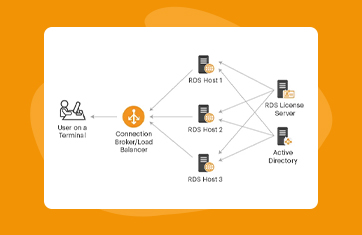
In most Microsoft RDS configurations, a Windows server does most of the work, including hosting the software, distributing the resources, and sharing those resources with users.
A specified number of users can then connect to that server using the Remote Desktop Protocol to access the operating system and applications they would normally use on their desktops.
What are Remote Desktop Services?
For those searching for an answer to the question “What is RDS,” it refers to the particular technology that allows users to access a remote desktop operating system from a different network-connected device.
Using a robust protocol, users can take their laptop or mobile device wherever they need to go with the assurance that they’ll be able to access their desktop applications as long as they have an internet connection. IT professionals can also use the technology to manage and troubleshoot computers from a central, remote location.
Remote desktop services have several components that work together to deliver a smooth remote access experience. These include:
Two additional features can also help to enhance the experience: RemoteApp allows you to run an application on your remote device while it’s also running on your desktop (regardless of operating system differences), while RemoteFX enables 3D graphics and a better all-around visual experience.
What are the benefits of Microsoft Remote Desktop Services?
What is RDS’s role in helping your organization reach its business goals? The following are some of the benefits of remote desktop service you can expect to see for your business.
What is Microsoft RDS monitoring, and Why is it important?
Microsoft RDS monitoring is simply a way to collect, track, and analyze data about your virtual desktop with the goal of proactively handling problems and ensuring optimal performance and health.
In general, your monitoring system may:
You can perform these tasks using native tools or third-party software. Whatever your choice, end-to-end monitoring of Microsoft RDS is vital because they enable you to do the following:
When you employ proper monitoring techniques, you can prevent small problems from becoming big ones, maintain the safety of your data and infrastructure, and keep everyone in your organization productive.