English
 Deutsch
 Espanol
 Français
 Portuguese
 中文
中文 한국어
한국어 日本語
日本語
Node.js
What is Node.js?
Node.js is a JavaScript runtime environment built on Chrome's V8 engine that allows developers to run JavaScript code outside the browser, typically on the server side. The ability to run JavaScript code on the server is often used to generate dynamic web page content before the page is sent to the user's web browser.
It is designed for building fast, scalable, event-driven applications, particularly web servers and APIs.
Node.js is cross-platform and supported OSs include Microsoft Windows, Linux, macOS, and FreeBSD plus others.
Is Node.js Open Source?
Yes, Node.js is open source. It is governed by the OpenJS Foundation and released under the MIT License, allowing developers to freely use, modify, and distribute the software. Its open-source nature has contributed to a large ecosystem of community-driven modules and tools via npm (Node Package Manager).
Node.js Architecture – An Overview

How Does Node.js Handle Concurrency?
Node.js uses a single-threaded event loop with non-blocking I/O—allowing many simultaneous connections efficiently, as long-running tasks are offloaded to background threads via libuv.
What is npm?
npm (Node Package Manager) is the default registry and CLI for managing packages and dependencies in Node.js projects.
What is the Event Loop?
The event loop processes callbacks in phases—polling I/O, executing timers, handling immediate tasks—enabling the asynchronous, non-blocking nature of Node.js
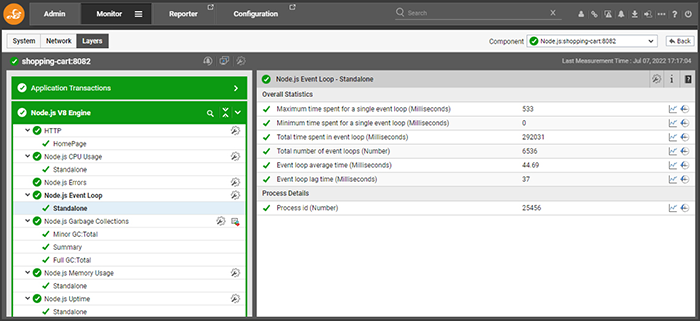
When working with Node.js it is essential to proactively monitor the behavior of the event loop – key metrics to monitor that are associated with the event loop are shown in this screenshot from the eG Enterprise monitoring platform
What are the Advantages of Using Node.js?
Benefits and Advantages of Node.js include:
What are the Limitations of Node.js?
Limitations of Node.js that should be taken into consideration include:
Given these potential challenges, proactive monitoring is not just a best practice but a critical component for maintaining a reliable and performant Node.js application.
Where Can I Find Details of Node.js Releases?
Information on Node.js releases is available here: Node.js — Node.js Releases.
Can I Get a Commercially Supported Version of Node.js?
Commercial support for versions past the Maintenance phase is available through the OpenJS Ecosystem Sustainability Program partner HeroDevs.
How Should I Monitor Node.js Applications?
When monitoring Node.js applications you should track and monitor the health of the server or container running Node.js. Metrics pertaining to resource usage should be used and you will also want to monitor the underlying infrastructure supporting the server or container – whether that be physical hardware or cloud / virtualized infrastructure. Basic metrics you should monitor include:
Application-level monitoring should capture metrics specific to Node.js, such as:
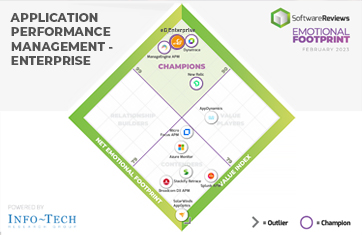
APM tools that capture application-level metrics include Dynatrace, Datadog, eG Enterprise and New Relic.
Monitoring should also cover the V8 engine.
What eG Enterprise Offers for Advanced Monitoring of Node.js
- Measures Node.js application code performance with application-level transaction details including per URL drilldowns and transaction details for each and every access to web and e-Commerce sites.
- Automatic inspection and continual monitoring of database queries and database performance. Use the Slow SQL Queries feature to identify queries that are taking excessive or abnormal time to execute. All major database technologies including MongoDB, MySQL, PostgreSQL and more supported.
- Distributed Transaction Flow analysis leverages a tag-and-follow technique to trace transactions across multiple tiers – Node.js and other (Java, PHP, .NET) APM tiers.
- Additional contextual information capture. For example, when monitoring an e-Commerce website, details of what products are viewed and what are the most searched products, etc. are captured.
- Code level exceptions are tracked and captured including comprehensive exception details.
- Comprehensive live and historical out-of-the-box Node.js reports cover all aspects of business transactions in an application including: Health Trend, Load Response vs Time Analysis, Unique User / Session and more.
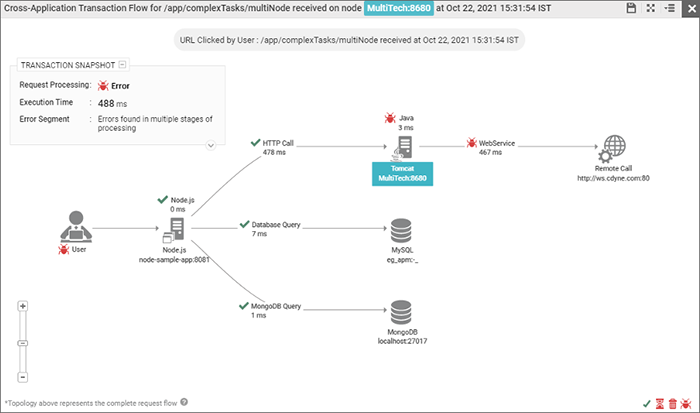
Coss-application transaction flow analysis will pinpoint issues such as slow database queries, application server issues or slow / failing remote calls
To learn more about eG Enterprise support for Node.js applications, see Node.js Application Performance Monitoring.