English
 Deutsch
 Espanol
 Français
 Portuguese
 中文
中文 한국어
한국어 日本語
日本語
Citrix
What is Citrix?
Citrix is an enterprise software company founded in 1989. Citrix is best known for providing technologies for virtualization, remote application delivery and cloud computing.
Millions of end users access remote desktops and applications via Citrix branded products such as Citrix Workspace App, an application employees use to access company resources, with many referring to the products as just “Citrix”. As a result support calls about application issues are often phrased as “Citrix is slow” or similar, although a stack of multiple Citrix and third-party products are usually involved in application delivery.
What is Citrix used for?
Citrix creates virtualization software and associated technologies that are widely used by businesses and organizations of all sizes to enable remote work capabilities, where user access to applications and desktop resources is available virtually.
Businesses and their employees use Citrix to recreate the conveniences of the workplace in out-of-office settings, ensuring that remote users can maximize productivity by continuing to use their digital workspace tools uninterrupted.
Some of the key use cases for Citrix technology include:
Key Use Cases for Citrix
Some of the key use cases for Citrix technology include:
For many organizations, Citrix technologies play an essential role in supporting remote work, improving user experiences, and ensuring efficient application delivery in modern IT environments.
Key Citrix Products
Some of the key products and solutions offered by Citrix include:
What is the role of IT monitoring in a Citrix deployment?
Citrix workloads are some of the most performance sensitive workloads in enterprise IT networks today. Even a small glitch anywhere in the infrastructure can result in screen freezes, slow logons, session disconnects and such. IT operations teams need to be able to monitor the Citrix delivery chain end-to-end in order to avoid “Citrix is slow” complaints from users.
Traditional system and network monitoring tools do not have the expertise to monitor Citrix technologies and protocols well. This is why Citrix customers have to explore specialized solutions for monitoring Citrix.
Effective Citrix monitoring provides visibility into user sessions, login performance, HDX latency, virtual desktops, application delivery, infrastructure health, and network performance. Organizations commonly use specialized Citrix monitoring tools to quickly identify root causes and improve digital employee experience (DEX).
Frequently Asked Questions (FAQs)
Common uses of Citrix technologies include:
Citrix Workspace is a service that provides secure access to virtual apps, desktops, web and SaaS apps from a web browser or Citrix Workspace app.
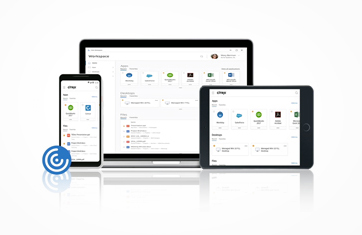
Citrix Workspace app is software that you can install on your device (Windows, Mac, Linux, iOS, Android, or ChromeOS) to securely connect to your organization's Citrix resources. It serves as the client application for accessing virtual desktops, business applications, files, and web/SaaS applications from a single interface.
Citrix Receiver was the older client application from Citrix that allowed users to connect to virtual desktops and applications hosted on Citrix servers. It was the software users installed on their devices to access company resources remotely.
Citrix replaced Citrix Receiver with Citrix Workspace app. Citrix Workspace app includes all the functionality of Receiver plus additional features and integrations.
Citrix monitoring helps keep employees productive by ensuring they can access the applications and desktops they need without delays or disruptions. It enables IT teams to quickly identify and resolve performance issues, reduce downtime, and maintain a reliable user experience.