For many years, uptime and availability have been basic standard measures of server health monitoring. But if a server is up and responding to a ping or HTTP request, does that really mean that all is well? In reality, uptime and availability alone often provide a false sense of security. A server can be technically “up” while being seconds away from a crash, running out of memory, operating with an expired license, or silently failing critical updates. Modern infrastructure demands proactive monitoring that detects early warning signs long before users or applications are impacted.
In recent versions of eG Enterprise we have enhanced our support for server monitoring to ensure that common issues are caught early and alerts raised automatically allowing IT administrators to pre-emptively avert issues and avoid downtime.
This article explores why uptime and server availability monitoring are not enough and what next-level server monitoring should look like in both Linux and Windows environments.
Why Uptime-Based Monitoring Falls Short
The uptime of a server is measured as the amount of time that the server has been up and running since the last time it rebooted. It is an internal measure of the servers state. Availability is an external check that measures whether a server is available for its intended purpose. But even availability only answers the question:
- Is the server reachable right now?
Neither uptime, nor availability can answer questions such as:
- Is the system stable under load?
- Is memory pressure building up?
- Are critical services degraded but not stopped?
- Is the OS correctly licensed and secure?
- Are pending updates or encryption issues increasing risk?
By the time availability or uptime monitoring detects a failure, the damage is often already done. Moreover, uptime monitoring only tells you that the server is down it doesn’t tell you why the issue has arisen nor what needs to be remediated so restore the server.
Proactive Monitoring: What Really Matters
In recent years we’ve added enhanced server monitoring features to eG Enterprise that go way beyond uptime or availability monitoring to give you actionable insights to ensure server health 24×7. Features added in recent releases include:
- Linux OOM Killer Detection
- Windows Reliability Monitoring
- Windows BSoD (Blue Screen of Death) Monitoring
- Windows License Status Monitoring
- Windows Updates Monitoring
- BitLocker Status Monitoring
- Hardware Monitoring of Linux Systems
- Windows Memory Usage and Memory Exhaustion
- S.M.A.R.T. Disk Status Monitoring
Linux OOM Killer Detection
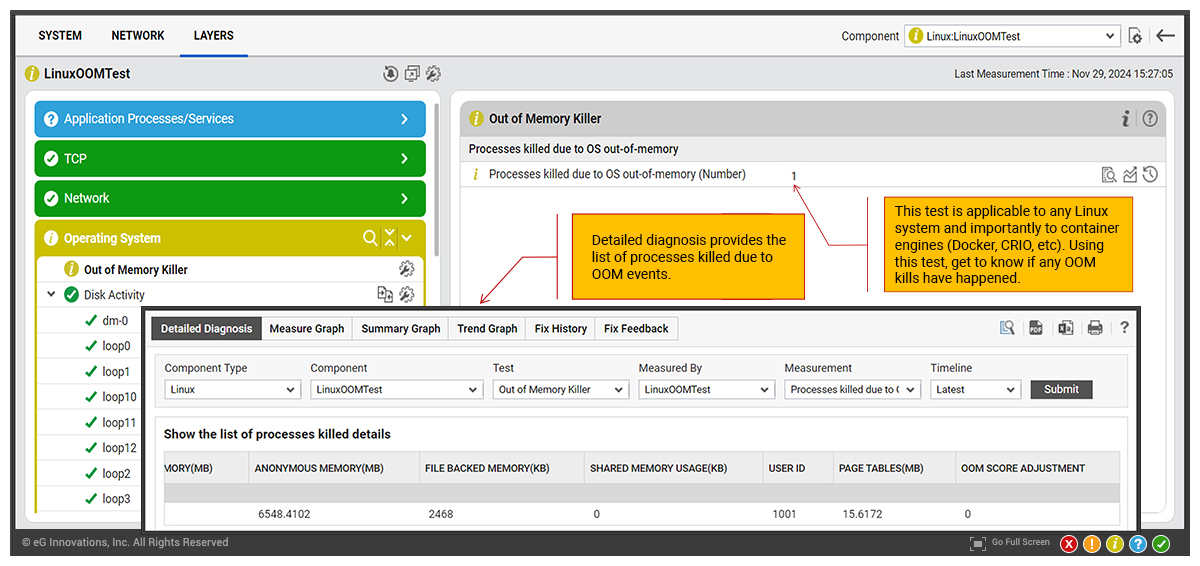
The Out of Memory Killer (OOM Killer) is a Linux kernel process that prevents the system from running out of memory. When the system is low on memory, the OOM Killer reviews all running processes and kills one or more to free up memory. It chooses which process to kill based on its oom_score, which is a value controlled by the operating system.
Whilst the OOM Killer prevents system-wide memory exhaustion, which can lead to system instability or unresponsiveness, it is a sign that all is not well with a server. Early detection and root-cause identification of why the system is running low on memory can avert serious issues.
OOM events often indicate memory leaks, misconfigured applications, or insufficient resources. Detecting OOM Killer events within the wider context of eG Enterprise’s broad range of APM and server monitoring features can detect the root-cause of many issues.
eG Enterprise provides OOM Killer monitoring for any Linux OS as well as for container engines such as Docker, CRIO and similar.
Windows Reliability Monitoring
A server that hasn’t crashed yet isn’t necessarily healthy. Tracking stability trends over time helps identify degrading systems long before a full failure occurs.
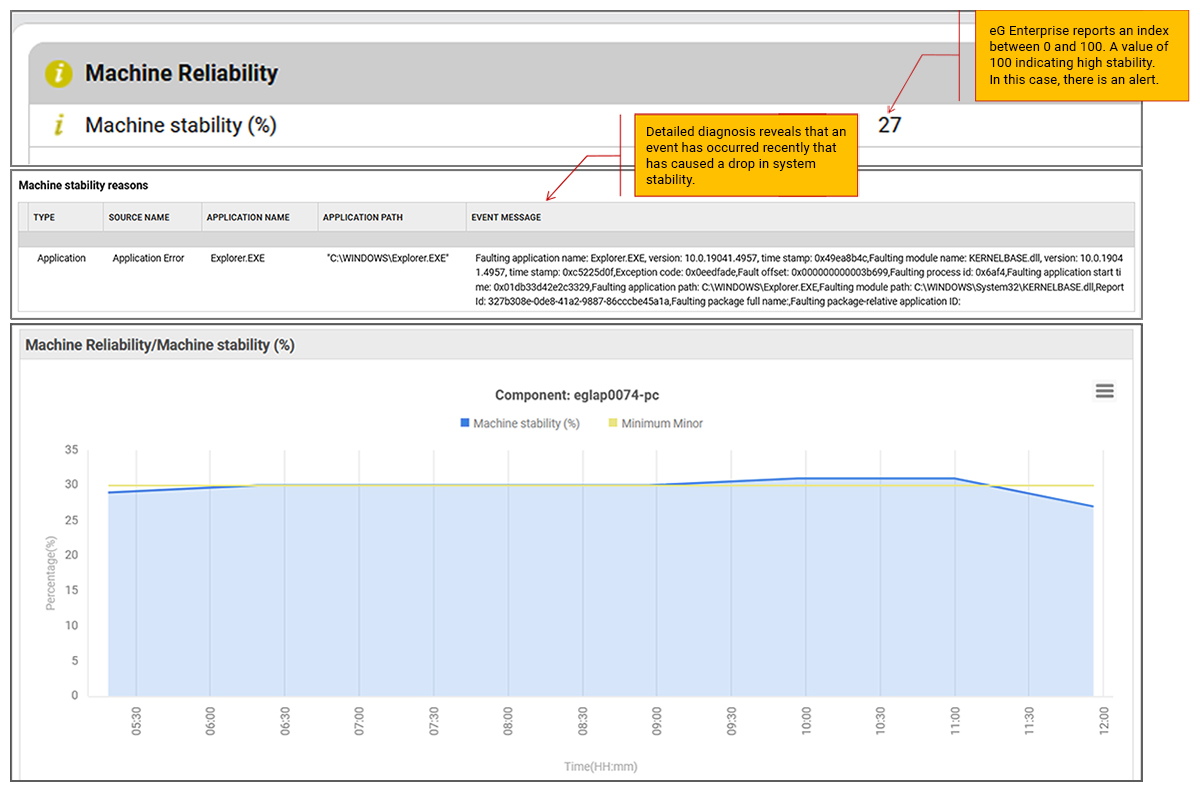
Reliability Monitor is a Windows tool that provides a quick view of how stable a system has been. This tool constantly monitors the system state including components like memory, drives, fans and CPU, as well as application events and tracks events that may be indicative of poor system stability. The stability index (used to be reliability value) is a score of a system’s overall stability. As the number and severity of errors increases, it lowers the stability index.
eG Enterprise now provides a turnkey integration with Windows Reliability Monitor to provide proactive and automated alerting to IT administrators in the event of any degradation in machine stability.
Windows BSoD (Blue Screen of Death) Monitoring
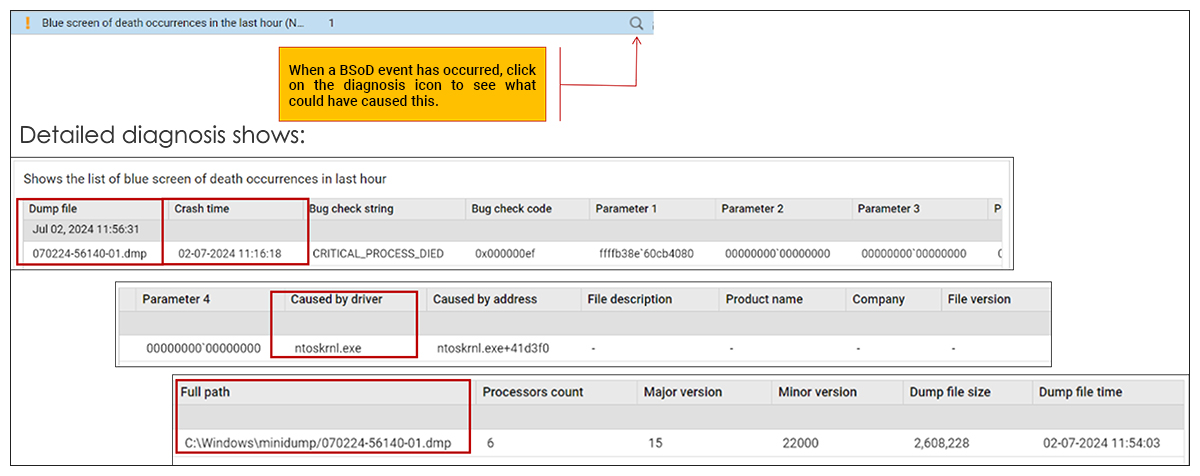
BSoDs are often treated as isolated incidents, but they’re usually symptoms of deeper problems. BSoDs can signal flawed Windows updates or driver rollout issues and a number of other serious problems. BSoDs also often occur without warning, leaving limited visibility after reboot, and generate logs that are hard to centralize and analyse across a distributed fleets.
Out-of-the-box eG Enterprise provides proactive BSoD monitoring, alerting and root-cause analytics. Detailed root-cause diagnostics provide key details related crashes, such as date and time, bug check strings, error codes, and any relevant driver information, crash dump logs and so on.
Learn more: Automated BSoD (Blue Screen of Death) Monitoring and Troubleshooting | eG Innovations
Windows License Status Monitoring
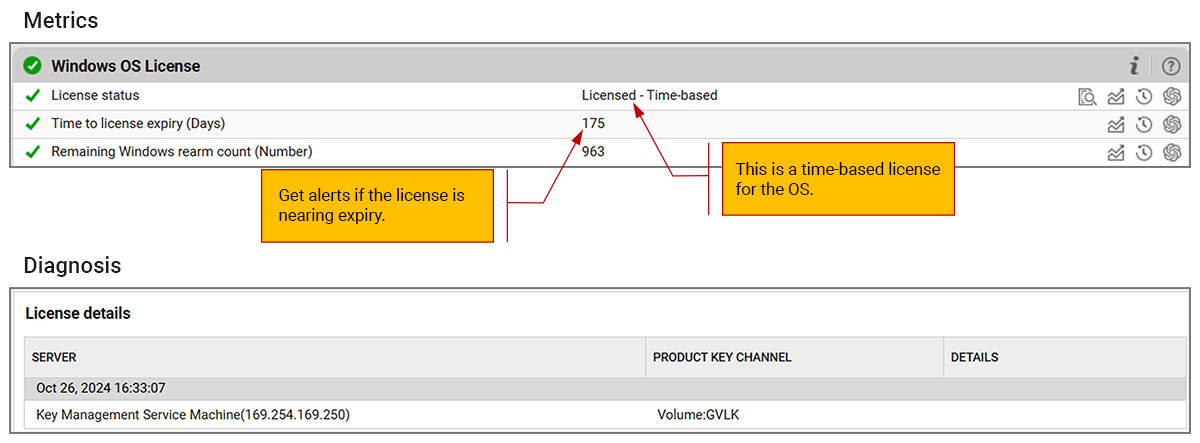
An IT admin may deploy a trial license for Windows server OS and forget about it. Sometime later, the license may expire, causing an unexpected incident.
eG Enterprise now automatically monitors the Windows OS License status. New reports also highlight which systems have permanent licenses and those with time-based licensing.
Windows Updates Monitoring
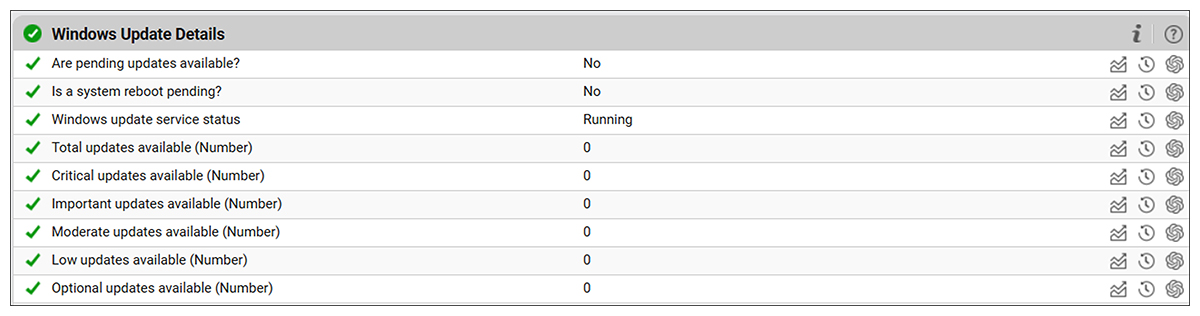
Missing updates are one of the biggest contributors to security incidents and instability. Knowing which servers are lagging behind allows controlled pre-emptive patching instead of emergency fixes. Key signals that there are problems with Windows updates include:
- Pending or failed updates
- Reboot-required states
- Update installation errors
Tracking the status of Windows updates can alert admins to situations where the update service is not running, where updates are pending, when a reboot is pending or when critical updates are pending.
BitLocker Status Monitoring
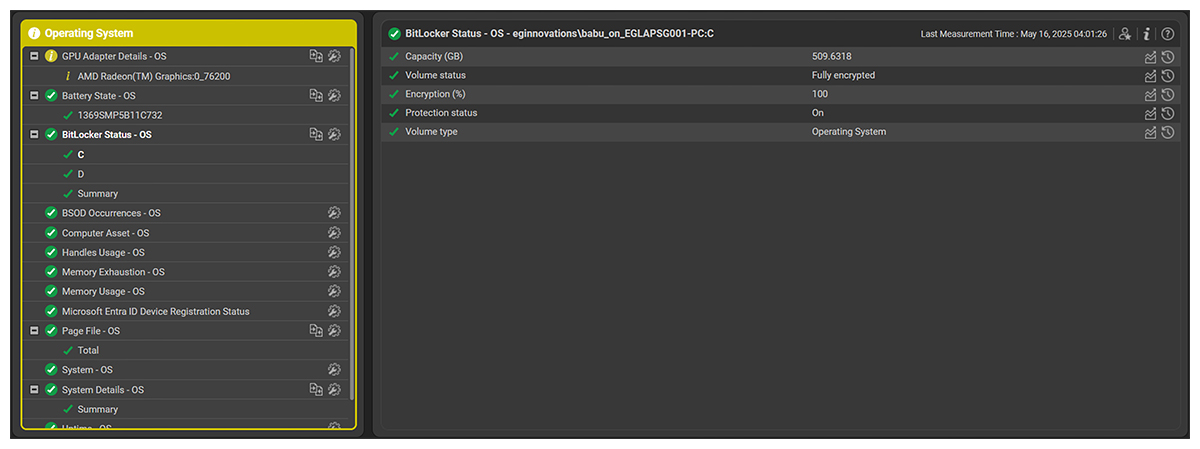
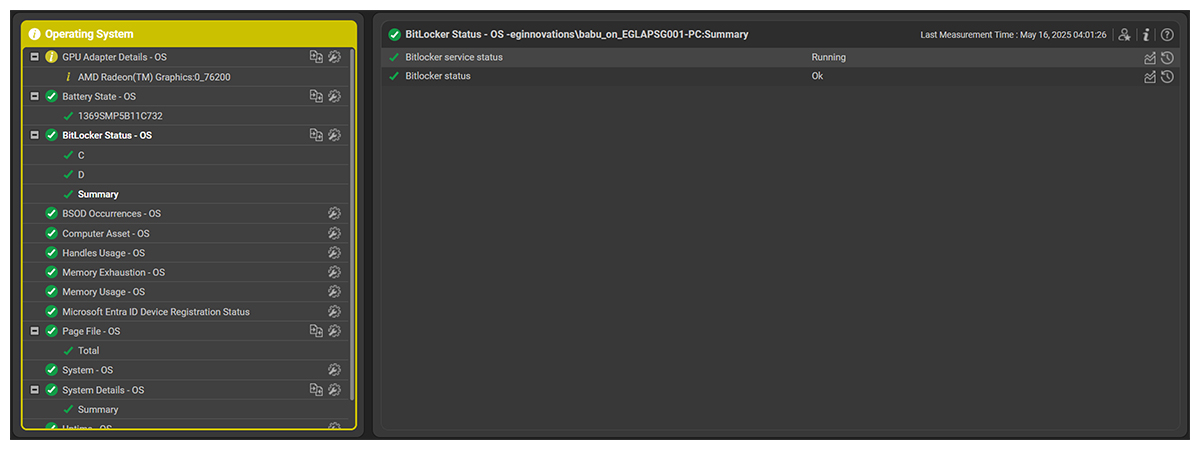
BitLocker is a security feature that is built into Windows. It helps protect your data by encrypting the hard drive where Windows is installed. Encryption issues can surface silently—until a reboot locks you out. Monitoring of BitLocker status:
- Ensures continuous compliance by confirming that BitLocker is active
- Helps IT and security teams track encryption status across all endpoints
- Detects machines with BitLocker not enabled, Suspended protection, drives in unencrypted or partially encrypted states
Monitoring BitLocker status improves server resilience by ensuring data protection remains intact and prevents recovery disasters during maintenance or restarts.
Hardware Monitoring of Linux Systems
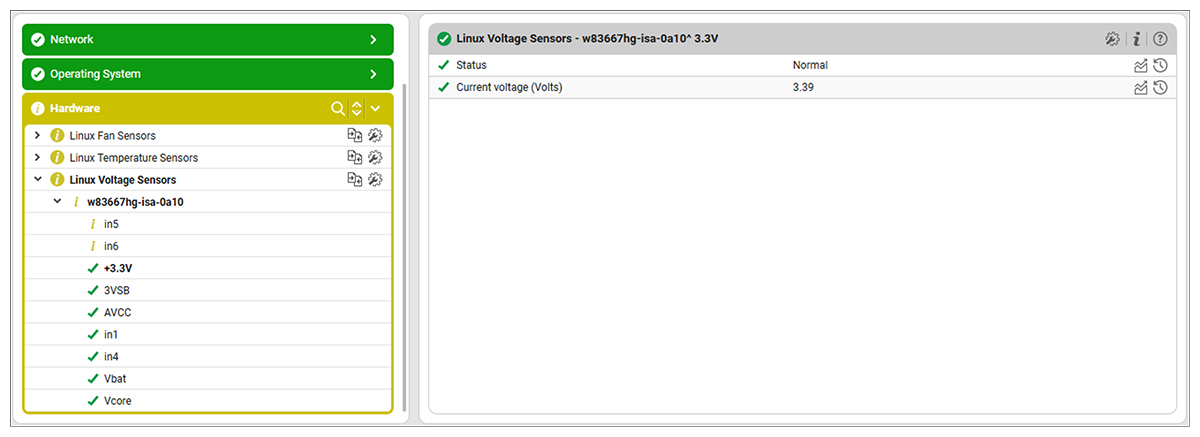
Hardware failures are time consuming and ordering and sourcing new hardware can come with long lead times. It is critical to identify symptoms that may indicate hardware is becoming unreliable or starting to fail. eG Enterprise includes hardware monitoring for Linux systems via the Lm-sensors hardware health monitoring package. This offers administrators automated alerting and continuous proactive monitoring of temperature, voltage and fan sensors.
Windows Memory Usage and Memory Exhaustion
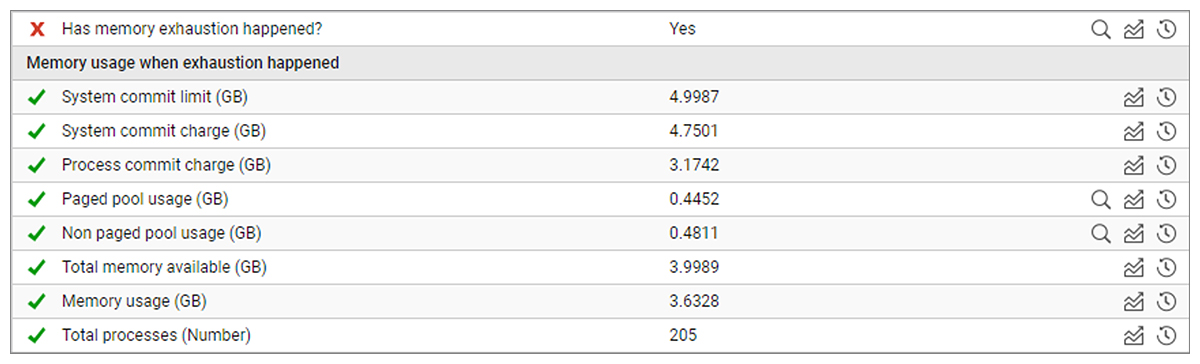
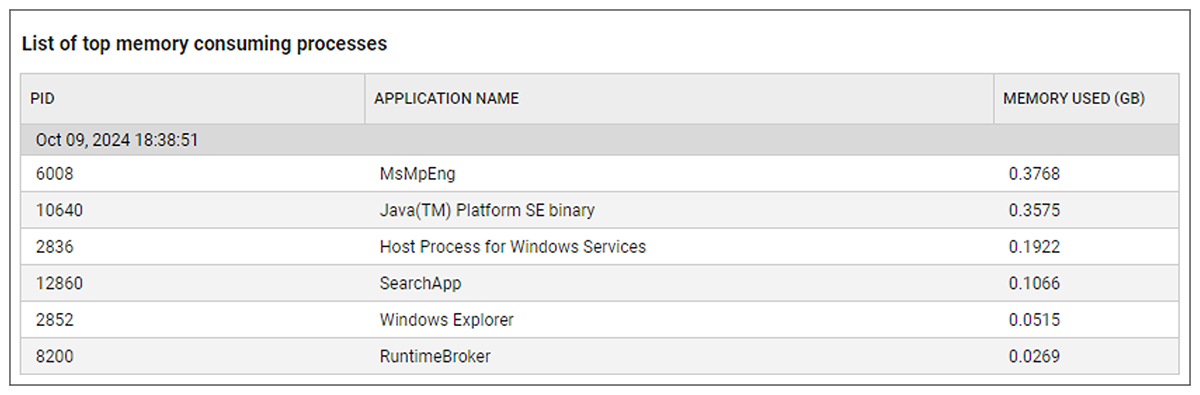
Memory exhaustion errors occur when a program or system runs out of available memory to perform a specific task. When a task fails, server stability can be impacted and user experience is frequently affected. eG Enterprise now provides dedicated memory exhaustion monitoring for Windows OS. eG Enterprise continuously monitors Windows system logs for memory exhaustion conditions and events, when memory exhaustion is detected additional diagnostic details on memory usage are collected.
S.M.A.R.T. Disk Status Monitoring
On Windows OS, eG Enterprise now monitors disks with S.M.A.R.T. data. S.M.A.R.T. (Self-Monitoring, Analysis and Reporting Technology – SMART) is a monitoring component included in computer hard disk drives (HDDs), solid-state drives (SSDs), and eMMC drives. Its primary function is to detect and report various indicators of drive reliability with the intent of anticipating imminent hardware failures.
When SMART data indicates a possible imminent drive failure, preventive action should be taken to prevent data loss, and the failing drive should be replaced.

Final Thoughts
If your monitoring strategy still focuses on 99.9% uptime while ignoring memory pressure, crash patterns, licensing, and security posture, you’re monitoring availability, not health.
Taking server monitoring to the next level means embracing proactive visibility, catching silent failures early, and ensuring systems are not just running—but running well.
Instead of asking “Is the server down?” or then “Why did the server go down?”, you can move to a mindset where you ask “What signals tell us this server might fail in the next 24 hours?”, or even longer timescales, timescales which allow you to avoid outages all together.
Because the best outage is the one that never happens.
Frequently Asked Questions
| 1. | How do I monitor BitLocker encryption status across Windows servers? |
Track per-drive protection state, encryption percentage, and BitLocker service health continuously. eG Enterprise monitors all three natively — no scripting required — and alerts when protection is suspended or a drive is partially encrypted.
| 2. | Which observability platforms monitor Windows OS health beyond uptime? |
eG Enterprise covers nine OS health dimensions natively: Reliability Monitor stability index, BSoD diagnostics, OS license expiry, Windows Update compliance, BitLocker state, memory exhaustion, S.M.A.R.T. disk health, Linux hardware sensors, and OOM Killer detection across containers.
| 3. | What tools detect Linux OOM Killer events across containers? |
eG Enterprise detects OOM Killer events at the OS level and within Docker and CRI-O container runtimes, capturing the killed process and oom_score context for root-cause analysis.
| 4. | Can server monitoring tools detect Windows license expiry automatically? |
eG Enterprise monitors Windows OS license status automatically, distinguishing permanent from time-based licenses and alerting before expiry causes an unplanned outage.
eG Enterprise is an Observability solution for Modern IT. Monitor digital workspaces,
web applications, SaaS services, cloud and containers from a single pane of glass.
eG Enterprise is an Observability solution for Modern IT. Monitor digital workspaces,
web applications, SaaS services, cloud and containers from a single pane of glass.