English
 Deutsch
 Espanol
 Français
 Portuguese
 中文
中文 한국어
한국어 日本語
日本語


However, their similarities obscure important distinctions in how each approaches container management. This post sheds light on the functional differences between Docker and Kubernetes.
What is Docker and How Does Containerization Work?
Docker is an open-source suite that enables developers to package applications into standardized units called containers to simplify deployment across various environments. Using a “build once, run anywhere” approach, Docker allows teams to ensure apps consistently run the same, regardless of infrastructure.
Containers hold everything needed to run an application — code, system solutions, libraries, and configuration files — and share resources of the host machine’s kernel. This makes Docker containers lightweight, portable, and scalable.
How Does Docker Work?
Docker utilizes a client-server architecture, with the Docker Engine responsible for building, running, and distributing containers. It uses a layered filesystem and leverages operating system-level virtualization to deliver its magic. Here’s a quick rundown:
- It starts with a base image, typically a stripped-down version of an operating system.
- Developers add application code and dependencies on top of this base image.
- Docker creates a read-only template called a Docker image.
- This image can then be used to spin up multiple identical containers.
Each container runs in isolation, sharing the host system’s OS kernel but having its own filesystem, processes, and network interfaces. Developers use Docker CLI commands and compose files to build optimized Docker images. These images can then be shared via Docker Hub, a repository where developers store and distribute container images, making it easy for others to pull and run the same environment. Docker images promote consistent and repeatable deployments across all stages of the development lifecycle.
What is Docker Used For?
Docker excels at streamlining application development through containerization. It allows organizations to package applications securely while ensuring the seamless portability of these containers between various computing environments, such as developers’ laptops, CI/CD pipelines, testing/staging servers, and production. Docker containers underpin many microservices-based applications by enabling the independent deployment of each business capability or component.
Key Features of Docker

Here are some of Docker’s standout features:
- Portability: Docker containers can run on any system that has Docker installed, whether it’s a laptop, a data center, or the cloud.
- Isolation: Containers run in their own isolated environments, ensuring that applications do not interfere with each other.
- Scalability: Docker makes it easy to scale up or down based on demand, automating the creation and management of containers.
- Efficiency: Containers share the host OS kernel, making them lightweight and faster to start than traditional virtual machines.
- Security: Docker includes security features such as image signing, network isolation, and role-based access control to ensure your applications are safe.
- Rapid deployment: Spin up new containers in seconds, not minutes or hours.
- Version control: Track changes to container images, making it easy to roll back if needed.
For a deeper dive into eG Enterprise’s monitoring capabilities and how you use it to manage your containers, be sure to check out our Docker container monitoring page. Now that we’ve explored Docker’s capabilities, let’s shift our focus to Kubernetes and its essential role in container orchestration.
What is Kubernetes and How Does Container Orchestration Work?
Kubernetes is an open-source platform designed to automate the deployment, scaling, and operation of application containers. Often abbreviated as K8s, Kubernetes was originally developed by Google but is now maintained by the Cloud Native Computing Foundation (CNCF). If Docker is the container, think of Kubernetes as the system managing all your containers in a dynamic environment.
How Does Kubernetes Work?
Kubernetes manages clusters of containers as a single system, making it easy to scale, move, and manage applications. At its heart is the Kubernetes master, which oversees everything happening in the cluster. Nodes, which are the worker machines, host the containerized applications.
Kubernetes manages and scales applications using a range of objects, such as Pods (the smallest deployable units in K8s). It monitors the health of containers, ensures desired application states, and can automatically restart or replace containers when they fail.
Briefly, Kubernetes operates on a cluster architecture where:
- The control plane manages the overall state of the cluster.
- Worker nodes run the actual containers.
- Pods house one or more containers.
- Services expose pods to the network and balance the load between them.
- Deployments define the desired state of applications, and Kubernetes works to maintain that state.
Developers usually define the desired app state in a manifest, and Kubernetes uses controllers to ensure apps meet goals around replicas, availability, and network connectivity. It handles tasks like hardware provisioning, networking, scaling, and load balancing to ensure containerized applications have the appropriate resources and remain healthy and available.
What is Kubernetes Used For?
Kubernetes excels in complex environments where applications need to be highly available, scalable, and resilient. It’s designed to manage clusters of machines running containerized applications across an on-premise data center, public cloud infrastructure, or hybrid environments.
Kubernetes is particularly useful for managing microservices architectures, where services may need to be deployed, scaled, or updated independently of one another. Kubernetes optimizes workflows like CI/CD, A/B testing, and feature flags through advanced operations capabilities. Its self-healing and auto-scaling features keep apps optimized for traffic spikes and load shedding.
In short, Kubernetes automates the process of managing hundreds or thousands of containers, reducing manual intervention and ensuring consistency across the entire application lifecycle.
Key Features of Kubernetes
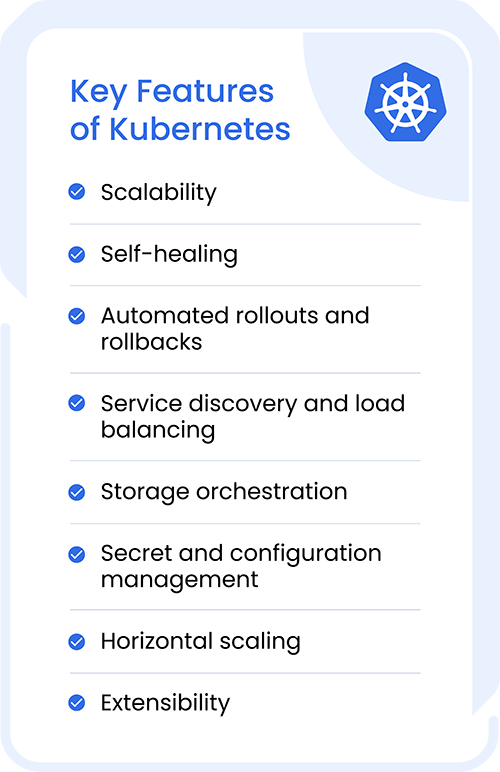
Kubernetes boasts an impressive array of features that make it the go-to for container orchestration:
- Scalability: Automatically adjust the size of applications up or down according to demand.
- Self-healing: Kubernetes maintains the smooth operation of your applications by automatically restarting any failed containers and replacing them when necessary.
- Automated rollouts and rollbacks: Change the state of your deployed containers with controlled precision.
- Service discovery and load balancing: Kubernetes can expose a container using a DNS name or IP address, keeping your applications responsive and dependable.
- Storage orchestration: Automatically mount storage systems of your choice, whether local or cloud-based.
- Secret and configuration management: Deploy and update secrets and application configuration without rebuilding your image.
- Horizontal scaling: Scale your application up or down with a simple command or automatically based on CPU usage.
- Extensibility: Because Kubernetes is open-source, it accommodates a broad variety of third-party integrations and extensions.
The Kubernetes API makes it easy to monitor clusters, ensuring you can gain insights and maintain peak performance of your system while quickly troubleshooting issues.
Docker vs Kubernetes: Key Differences Explained
Are Docker and Kubernetes the same thing? Although they are often mentioned together in discussions about containerization, Docker and Kubernetes serve different purposes.
The difference between Docker and Kubernetes is that Docker is a platform for creating, running, and managing containers, while Kubernetes is a system for orchestrating those containers across multiple hosts.
Container orchestration, like what Kubernetes provides, is essential when managing many containers in production environments. It automates the deployment, scaling, and operation of containers, ensuring that applications remain available, resilient, and efficient. Without orchestration, managing containers manually would be time-consuming and prone to errors, especially as applications grow more complex.
To use an analogy when comparing Kubernetes vs. Docker, you can think of Docker as a solo musician playing an instrument and focusing on their performance, while Kubernetes is the conductor, orchestrating (or coordinating) an entire ensemble of musicians. In this analogy, Kubernetes ensures that each “musician” (container) plays in sync, allowing the whole system to function harmoniously, no matter how many containers are involved. This coordination is crucial for maintaining performance and resilience in large-scale applications.
So, does Kubernetes use Docker? Yes, Kubernetes can use Docker as the container runtime (but it’s not limited to it) to create and run containers. Docker handles the creation and deployment of containers, while Kubernetes focuses on managing containers at scale in complex, multi-container environments.
Let’s break down some key distinctions:

- Scope: Docker focuses on building and running containers on a single host, while Kubernetes manages containers across a cluster of machines.
- Scalability: Docker alone doesn’t provide built-in solutions for scaling applications. Kubernetes, on the other hand, offers robust auto-scaling capabilities.
- Availability: Kubernetes has built-in features to ensure high availability, such as replication controllers and services. Docker requires additional solutions to achieve similar results.
- Load balancing: Kubernetes comes with integrated load balancing. With Docker, you’d need to set up a separate load balancer.
- Updates and rollbacks: Kubernetes provides sophisticated mechanisms for rolling updates and automatic rollbacks. Docker requires manual intervention or custom scripting for these tasks.
- Self-healing: If a container fails, Kubernetes can automatically restart or replace it with a new one. Docker doesn’t offer this functionality out of the box.
- Networking: Kubernetes provides a flat, cluster-wide networking model. Docker’s networking is more host-centric.
- Storage: Kubernetes offers a more robust and flexible storage system with persistent volumes. Docker’s storage options are more limited without additional plugins.
- Kubernetes vs. Docker security: Docker focuses on securing individual containers through isolation techniques, while Kubernetes provides more advanced, cluster-wide security mechanisms. When used together, they offer a comprehensive security solution for containerized apps.
Simply put, Docker is great for packaging/containerizing and building applications, while Kubernetes handles advanced orchestration in production.
Docker vs Kubernetes: Benefits Comparison
What are Docker and Kubernetes’ main advantages? Both have their own benefits, making them suitable for different scenarios.
Docker Advantages
Docker is a valuable asset for development workflows, streamlining processes from image building to testing. Some benefits include:
- Security features: Docker’s built-in security features, such as namespaces and control groups, help isolate applications and reduce attack surfaces.
- Portability: Docker containers can run consistently across multiple environments, simplifying the development and deployment process.
- Ease of Use: Docker’s straightforward setup and minimal configuration requirements make it accessible for developers at any level.
- Isolation: Containers run in isolation, preventing them from interfering with each other or the underlying system.
- Lightweight: Containers share the host operating system’s kernel, making them lightweight and efficient compared to virtual machines.
These advantages make Docker an indispensable solution for modern software development, enabling faster, more consistent, and more secure application delivery across diverse environments.
Kubernetes Advantages
While Docker excels at containerization, Kubernetes takes container management to the next level with its robust orchestration capabilities. Here are some of the main advantages of using Kubernetes:
- Manages resources efficiently: Kubernetes automatically optimizes resource use, distributing containers across nodes based on available capacity.
- Rolling updates and rollbacks: Kubernetes supports smooth updates, with the ability to roll back if something goes wrong, ensuring minimal disruption to services.
- Self-healing: Kubernetes automatically restarts failed containers and reschedules them for high availability.
- Automated deployments and scaling: Kubernetes automates deployments and scales applications based on predefined rules.
- Declarative configuration: Kubernetes uses declarative configuration, allowing you to define the desired state of your application, and Kubernetes will automatically make the necessary changes.
With these powerful benefits, Kubernetes has become the go-to solution for managing containerized applications at scale in production environments.
When Should You Use Docker vs Kubernetes?
Choosing between Docker and Kubernetes isn’t always an either/or decision. If you’re just starting with containerization or working on smaller projects, Docker is the way to go. Its simplicity and ease of use make it perfect for individual developers or small teams.
On the other hand, if you’re dealing with complex, large-scale applications that need to be highly available and scalable, Kubernetes is the better choice. It provides the advanced orchestration features needed to manage containerized applications at scale.
But here’s the kicker: despite the differences between Docker and Kubernetes, you don’t have to choose one or the other. Using them together allows you to maximize their complementary strengths.
Best of Both Worlds: Using Kubernetes with Docker
Kubernetes and Docker work beautifully together, combining Docker’s containerization with Kubernetes’ orchestration capabilities. Here’s why this combination is a winner:
- Advanced orchestration: Kubernetes automates the deployment and management of Docker containers, reducing manual workload and ensuring that your applications run smoothly. This simplifies managing complex applications at scale, too.
- Optimized resource allocation: Kubernetes intelligently allocates resources to Docker containers based on real-time needs, helping you maintain optimal performance and avoid wasting resources.
- Enhanced performance and scalability: Kubernetes automatically scales applications up or down based on demand, while Docker ensures consistent performance across environments. This combined approach helps applications adapt to changing workloads.
- High availability and resilience: With Kubernetes, your Docker containers are always monitored and managed, meaning if one container fails, another one is spun up automatically, minimizing downtime and keeping your services reliable.
As such, leveraging the strengths of both technologies empowers you to build, deploy, and manage containerized applications more effectively and at scale. Kubernetes orchestrates container deployments across clusters, leveraging Docker’s pre-built container images. This powerful combination is one of the cornerstones of modern cloud-native architectures.
Docker vs Kubernetes Comparison Table
| Docker | Kubernetes |
| Creates and runs containers | Manages containers at scale |
| Manages containers at scale | Focuses on deployment, scaling, and operations |
| Usually works on a single host | Typically manages clusters of hosts |
| Handles container lifecycle | Handles cluster-wide orchestration |
Purpose
Docker is designed to package applications and their dependencies into portable containers, ensuring consistency across environments. Kubernetes, on the other hand, is built to orchestrate those containers across multiple machines, automating deployment, scaling, and operations.
Architecture
Docker uses a client-server architecture with components like Docker Engine, images, and containers running on a single host. Kubernetes has a more complex architecture, including a control plane (API server, scheduler, controller manager) and worker nodes that run containerized workloads.
Scalability
Docker supports limited scaling, typically handled manually or via tools like Docker Compose. Kubernetes excels in scalability with built-in features like auto-scaling, load balancing, and self-healing, making it ideal for large, distributed systems.
Networking
Docker provides basic networking capabilities, allowing containers to communicate within the same host or across hosts with additional configuration. Kubernetes offers advanced networking with built-in service discovery, DNS, and seamless communication across clusters.
Storage
Docker uses volumes for persistent storage but requires manual configuration. Kubernetes provides more robust storage orchestration through Persistent Volumes (PVs) and Persistent Volume Claims (PVCs), supporting dynamic provisioning and integration with cloud storage.
Security
Docker ensures container-level isolation but relies on external tools for advanced security. Kubernetes enhances security with role-based access control (RBAC), network policies, secrets management, and namespace isolation.
Deployment Complexity
Docker is relatively simple to set up and use, making it ideal for developers and small-scale applications. Kubernetes has a steeper learning curve due to its complex architecture but provides powerful automation for managing production-grade workloads.
Best Use Cases
Docker is best suited for:
- Local development and testing environments
- Packaging microservices
- Small-scale deployments
Kubernetes is best suited for:
- Large-scale, distributed applications
- Microservices architectures in production
- Automated scaling and high availability environments
Start Your Free Trial with eG Innovations
Now that you understand the difference between Kubernetes and Docker, are you ready to take your container monitoring to the next level? As containerized applications scale, monitoring becomes crucial for ensuring performance and reliability.
Whether you’re using Docker, Kubernetes, or both, eG Innovations has you covered. Our comprehensive monitoring solutions provide deep insights into your containerized environments, helping you optimize performance and ensure smooth operations.
Book your free trial today and experience the power of advanced container monitoring. Don’t let performance issues slow you down — get the visibility you need to keep your applications running efficiently.
eG Enterprise is an Observability solution for Modern IT. Monitor digital workspaces,
web applications, SaaS services, cloud and containers from a single pane of glass.
Frequently Asked Questions
Docker and Kubernetes solve different problems:
Docker is a containerization platform. It packages applications and their dependencies into containers that can run consistently across environments.
Kubernetes is a container orchestration platform. It manages large numbers of containers across multiple servers.
Yes. In fact Kubernetes removed direct Docker runtime support in version 1.24. Nowadays Kubernetes typically uses lean container runtimes such as:
- Container
- CRI-O
Kubernetes still runs Docker-built container images because Docker images follow industry standards, but Docker itself is no longer the default or required on Kubernetes nodes.
Not primarily. Docker's main purpose is container creation and execution.
Docker includes a lightweight orchestrator called Docker Swarm, which in recent versions has been incorporated into the Docker Engine. Docker itself is not generally considered a full-fledged orchestration platform like Kubernetes.
Historically:
- Developers built container images with Docker.
- Kubernetes deployed and managed those containers.
This combination became popular because Docker simplified packaging applications, while Kubernetes automated:
- Scheduling
- Scaling
- Load balancing
- Self-healing
- Rolling updates
Today, developers still commonly build images with Docker and deploy them to Kubernetes, even though Kubernetes does not require Docker as its runtime.
It is generally accepted that the learning curve for Kubernetes is far higher than for Docker. Learning about Docker (and containers in general) is for many a natural precursor to starting to learn about Kubernetes. Many start learning about Docker before learning then about Docker Swarm to grasp a basic understanding of container orchestration.
Scenarios where you can consider using Docker alone include:
- Running a few applications
- Developing locally
- Testing environments
- Small projects
- Single-server deployments
- Learning containers
Examples of when you may want to use Docker standalone could include:
- Local development machine
- Small internal tool
- Personal website
- CI/CD build environment
Where Kubernetes is probably an unnecessary overhead in these situations.
No, Kubernetes is not required. You probably only need it if you are managing complex, multi-server applications that demand automatic scaling and high availability. For smaller projects or simple apps, it is faster and easier to use basic container tools without it.
There are many alternative orchestration platforms available including many built upon Kubernetes to add additional functionality or to simplify ease of use. Cloud-based managed services have also become popular with those looking to avoid some of the overhead of self-managed and built vanilla Kubernetes. Kubernetes alternatives include: Rancher, OpenShift (Red Hat), Amazon EKS, Microsoft AKS, and Hashicorp Nomad.
Many Serverless and PaaS options offer ways to run containerized applications that negate the need for orchestration, for example: AWS Fargate and Azure Container Apps.
Kubernetes is highly beneficial for microservices because it automates many of the operational challenges that come with running dozens or hundreds of small services, such as service discovery, load balancing, scaling, and fault tolerance. It ensures that each microservice can be deployed, updated, and rolled back independently through rolling updates, while also continuously monitoring the health of containers and restarting or replacing them if they fail. Kubernetes also enables efficient resource utilization by scheduling services across a cluster based on CPU and memory needs, and it supports horizontal scaling so individual services can grow or shrink based on demand. In addition, it provides built-in mechanisms for managing configuration and secrets securely, which helps microservices remain loosely coupled and easier to maintain in complex distributed systems.
Kubernetes schedules and automates container deployment across multiple compute nodes, whether on the public cloud, onsite VMs or physical on-premises machines. Its automatic scaling lets teams scale up or down to meet demand faster.
Yes, this is a popular choice, we see many eG Enterprise customers using our platform to provide unified monitoring of Docker alongside Kubernetes in the same single console as their application and infrastructure monitoring.