How Does EG Enterprise Monitor Couchbase Database?
eG Enterprise can monitor Couchbase Database in both agent-based and agentless manner. The external agent used to monitor the Couchbase Database server can be deployed on any remote host in the host environment.
Prerequisites for monitoring Couchbase Database
You need to ensure below prerequisites are met before configuring the eG Enterprise to monitor Couchbase database:
-
eG agent must be able to connect to the target Couchbase database server. The communication port of server should be open and should allow connections. By default Couchbase database connectivity is available through port 8091. Once connected eG agent will pull monitoring metrics through this port.
-
For setting up monitoring, administrators and applications will require access on Couchbase server, to be able to access data, settings and statistics. For this reason, database server credentials might be required.
-
To monitor Couchbase database server, a user will be required with read only admin privilages. You can use an existing user or create a new user. In case you are using an existing user, username and password will be required. For detailed instructions on creating a new user, refer to the topic below.
Creating a new user on Couchbase database
The following steps guide you on how to create a new user on the Couchbase database web console:
-
Access the Couchbase web console using the machine-host name and default port 8091 (e.g., http://localhost:8091/).
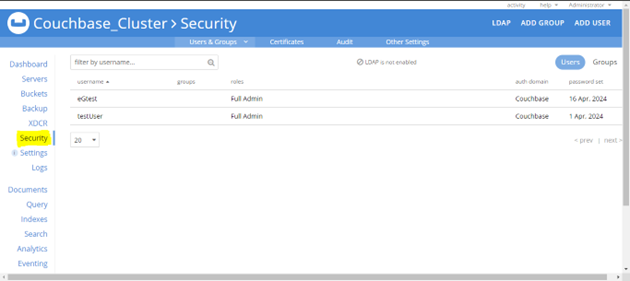
Figure 327 : Couchbase Console
-
In the Couchbase web console, click "Security" in the left menu.
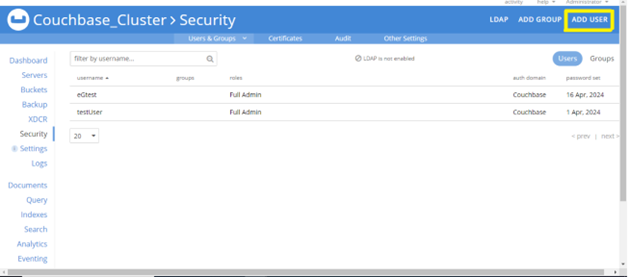
Figure 328 : Add User
-
Click the "ADD USER" tab.
-
Create a new username and password.
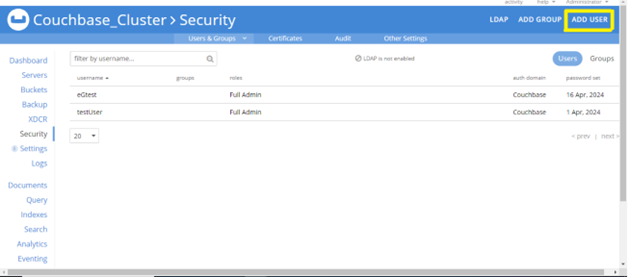
Figure 329 : Assigning role permission
-
Grant Read-Only Admin privileges to access data, settings, and statistics.
With the steps above, new user will be ready for monitoring.