Xen Desktop Applications Test
This test discovers the applications executing on the cloud desktops and reports the availability and resource-usage of each of the desktop applications.
Target of the test : A Frame virtual desktop on the cloud
Agent deploying the test : A remote agent
Outputs of the test : One set of outputs for every distinct application executing on the Dizzion Frame desktops.
| Parameter | Description |
|---|---|
|
Test Period |
How often should the test be executed. By default this is 1 hour. |
|
Host |
The host for which the test is to be configured. |
|
Port |
The default port is NULL. |
|
Inside View Using |
To obtain the 'inside view' of performance of the cloud-hosted Frame desktops - i.e., to measure the internal performance of the Frame virtual desktops - this test uses a light-weight eG VM Agent software deployed on each of the desktops. Accordingly, this parameter is by default set to eG VM Agent (Frame). |
|
Report By User |
This flag is set to Yes by default. The value of this flag cannot be changed. This implies that the virtual machines in VDI environments will always be identified using the login name of the user. In other words, in VDI environments, this test will, by default, report measures for every username_on_virtualmachinename. |
|
Report Powered OS |
This flag is relevant only for those tests that are mapped to the Inside View of Desktops layer. If this flag is set to Yes (which is the default setting), then the 'inside view' tests will report measures for even those Frame virtual desktops that do not have any users logged in currently. Such desktops will be identified by their name and not by the username_on_virtualdesktopname. On the other hand, if this flag is set to No, then this test will not report measures for those Frame virtual desktops to which no users are logged in currently. |
|
Is Cloud VMs |
Since this test runs for 'Frame Desktops' component which is a cloud-hosted desktop group, this flag is set to Yes by default. |
|
Exclude |
Provide a comma-separated list of file patterns to be excluded from monitoring in the Exclude text box. This helps to filter out irrelevant file types that are not essential to the performance analysis of the desktop applications. For example *.vvf,*.pdf,*.jpeg,*.png,*.rbf,*.doc*. |
|
DD Frequency |
Refers to the frequency with which detailed diagnosis measures are to be generated for this test. For instance, if you set to 1:1, it means that detailed measures will be generated every time this test runs, and also every time the test detects a problem. |
|
Detailed Diagnosis |
To make diagnosis more efficient and accurate, the eG suite embeds an optional detailed diagnostic capability. With this capability, the eG agents can be configured to run detailed, more elaborate tests as and when specific problems are detected. To enable the detailed diagnosis capability of this test for a particular server, choose the On option. To disable the capability, click on the Off option. The option to selectively enable/disable the detailed diagnosis capability will be available only if the following conditions are fulfilled:
|
| Measurement | Description | Measurement Unit | Interpretation |
|---|---|---|---|
|
Processes running |
Indicates the number of instances of this application that is currently executing across all virtual desktops on the target host operating system. |
Number |
|
|
Physical CPU usage |
Indicates the percentage of physical CPU resources utilized by this application across the guest VMs. |
Percent |
A very high value of this measure is a cause for concern, as it indicates excessive CPU usage by a single application. This in turn would cause other desktop applications to contend for limited physical resources, thus degrading the performance of those applications and that of the virtual server as a whole. If this measure reports a value close to 100% for any application, then you can use the detailed diagnosis of this measure to identify which specific instance of that application is hogging CPU. |
|
Memory usage |
Indicates the amount of physical memory resources utilized by this application across the guest VMs. |
MB |
A very high value of this measure is a cause for concern, as it indicates excessive memory usage by a single application. This in turn would cause other desktop applications to contend for limited physical memory resources, thus degrading the performance of those applications and that of the virtual server as a whole. If this measure reports a high for any application, then you can use the detailed diagnosis of this measure to identify which specific instance of that application is hogging memory. |
|
CPU used |
Indicates the physical CPU (in Mhz) used up by this application. |
Mhz |
|
|
I/O reads |
Indicates the rate at which this application reads data from the virtual disk. |
KB/Sec |
Compare the value of these measures across applications to identify the I/O-intensive application. |
|
I/O writes |
Indicates the rate at which this application writes data to the virtual disk. |
KB/Sec |
|
|
I/O read operations |
Indicates the rate at which this application performs read operations. |
Operations/Sec |
Compare the value of these measures across applications to identify the I/O-intensive application. |
|
I/O write operations |
Indicates the rate at which this application performs write operations. |
Operations/Sec |
|
|
Total I/O operations |
Indicates the rate at which this application performs I/O operations. |
Operations/Sec |
|
|
Percent of memory usage |
Indicates the percentage of memory used by this application. |
Percent |
A high value for this measure indicates that the application is consuming more memory. This is a cause for concern. |
The detailed diagnosis of the Physical CPU usage and Memory usage measures list all the running instances of the given application, and reports the CPU and memory usage of each instance. From these insights, you can accurately isolate the instance that is consuming CPU and/or memory resources excessively.
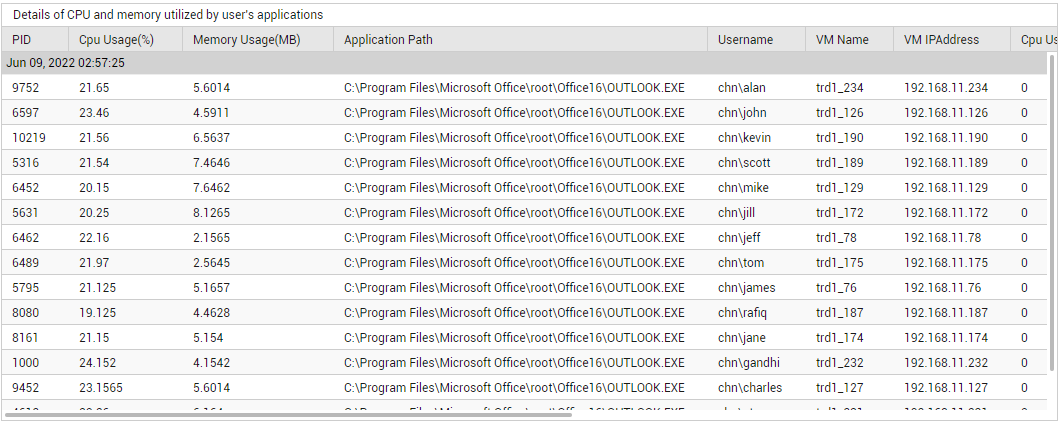
Figure 1 : The detailed diagnosis of the Physical CPU usage measure of the Desktop Applications test