Azure DNS Private Resolvers Test
In Microsoft Azure, a DNS Private Resolver is a fully managed service that enables name resolution between Azure private DNS zones and your on-premises or other network environments. A DNS Private Resolver resolves DNS names in private networks, bridges DNS resolution between Azure and on-premises, and is secure and scalable.
This test monitors and reports the provisioning state and query rate of the target Microsoft Azure DNS Private Resolver. In addition, this test reports if there is any latency caused while handling high number of inbound/outbound endpoints. Using this test, administrators can find out if the DNS private resolver is connected or not.
Target of the Test: A Microsoft Azure DNS Private Resolver
Agent deploying the test: A remote agent
Output of the test: One set of results for each Resource group:Microsoft Azure DNS Private Resolver that is monitored.
| Parameters | Description |
|---|---|
|
Test Period |
How often should the test be executed. |
|
Host |
The host for which the test is to be configured. |
|
Subscription ID |
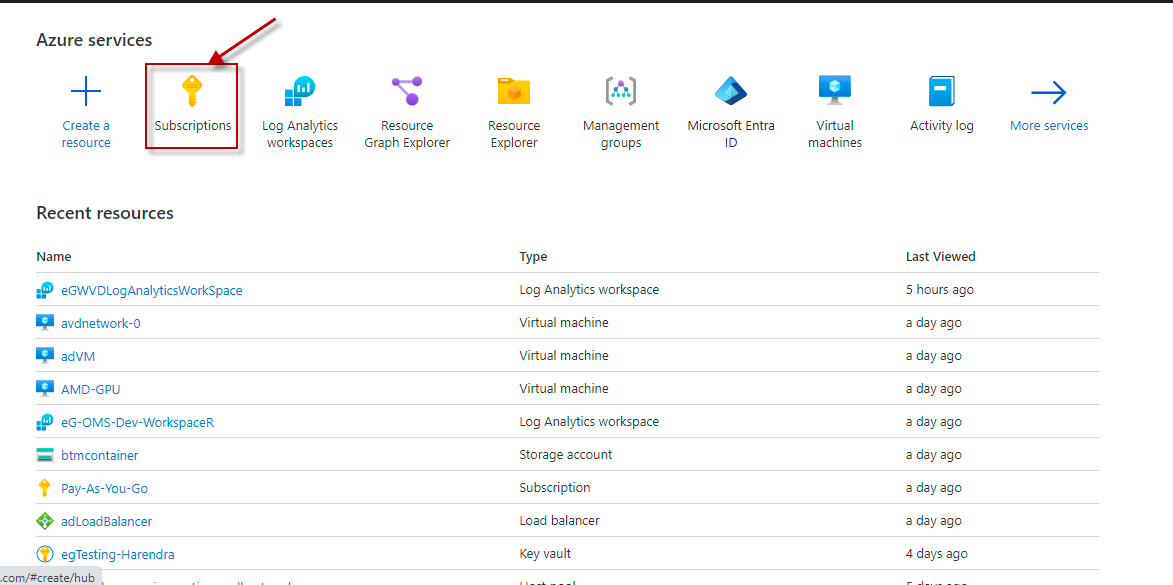
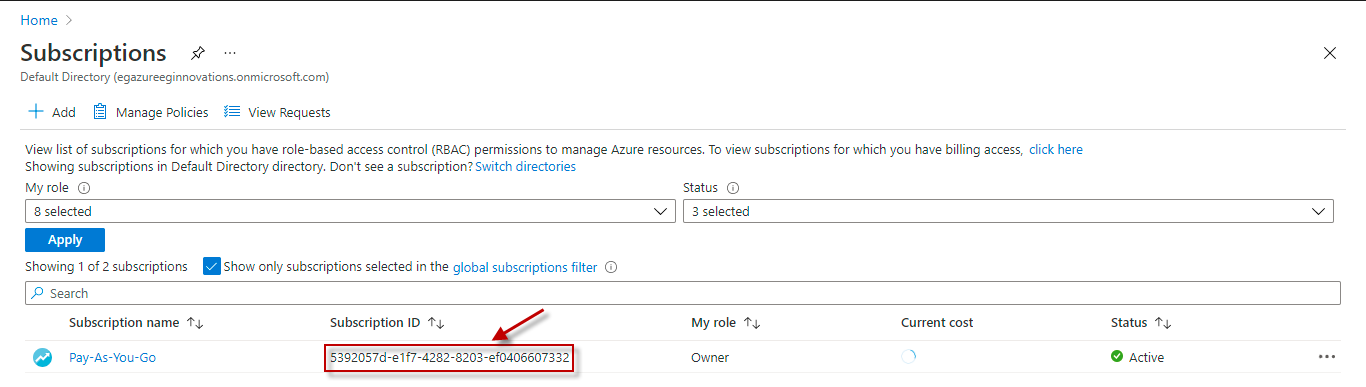
Specify the GUID which uniquely identifies the Microsoft Azure Subscription to be monitored. To know the ID that maps to the target subscription, do the following:
|
|
Tenant ID |
Specify the Directory ID of the Microsoft Entra tenant to which the target subscription belongs. To know how to determine the Directory ID, refer to Configuring the eG Agent to Monitor a Microsoft Azure Subscription Using Azure ARM REST API. |
|
Client ID, Client Password, and Confirm Password |
To connect to the target subscription, the eG agent requires an Access token in the form of an Application ID and the client secret value. For this purpose, you should register a new application with the Microsoft Entra tenant. To know how to create such an application and determine its Application ID and client secret, refer to Configuring the eG Agent to Monitor a Microsoft Azure Subscription Using Azure ARM REST API. Specify the Application ID of the created Application in the Client ID text box and the client secret value in the Client Password text box. Confirm the Client Password by retyping it in the Confirm Password text box. |
|
Proxy Host and Proxy Port |
In some environments, all communication with the Azure cloud be routed through a proxy server. In such environments, you should make sure that the eG agent connects to the cloud via the proxy server and collects metrics. To enable metrics collection via a proxy, specify the IP address of the proxy server and the port at which the server listens against the Proxy Host and Proxy Port parameters. By default, these parameters are set to none, indicating that the eG agent is not configured to communicate via a proxy, by default. |
|
Proxy Username, Proxy Password and Confirm Password |
If the proxy server requires authentication, then, specify a valid proxy user name and password in the Proxy Username and Proxy Password parameters, respectively. Then, confirm the password by retyping it in the Confirm Password text box. |
|
Resource Group |
A resource group is a container that holds related resources for an Azure solution. The resource group can include all the resources for the solution, or only those resources that you want to manage as a group. Specify the name of the particular Resource Group which is a part of the DNS Private Resolver to be managed in the Resource Group text box. |
|
DNS Zones |
A DNS zone is a distinct part of the Domain Name System (DNS) namespace that is managed by a specific organization or administrator. It contains the mappings between domain names and IP addresses, along with other DNS records. Specify the name of the particular DNS Zone which is a part of the DNS Private Resolver to be managed in the DNS Zones text box. |
|
DD Frequency |
Refers to the frequency with which detailed diagnosis measures are to be generated for this test. The default is 1:1. This indicates that, by default, detailed measures will be generated every time this test runs, and also every time the test detects a problem. You can modify this frequency, if you so desire. Also, if you intend to disable the detailed diagnosis capability for this test, you can do so by specifying none against DD frequency. |
|
Detailed Diagnosis |
To make diagnosis more efficient and accurate, the eG Enterprise embeds an optional detailed diagnostic capability. With this capability, the eG agents can be configured to run detailed, more elaborate tests as and when specific problems are detected. To enable the detailed diagnosis capability of this test for a particular server, choose the On option. To disable the capability, click on the Off option. The option to selectively enable/disable the detailed diagnosis capability will be available only if the following conditions are fulfilled:
|
| Measurement | Description | Measurement Unit | Interpretation | ||||||||||
|---|---|---|---|---|---|---|---|---|---|---|---|---|---|
|
Provisioning State |
Indicates the provisioning state of this DNS private resolver. |
|
This measure indicates the current stage of deployment or configuration of the DNS private resolver. The values that this measure can report and their corresponding numeric values are discussed in the table below:
Note: By default, this measure reports the above-mentioned Measure Values while indicating the provisioning state of the target DNS private resolver. However, in the graph of this measure, states will be represented using the corresponding numeric equivalents only - i.e., 1 to 4. Use the detailed diagnosis to find out further details of the DNS private resolvers that are in above-mentioned provisioning states. |
||||||||||
|
DNS resolver state |
Indicates the state of this DNS private resolver. |
|
The values that this measure can report and their corresponding numeric values are discussed in the table below:
Note: By default, this measure reports the above-mentioned Measure Values while indicating the state of the target DNS private resolver. However, in the graph of this measure, states will be represented using the corresponding numeric equivalents only - i.e., 0 or 1. |
||||||||||
|
Query rate |
Indicates the rate at which queries were resolved by this DNS private resolver. |
Queries/sec |
A very high value of this measure denotes that the DNS private resolver is experiencing higher traffic, leading to more DNS lookups. |
||||||||||
|
Inbound endpoints |
Indicates the number of inbound endpoints handled by this DNS private resolver. |
Number |
An inbound endpoint is a DNS listener that allows DNS queries from on-premises networks or peered VNets to resolve Azure Private DNS zones. A drastic surge in this value could return timeouts or failed resolutions if overwhelmed. |
||||||||||
|
Outbound endpoints |
Indicates the number of outbound endpoints handled by this DNS private resolver. |
Number |
An outbound endpoint allows your Azure DNS resolver to forward DNS queries to external DNS servers, such as on-premises DNS servers (via VPN or ExpressRoute), public DNS servers (e.g., 8.8.8.8), third-party DNS appliances. A very high volume of queries through one or two outbound endpoints could lead to increased query latency. |