Mongo Azure Cosmos Service Test
Azure Cosmos DB's API for MongoDB lets you use MongoDB tools and drivers to interact with Azure's globally distributed, multi-model database. It offers automatic scaling, low-latency reads/writes, and enterprise-grade security. You can migrate MongoDB apps without code changes while benefiting from Cosmos DB's high availability, elastic scalability, and SLAs for throughput, latency, consistency, and availability.
Monitoring MongoDB on Azure Cosmos DB is crucial to ensure performance, availability, and cost-efficiency. It helps detect issues like high latency, throttled requests, or storage limits before they impact users. Monitoring enables proactive scaling, optimizes resource usage, and ensures compliance with SLAs. It also helps track usage patterns, identify slow queries, and manage indexes effectively. By analyzing metrics such as request rates, RU consumption, and replication lag, you can fine-tune performance and plan capacity. Integration with Azure Monitor, Log Analytics, and alerts allows for automated responses and deeper insights, ensuring your MongoDB-based applications run reliably and efficiently at scale.
This test monitors the Mongo Azure Cosmos Service and reports key metrics like service availability, data usage, index usage, number of documents, document size, partitions, size of partitions etc. These metrics help the administrators analyze and understand the current state of the service and allows them to take preemptive actions in case of potential failures. This way administrators can ensure high availability and high performance through proactive monitoring approach.
Target of the test : An Azure Cosmos Mongo Server
Agent deploying the test : A remote agent
Outputs of the test : One set of results for target mongo server being monitored.
| Parameter |
Description |
|
Test period |
How often should the test be executed. |
|
Host |
The host for which the test is to be configured. |
|
Port |
The port number at which the specified host listens. |
|
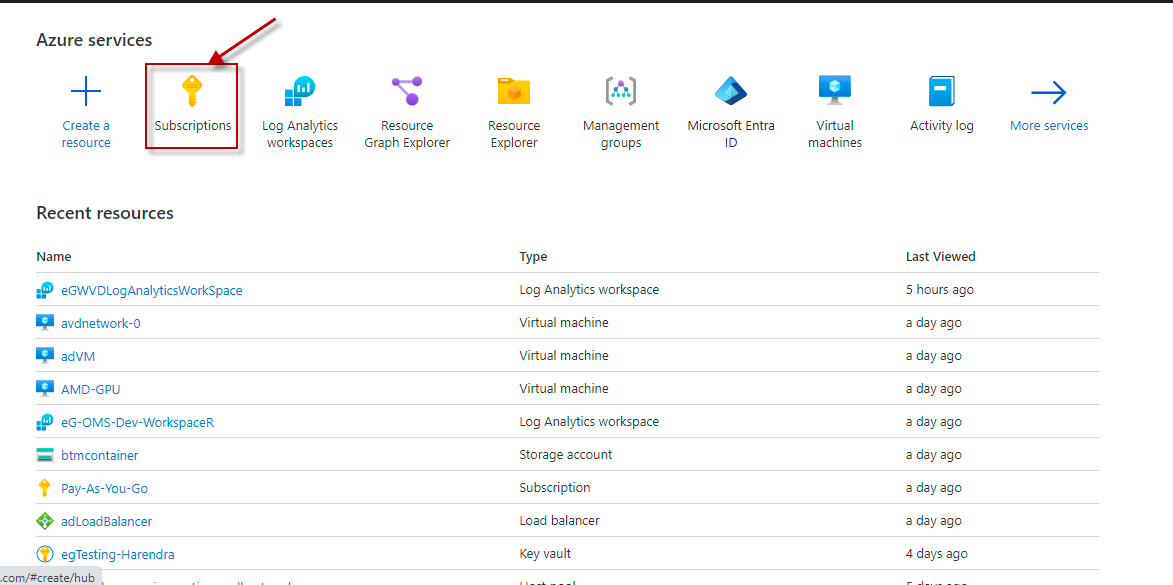
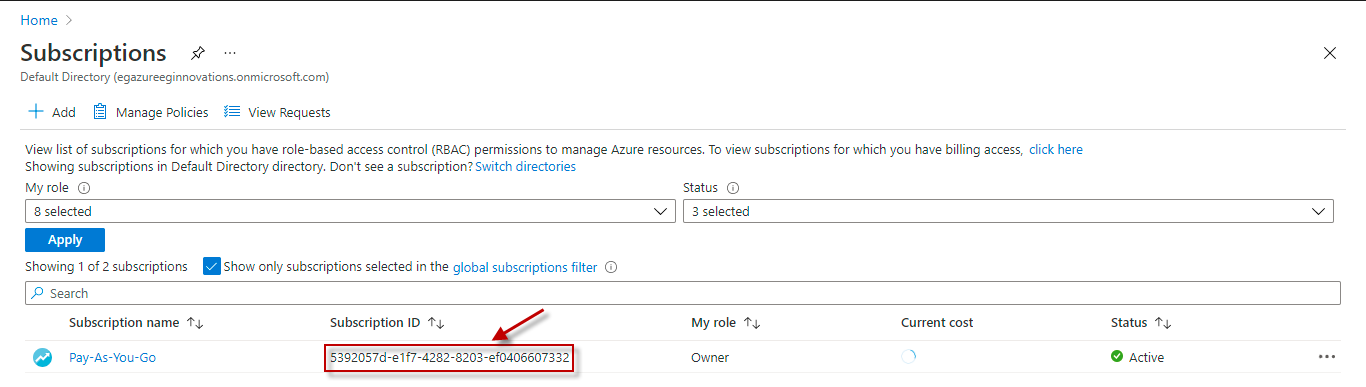
Subscription Id |
Specify the GUID which uniquely identifies the Microsoft Azure Subscription to be monitored. To know the ID that maps to the target subscription, do the following:
|
|
Tenant Id |
Specify the Directory ID of the Microsoft Entra tenant to which the target subscription belongs. To know how to determine the Directory ID, refer to Configuring the eG Agent to Monitor Microsoft Azure section in Monitoring Microsoft Azure Subscription document. |
|
Client Id and Client Password |
To connect to the target subscription, the eG agent requires an Access token in the form of an Application ID and the client secret value. For this purpose, you should register a new application with the Microsoft Entra tenant. To know how to create such an application and determine its Application ID and client secret, refer to Configuring the eG Agent to Monitor Microsoft Azure section in Monitoring Microsoft Azure Subscription document. Specify the Application ID of the created Application in the Client ID text box and the client secret value in the Client Password text box. |
|
Resource Group name |
Specify the resource group name which we created for monitoring. |
|
Measurement |
Description |
Measurement Unit |
Interpretation |
|---|---|---|---|
|
Service availability |
Indicates the availability percentage of the server. |
Percent |
MongoDB service availability on Azure depends on how you choose to deploy it. There are three main options: MongoDB Atlas (managed by MongoDB), Azure Cosmos DB (MongoDB API), and self-managed MongoDB on Azure VMs. |
|
Account created |
Indicates the number of accounts created. |
Number |
Account creation in Azure Cosmos DB for MongoDB involves setting up a database account, selecting API, region, and configuring throughput and security. |
|
Account deleted |
Indicates the number accounts deleted. |
Number |
|
|
Data usage |
Indicates the size of the data usage. |
MB |
Azure Cosmos DB for MongoDB uses request units, storage, indexing, and bandwidth to manage and measure data usage efficiently. |
|
Index usage |
Indicates the size of the index usage. |
MB |
Index usage in Azure Cosmos DB for MongoDB improves query performance by automatically indexing fields, increasing speed but consuming more storage and RUs. |
|
Number of documents |
Indicates the total number of documents stored in the database. |
Number |
|
|
Document size |
Indicates the size of the document in MB. |
MB |
|
|
Total request units |
Indicates the number of SQL requests units consumed. |
Number |
|
|
Total requests rate |
Indicates the total number of requests received per second on this Mongo server. |
Requests/Sec |
|
|
Metadata requests rate |
Indicates the total number of metadata requests received per second on this Mongo server. |
Requests/Sec |
Metadata request rate in Azure Cosmos DB for MongoDB refers to how often operations like listing databases, collections, or indexes are performed. |
|
Auto scaled RU |
Indicates the number of autoscaled RU count. |
Number |
Auto-scaled RU in Azure Cosmos DB for MongoDB adjusts throughput automatically based on workload, ensuring performance without manual provisioning. |
|
Normalized RU consumption |
Indicates the number of normalized RU consumption count. |
Number |
|
|
Autoscale max throughput |
Indicates the maximum throughput achieved through autoscale on this server. |
Number |
|
|
Provision throughput |
Indicates the throughput provisioned on this server. |
Number |
|
|
Physical partitions |
Indicates the number of physical partitions available on this server. |
Number |
Physical partition in Azure Cosmos DB for MongoDB stores data across distributed servers, enabling horizontal scaling, high availability, and performance. |
|
Physical partition size |
Indicates the size of each physical partition on this server. |
MB |
|
|
Physical partition throughput |
Indicates the throughput of each physical partition. |
Number |
|
|
Backup policy update |
Indicates the number of backup policy updates till now on this Mongo server. |
Number |
Backup policy update in Azure Cosmos DB for MongoDB allows changing backup frequency, retention, and type (periodic or continuous) via portal. |
|
Backup policy interval update |
Indicates the number of backup policy interval update. |
Number |
|
|
Backup policy redundancy update |
Indicates the number of backup policy redundancy update. |
Number |
|
|
Backup policy retention update |
Indicates the number of backup policy retention update. |
Number |
Backup policy retention update in Azure Cosmos DB for MongoDB changes how long backups are stored, supporting compliance and recovery needs efficiently. |
|
Backup mode update |
Indicates the number of backups mode updates. |
Number |
|
|
Continuous backup mode tier update |
Indicates the number of continuous backup mode tier update. |
Number |
|
|
Account keys updated |
Indicates the number of account keys updated on this Mongo server. |
Number |
Account key update in Azure Cosmos DB for MongoDB rotates access keys to enhance security, requiring updated credentials for client connections. |
|
Account network settings updated |
Indicates the number of times the account network settings have been updated. |
Number |
|
|
Account replication settings updated |
Indicates the number of times the account replication settings have been updated. |
Number |
|
|
Account diagnostic settings updated |
Indicates the number of times the account diagnostic settings have been updated. |
Number |
|
|
Server side latency direct |
Indicates the time it takes for the server to process the request. |
Seconds |
Server-side latency (direct) in Azure Cosmos DB for MongoDB measures time taken by backend systems to process requests without network delays. |
|
Server side latency gateway |
Indicates the latency experienced when processing a request through the gateway, including the time taken to send and receive the request. |
Seconds |
Server-side latency (gateway) in Azure Cosmos DB for MongoDB measures request processing time through the gateway proxy, including routing and authentication overhead. |
|
Replication latency |
Indicates the time it takes for replication between the nodes to complete. |
Seconds |
|
|
Region added |
Indicates the number of regions added. |
Number |
Region added in Azure Cosmos DB for MongoDB enables multi-region replication, improving availability, disaster recovery, and reducing latency for global users. |
|
Region failover |
Indicates the number of failover regions. |
Number |
|
|
Region removed |
Indicates the number of regions removed. |
Number |
|
|
Region online |
Indicates the number of currently online across the Azure regions for Mongo Cosmos service. |
Number |
Region online in Azure Cosmos DB for MongoDB means the newly added region is active, serving requests, and replicating data successfully. |
|
Region offline |
Indicates the number of regions currently offline. |
Number |
|