Mongo Azure Database Transactions Test
Azure Cosmos DB for MongoDB supports multi-document transactions that ensure ACID properties across multiple operations and collections. Transactions allow developers to group inserts, updates, or deletes so all succeed or all roll back together, maintaining data consistency. They’re started with `session.startTransaction()` in a MongoDB driver session and committed using `session.commitTransaction()`. Under the hood, Cosmos DB uses a distributed transaction protocol to guarantee atomicity and isolation across replicas and partitions. Transactions can span multiple collections within the same database and support point-in-time consistency. Proper indexing and partition key selection are important to minimize latency and optimize performance.
Monitoring database transactions ensures data consistency, detects long-running or failed operations, and prevents bottlenecks that degrade performance. It helps identify deadlocks, slow queries, and resource contention early, enabling quick corrective action. Tracking transaction metrics supports capacity planning, compliance auditing, and high availability, ensuring applications remain reliable, responsive, and meet service-level objectives for critical workloads.
This test monitors the transactions and provide the insights into the operations performed on the database. These insights are quite valuable for analysis of transaction performance of database and helps administrators carry out the root cause analysis.
Target of the test : An Azure Cosmos Mongo Server
Agent deploying the test : A remote agent
Outputs of the test : One set of results for target Mongo server being monitored.
| Parameter |
Description |
|
Test period |
How often should the test be executed. |
|
Host |
The host for which the test is to be configured. |
|
Port |
The port number at which the specified host listens. |
|
Subscription Id |
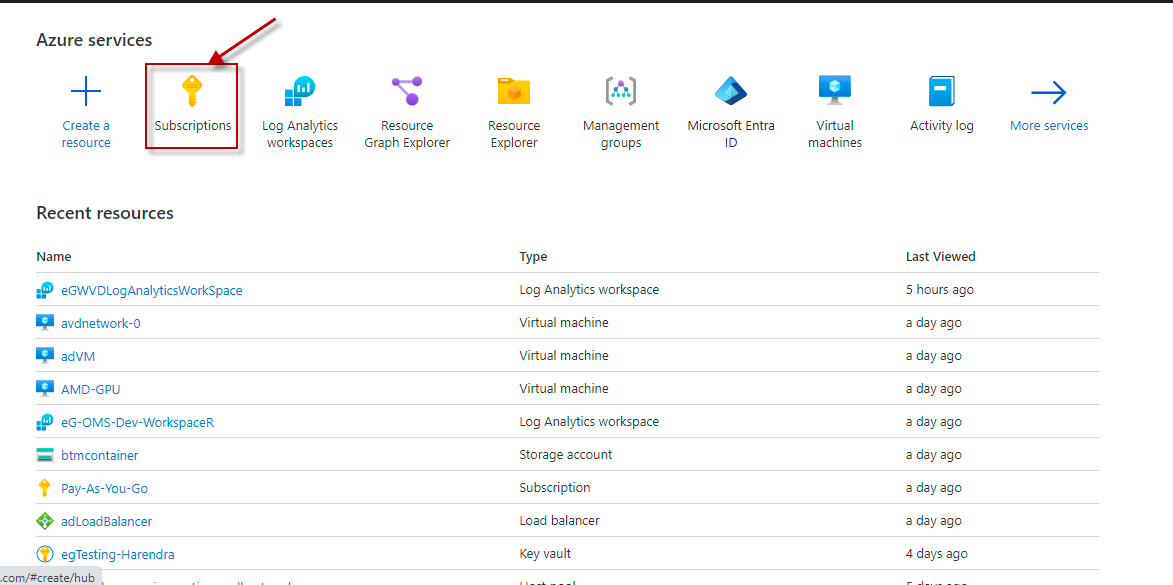
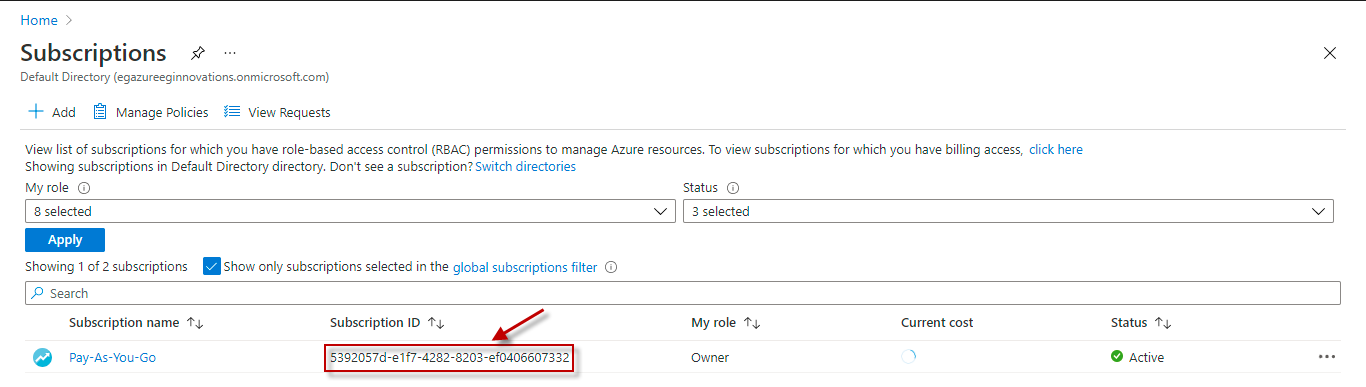
Specify the GUID which uniquely identifies the Microsoft Azure Subscription to be monitored. To know the ID that maps to the target subscription, do the following:
|
|
Tenant Id |
Specify the Directory ID of the Microsoft Entra tenant to which the target subscription belongs. To know how to determine the Directory ID, refer to Configuring the eG Agent to Monitor Microsoft Azure section in Monitoring Microsoft Azure Subscription document. |
|
Client Id and Client Password |
To connect to the target subscription, the eG agent requires an Access token in the form of an Application ID and the client secret value. For this purpose, you should register a new application with the Microsoft Entra tenant. To know how to create such an application and determine its Application ID and client secret, refer to Configuring the eG Agent to Monitor Microsoft Azure section in Monitoring Microsoft Azure Subscription document. Specify the Application ID of the created Application in the Client ID text box and the client secret value in the Client Password text box. |
|
Resource Group name |
Specify the resource group name which we created for monitoring. |
| Measurement | Description | Measurement Unit | Interpretation |
|---|---|---|---|
|
Database created |
Indicates the number of databases created on this Mongo server. |
Number |
Database creation in Azure Cosmos DB for MongoDB involves defining a database name, configuring throughput, and setting region and security options. |
|
Database updated |
Indicates the number of databases updated on this Mongo server. |
Number |
|
|
Database deleted |
Indicates the number of databases deleted on this Mongo server. |
Number |
|
|
Database throughput updated |
Indicates the number of times the database throughput has been updated. |
Number |
Database throughput update in Azure Cosmos DB for MongoDB adjusts provisioned RUs to meet workload demands, optimizing performance and cost dynamically. |
|
Database throughput update rate |
Indicates the rate at which the database throughput is updated on this server. |
Updates/Sec |
|
|
Collection created |
Indicates the number of collections created on this server. |
Number |
|
|
Collection updated |
Indicates the number of collections updated on this server. |
Number |
Collection update in Azure Cosmos DB for MongoDB modifies collection settings like indexing, throughput, or schema to optimize performance and resource usage. |
|
Collection deleted |
Indicates the number of collections deleted on this server. |
Number |
|
|
Collection throughput updated |
Indicates the number of times the collection throughput has been updated. |
Number |
|
|
Collection throughput update rate |
Indicates the rate at which the collection throughput is updated on this server. |
Updates/Sec |
|
|
Requests |
Indicates the number of requests received on this server. |
Number |
|
|
Request rate |
Indicates the number of requests received per second on this server. |
Requests/Sec |
|