AWS Inspector Findings Test
Amazon Inspector is a security assessment service/vulnerability management service that helps you improve the security and compliance of applications deployed on Amazon Web Services (AWS). It automates the process of identifying vulnerabilities and assessing resources against security best practices.
Amazon Inspector discovers and scans:
-
Amazon EC2 instances
-
Container images in Amazon ECR and
-
Lambda functions
When Amazon Inspector detects a software vulnerability or unintended network exposure, it creates a finding, which is a detailed report about the issue. The AWS Inspector Findings test scans these findings and offers a consolidated view of them from the eG console.
For each AWS region, this test reports the count of findings for each type of severity level (critical / high / medium / low / informational). This test also reports the findings for EC2 instances, ECR container images and lambda functions in the target AWS Cloud. Based on the alerts raised for critical findings, administrators can instantly identify problematic EC2 instances, ECR container images and lambda functions.
Target of the test: Amazon Cloud
Agent deploying the test : A remote agent
Outputs of the test : One set of results for each AWS Regions on the target AWS Cloud being monitored.
Descriptor: AWS Region
| Parameter | Description |
|---|---|
|
Test Period |
How often should the test be executed. |
|
Host |
The host for which the test is to be configured. |
|
Access Type |
eG Enterprise monitors the AWS cloud using AWS API. By default, the eG agent accesses the AWS API using a valid AWS account ID, which is assigned a special role that is specifically created for monitoring purposes. Accordingly, the Access Type parameter is set to Role by default. Furthermore, to enable the eG agent to use this default access approach, you will have to configure the eG tests with a valid AWS Account ID to Monitor and the special AWS Role Name you created for monitoring purposes.
Some AWS cloud environments however, may not support the role-based approach Note that the Secret option may not be ideal when monitoring high-security cloud environments. This is because, such environments may issue a security mandate, which would require administrators to change the Access Key and Secret Key, often. Because of the dynamicity of the key-based approach, Amazon recommends the Role-based approach for accessing the AWS API. |
|
AWS Account ID to Monitor |
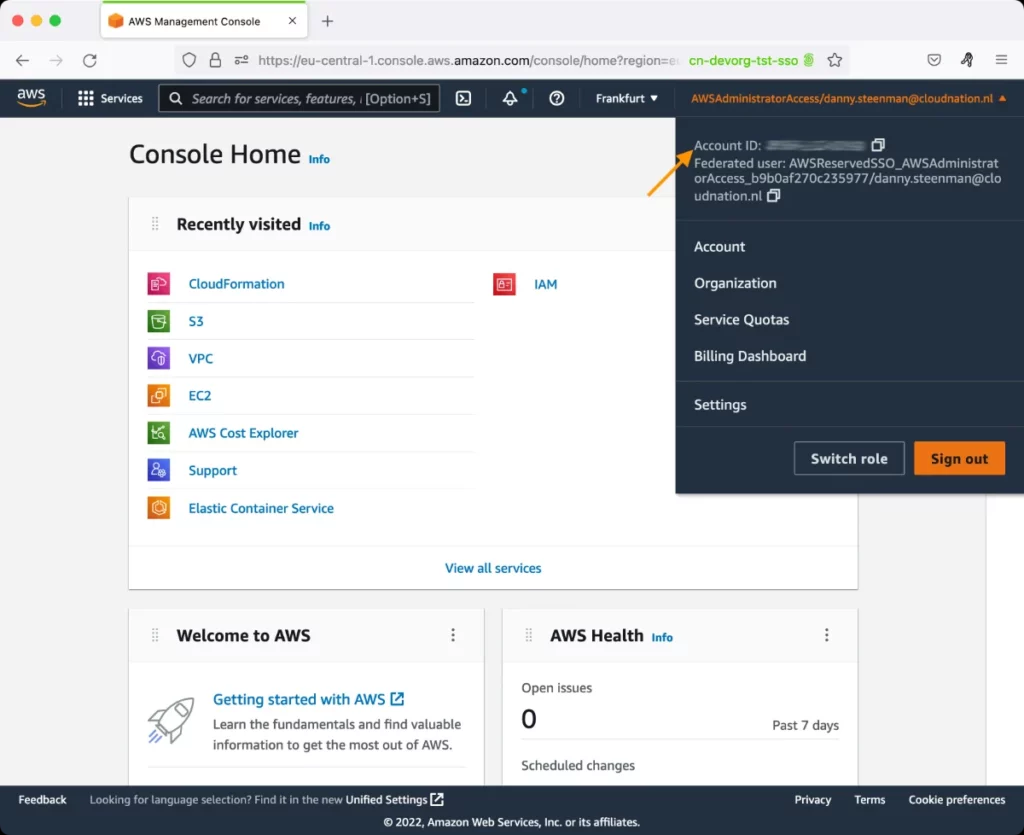
This parameter appears only when the Access Type parameter is set to Role. Specify the AWS Account ID that the eG agent should use for connecting and making requests to the AWS API. To determine your AWS Account ID, follow the steps below:
|
|
AWS Role Name |
This parameter appears when the Access Type parameter is set to Role. Specify the name of the role that you have specifically created on the AWS cloud for monitoring purposes. The eG agent uses this role and the configured Account ID to connect to the AWS Cloud and pull the required metrics. To know how to create such a role, refer to Creating a New Role. |
|
AWS Access Key, AWS Secret Key, Confirm AWS Access Key, Confirm AWS Secret Key |
These parameters appear only when the Access Type parameter is set to Secret.To monitor an Amazon cloud instance using the Secret approach, the eG agent has to be configured with the access key and secret key of a user with a valid AWS account. For this purpose, we recommend that you create a special user on the AWS cloud, obtain the access and secret keys of this user, and configure this test with these keys. The procedure for this has been detailed in the Obtaining an Access key and Secret key topic. Make sure you reconfirm the access and secret keys you provide here by retyping it in the corresponding Confirm text boxes. |
|
Proxy Host and Proxy Port |
In some environments, all communication with the AWS cloud and its regions could be routed through a proxy server. In such environments, you should make sure that the eG agent connects to the cloud via the proxy server and collects metrics. To enable metrics collection via a proxy, specify the IP address of the proxy server and the port at which the server listens against the Proxy Host and Proxy Port parameters. By default, these parameters are set to none , indicating that the eG agent is not configured to communicate via a proxy, by default. |
|
Proxy User Name, Proxy Password, and Confirm Password |
If the proxy server requires authentication, then, specify a valid proxy user name and password in the Proxy User Name and Proxy Password parameters, respectively. Then, confirm the password by retyping it in the Confirm Password text box. By default, these parameters are set to none, indicating that the proxy sever does not require authentication by default. |
|
Proxy Domain and Proxy Workstation |
If a Windows NTLM proxy is to be configured for use, then additionally, you will have to configure the Windows domain name and the Windows workstation name required for the same against the Proxy Domain and Proxy Workstation parameters. If the environment does not support a Windows NTLM proxy, set these parameters to none. |
|
Exclude Region |
Here, you can provide a comma-separated list of region names or patterns of region names that you do not want to monitor. For instance, to exclude regions with names that contain 'east' and 'west' from monitoring, your specification should be: *east*,*west* |
|
Default Connection Region |
By default, this test connects to the endpoint URL of the us-east-1 region to collect the required metrics. If the default us-east-1 region is not enabled in the target environment, then, for this test to collect the required metrics, specify the region that is enabled in the target environment. |
|
DD for Informational Severity Findings |
By default, this flag is set to No. This implies that by default, detailed metrics will not be available for the Recent informational findings, Recent informational findings by instance, Recent informational findings by container image and Recent informational findings by Lambda function measures reported by this test. To enable detailed diagnosis for these measures, you can set this flag to Yes. In this case, you will be able to view the complete details of the assessment findings with Informational severity level. |
|
DD for Low Severity Findings |
By default, this flag is set to No. This implies that by default, detailed metrics will not be available for the Recent low findings, Recent low findings by instance, Recent low findings by container image and Recent low findings by Lambda function measures reported by this test. To enable detailed diagnosis for these measures, you can set this flag to Yes. In this case, you will be able to view the complete details of the assessment findings with Informational severity level. |
|
DD Frequency |
Refers to the frequency with which detailed diagnosis measures are to be generated for this test. The default is 1:1. This indicates that, by default, detailed measures will be generated every time this test runs, and also every time the test detects a problem. You can modify this frequency, if you so desire. Also, if you intend to disable the detailed diagnosis capability for this test, you can do so by specifying none against DD frequency. |
|
Detailed Diagnosis |
To make diagnosis more efficient and accurate, the eG Enterprise embeds an optional detailed diagnostic capability. With this capability, the eG agents can be configured to run detailed, more elaborate tests as and when specific problems are detected. To enable the detailed diagnosis capability of this test for a particular server, choose the On option. To disable the capability, click on the Off option. The option to selectively enable/disable the detailed diagnosis capability will be available only if the following conditions are fulfilled:
|
|
Measurement |
Description |
Measurement Unit |
Interpretation |
|---|---|---|---|
|
All active findings |
Indicates the total number of active assessment findings of this AWS region. |
Number |
|
|
Recent active findings |
Indicates the number of recent active assessment findings of this AWS region. |
Number |
The detailed diagnosis of this measure lists the title, impacted resource, severity level of the assessment finding, resource type, vulnerability type, age of the assessment finding and description. |
|
Recent critical findings |
Indicates the number of recent assessment findings of this AWS region with Critical severity level. |
Number |
Critical assessment findings are vulnerabilities that can lead to complete system compromise. Typically, they can be remote code execution or privilege escalation. A high value for this measure requires immediate attention of the administrators. The detailed diagnosis of this measure lists the title, impacted resource, severity level of the assessment finding, resource type, vulnerability type, age of the assessment finding and description. |
|
Recent high findings |
Indicates the number of recent assessment findings of this AWS region with High severity level. |
Number |
High severity assessment findings are significant threats that could be exploited easily and cause major damage if left unpatched. These findings should be remediated quickly. A high value for this measure requires immediate attention of the administrators. The detailed diagnosis of this measure lists the title, impacted resource, severity level of the assessment finding, resource type, vulnerability type, age of the assessment finding and description. |
|
Recent medium findings |
Indicates the number of recent assessment findings of this AWS region with Medium severity level. |
Number |
Medium assessment findings are less likely to be exploited or would have a limited impact. These findings are still important, especially on sensitive systems. A high value for this measure requires immediate attention of the administrators. The detailed diagnosis of this measure lists the title, impacted resource, severity level of the assessment finding, resource type, vulnerability type, age of the assessment finding and description. |
|
Recent informational findings |
Indicates the number of recent assessment findings of this AWS region with Informational severity level. |
Number |
Low / Informational assessment findings are of low impact and are mostly informational or low-risk items. You can address them at your convenience or in hardening phases. The detailed diagnosis of this measure lists the title, impacted resource, severity level of the assessment finding, resource type, vulnerability type, age of the assessment finding and description. |
|
Recent low findings |
Indicates the number of recent assessment findings of this AWS region with Low severity level. |
Number |
Low / Informational assessment findings are of low impact and are mostly informational or low-risk items. You can address them at your convenience or in hardening phases. The detailed diagnosis of this measure lists the title, impacted resource, severity level of the assessment finding, resource type, vulnerability type, age of the assessment finding and description. |
|
Recent untriaged findings |
Indicates the number of recent assessment findings of this AWS region that are untriaged. |
Number |
Untriaged assessment findings are those that have not yet been reviewed, suppressed, or remediated. They are essentially active findings that need attention. The detailed diagnosis of this measure lists the title, impacted resource, severity level of the assessment finding, resource type, vulnerability type, age of the assessment finding and description. |
|
Total findings by instance |
Indicates the total number of assessment findings of this AWS region based on the EC2 instance resource type. |
Number |
|
|
Recent findings by instance |
Indicates the number of recent assessment findings of this AWS region for the EC2 instance resource type. |
Number |
The detailed diagnosis of this measure lists the title, name of the EC2 instance, AWS Account ID, Age of the assessment finding, Image ID and the operating system of the EC2 instance. |
|
Recent critical findings by instance |
Indicates the number of recent assessment findings of this AWS region with Critical severity level for the EC2 instance resource type. |
Number |
A high value for this measure requires immediate attention of the administrators. The detailed diagnosis of this measure lists the title, name of the EC2 instance, AWS Account ID, Age of the assessment finding, Image ID and the operating system of the EC2 instance. |
|
Recent high findings by instance |
Indicates the number of recent assessment findings of this AWS region with a High severity level for the EC2 instance resource type. |
Number |
A high value for this measure requires immediate attention of the administrators. The detailed diagnosis of this measure lists the title, name of the EC2 instance, AWS Account ID, Age of the assessment finding, Image ID and the operating system of the EC2 instance. |
|
Recent medium findings by instance |
Indicates the number of recent assessment findings of this AWS region with Medium severity level for the EC2 instance resource type. |
Number |
A high value for this measure requires immediate attention of the administrators. The detailed diagnosis of this measure lists the title, name of the EC2 instance, AWS Account ID, Age of the assessment finding, Image ID and the operating system of the EC2 instance. |
|
Recent low findings by instance |
Indicates the number of recent assessment findings of this AWS region with Low severity level for the EC2 instance resource type. |
Number |
The detailed diagnosis of this measure lists the title, name of the EC2 instance, AWS Account ID, Age of the assessment finding, Image ID and the operating system of the EC2 instance. |
|
Recent informational findings by instance |
Indicates the number of recent assessment findings of this AWS region with Informational severity level for the EC2 instance resource type. |
Number |
The detailed diagnosis of this measure lists the title, name of the EC2 instance, AWS Account ID, Age of the assessment finding, Image ID and the operating system of the EC2 instance. |
|
Recent untriaged findings by instance |
Indicates the number of recent untriaged assessment findings of this AWS region for the EC2 instance resource type. |
Number |
The detailed diagnosis of this measure lists the title, name of the EC2 instance, AWS Account ID, Age of the assessment finding, Image ID and the operating system of the EC2 instance. |
|
Total findings by container image |
Indicates the total number of assessment findings of this AWS region based on the container image resource type. |
Number |
|
|
Recent findings by container image |
Indicates the number of recent assessment findings of this AWS region for the container image resource type. |
Number |
The detailed diagnosis of this measure lists the title, image tags, repository image, AWS account ID and the age of the assessment finding. |
|
Recent critical findings by container image |
Indicates the number of recent assessment findings of this AWS region with Critical severity level for the container image resource type. |
Number |
A high value for this measure requires immediate attention of the administrators. The detailed diagnosis of this measure lists the title, image tags, repository image, AWS account ID and the age of the assessment finding. |
|
Recent high findings by container image |
Indicates the number of recent assessment findings of this AWS region with a High severity level for the container image resource type. |
Number |
A high value for this measure requires immediate attention of the administrators. The detailed diagnosis of this measure lists the title, image tags, repository image, AWS account ID and the age of the assessment finding. |
|
Recent medium findings by container image |
Indicates the number of recent assessment findings of this AWS region with Medium severity level for the container image resource type. |
Number |
A high value for this measure requires immediate attention of the administrators. The detailed diagnosis of this measure lists the title, image tags, repository image, AWS account ID and the age of the assessment finding. |
|
Recent low findings by container image |
Indicates the number of recent assessment findings of this AWS region with Low severity level for the container image resource type. |
Number |
The detailed diagnosis of this measure lists the title, image tags, repository image, AWS account ID and the age of the assessment finding. |
|
Recent informational findings by container image |
Indicates the number of recent assessment findings of this AWS region with Informational severity level for the container image resource type. |
Number |
The detailed diagnosis of this measure lists the title, image tags, repository image, AWS account ID and the age of the assessment finding. |
|
Recent untriaged findings by container image |
Indicates the number of recent untriaged assessment findings of this AWS region for the container image resource type. |
Number |
The detailed diagnosis of this measure lists the title, image tags, repository image, AWS account ID and the age of the assessment finding. |
|
Total findings by Lambda function |
Indicates the total number of assessment findings of this AWS region for the Lambda function resource type. |
Number |
|
|
Recent findings by Lambda function |
Indicates the number of recent assessment findings of this AWS region for the Lambda function resource type. |
Number |
The detailed diagnosis of this measure lists the title, name of the Lambda function, AWS account, age of the assessment finding and the runtime of the Lambda function. |
|
Recent critical findings by Lambda function |
Indicates the number of recent assessment findings of this AWS region with Critical severity level for the Lambda function resource type. |
Number |
A high value for this measure requires immediate attention of the administrators. The detailed diagnosis of this measure lists the title, name of the Lambda function, AWS account, age of the assessment finding and the runtime of the Lambda function. |
|
Recent high findings by Lambda function |
Indicates the number of recent assessment findings of this AWS region with a High severity level for the Lambda function resource type. |
Number |
A high value for this measure requires immediate attention of the administrators. The detailed diagnosis of this measure lists the title, name of the Lambda function, AWS account, age of the assessment finding and the runtime of the Lambda function. |
|
Recent medium findings by Lambda function |
Indicates the number of recent assessment findings of this AWS region with Medium severity level for the Lambda function resource type. |
Number |
A high value for this measure requires immediate attention of the administrators. The detailed diagnosis of this measure lists the title, name of the Lambda function, AWS account, age of the assessment finding and the runtime of the Lambda function. |
|
Recent low findings by Lambda function |
Indicates the number of recent assessment findings of this AWS region with Low severity level for the Lambda function resource type. |
Number |
The detailed diagnosis of this measure lists the title, name of the Lambda function, AWS account, age of the assessment finding and the runtime of the Lambda function. |
|
Recent informational findings by Lambda function |
Indicates the number of recent assessment findings of this AWS region with Informational severity level for the Lambda function resource type. |
Number |
The detailed diagnosis of this measure lists the title, name of the Lambda function, AWS account, age of the assessment finding and the runtime of the Lambda function. |
|
Recent untriaged findings by Lambda function |
Indicates the number of recent untriaged assessment findings of this AWS region for the Lambda function resource type. |
Number |
The detailed diagnosis of this measure lists the title, name of the Lambda function, AWS account, age of the assessment finding and the runtime of the Lambda function. |