Desktop Experience Rating Test
To assess the overall performance of physical desktops, administrators typically monitor a wide range of metrics reported by eG Enterprise. However, for executives who need a quick, high-level view without going through detailed data, the Desktop Experience Rating test provides a simplified status summary, making it easier to gauge desktop health at a glance. This test reports a consolidated performance score that reflects the overall health and user experience of desktops in a multi-desktop environment. It is computed by analyzing several key performance metrics such as CPU usage, memory usage, disk I/O, system responsiveness, error conditions, etc.
Target of the test :A Physical Desktop Group
Agent deploying the test : A remote agent
Outputs of the test : One set of results for each user on physical desktop
| Parameter | Description |
|---|---|
|
Test Period |
How often should the test be executed |
|
Host |
The nick name of the Physical Desktop Group component for which this test is to be configured. |
|
Port |
The port at which the specified Host listens. By default, this is NULL. |
|
Minimum and Maximum Values |
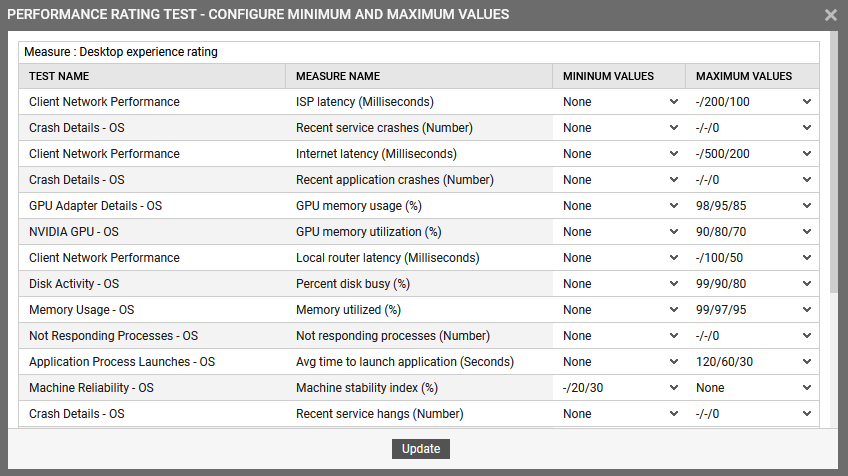
To enable this test to compute desktop rating, you should specify the maximum/minimum values against each measure based on which the desktop experience rating would be computed. To configure this, click the Configure Minimum and Maximum Values for computing performance rating icon. This will invoke the following image:
The PERFORMANCE RATING TEST - CONFIGURE MINIMUM AND MAXIMUM VALUES window lists the measures added for computing the desktop experience rating. To set the values, click the drop-down arrow (provided for each measure) in the MINIMUM VALUES and MAXIMUM VALUES columns. The Minimum Values specified should be in ascending order and the Maximum Values specified should be in descending order. By default, the Minimum Values/Maximum Values should be in the format: Critical/Major/Minor. However, if you wish to add/remove measures from the rating computation, refer the Modifying the Performance Rating test. |
| Measurement | Description | Measurement Unit | Interpretation |
|---|---|---|---|
|
Desktop experience rating |
Indicates the overall desktop experience rating of this user. |
Percent |
Ideally, a high value (close to 100%) for this measure indicates a smooth and responsive user experience where as a lower value suggests performance degradation, potential resource bottlenecks, or system instability. |