Office Security Update Status - OS Test
An Office Security Update is a software patch specifically designed to fix vulnerabilities and strengthen the security of Microsoft Office applications such as Word, Excel, PowerPoint, Outlook, etc. These updates play a vital role in protecting desktops from cyber threats, such as malware and hacking attempts, ransomware and phishing attacks, etc., by addressing security flaws in the software. If the target system is not updated with these security updates regularly, Office applications on the desktops may become vulnerable to malware injections, email-based attacks, remote code execution and other threats that can challenge both system performance and data security. Therefore, it is essential for administrators to verify that the latest Office security updates are installed on the target desktop. This check can be efficiently done using the Office Security Update Status - OS test.
This test periodically checks the current status of Office security update installed on the target desktop and also help administrators find out whether the latest version of the update is installed on the system or not.
Target of the test : A Physical Desktop Group
gent deploying the test : An internal agent
Outputs of the test : One set of results for each Physical desktop
| Parameter | Description |
|---|---|
|
Test period |
How often should the test be executed. |
|
Host |
The host for which the test is to be configured. |
|
Port |
The port number at which the specified host listens. By default, this is NULL. |
|
Report Powered OS |
If this flag is set to Yes (which is the default setting), then the 'inside view' tests will report measures for even those physical desktops that do not have any users logged in currently. Such desktops will be identified by their name and not by the username_on_physicalmachinename. On the other hand, if this flag is set to No, then this test will not report measures for those physical desktops to which no users are logged in currently. |
|
Report By User |
This flag is set to Yes by default. This implies that the physical machines in environments will always be identified using the login name of the user. In other words, this test will, by default, report measures for every username_on_physicalmachinename. |
|
Detailed Diagnosis |
To make diagnosis more efficient and accurate, the eG Enterprise embeds an optional detailed diagnostic capability. With this capability, the eG agents can be configured to run detailed, more elaborate tests as and when specific problems are detected. To enable the detailed diagnosis capability of this test for a particular server, choose the On option. To disable the capability, click on the Off option. The option to selectively enable/disable the detailed diagnosis capability will be available only if the following conditions are fulfilled:
|
| Measurement | Description | Measurement Unit | Interpretation | ||||||||||||
|---|---|---|---|---|---|---|---|---|---|---|---|---|---|---|---|
|
Status of installed version |
Indicates the current status of the Office security update. |
|
The values reported by this measure and their corresponding numeric equivalents are described in the table below:
Note: By default, this measure reports the above-mentioned Measure Values while indicating the current status of the Office security update. However, in the graph of this measure, the values will be represented using the corresponding numeric equivalents only. |
||||||||||||
|
Is latest security update installed? |
Indicates whether/not the target desktop is installed with the latest version of the Office security update. |
|
The values reported by this measure and their corresponding numeric equivalents are described in the table below:
Note: By default, this measure reports the above-mentioned Measure Values while indicating whether the latest version of Office security update is installed or not. However, in the graph of this measure, the values will be represented using the corresponding numeric equivalents only. |
The detailed diagnosis of the Status of installed version measure reveals how frequently Office updates are delivered, installed version of Office updates, date after which Microsoft no longer provides security updates, type of the most recent Office update, version number of the recent Office update, and the date on which the most recent Office update was officially released.
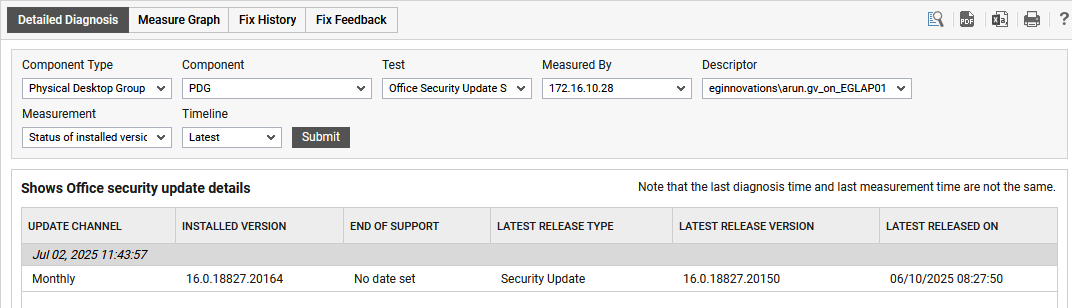
Figure 1 : The detailed diagnosis of the Status of installed version