Configuring Tests for PostgreSQL Cluster
Once the PostgreSQL Cluster is managed, proceed to configure tests for the component. For that, do the following:
-
Follow the Infrastructure -> Components -> Add/Modify menu sequence in the eG admin interface.
-
In the page that appears next, select PostgreSQL Cluster as the Component type. The PostgreSQL Cluster component that you recently managed/added will then be listed therein. To configure tests for that server, click on the
 icon corresponding to it (see Figure 1).
Figure 1 : Clicking on the Configure Tests icon corresponding to a managed PostgreSQL Cluster component
-
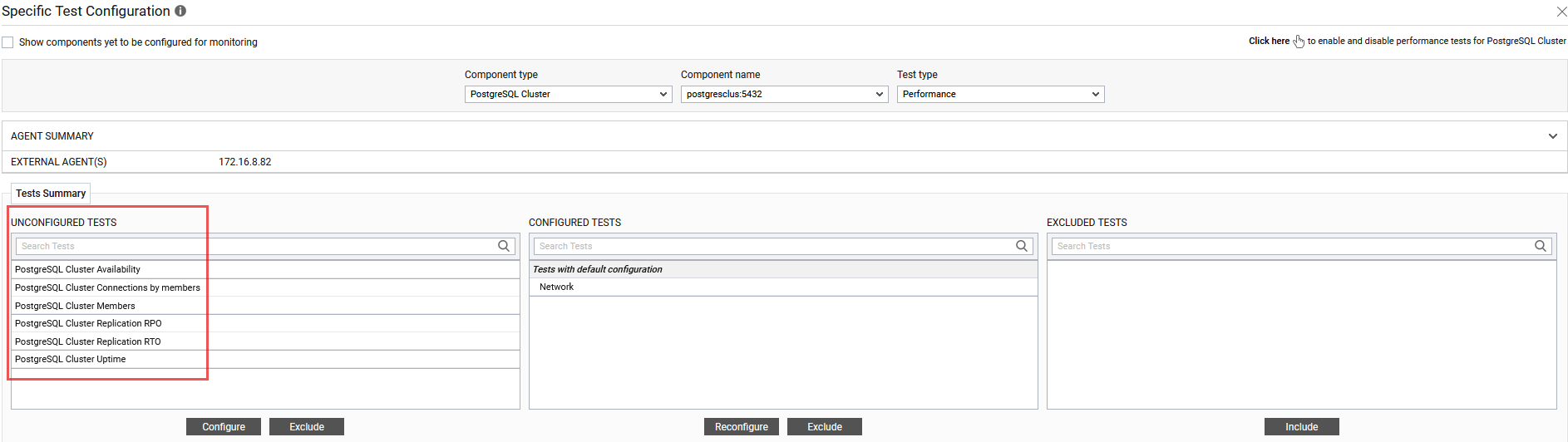
Figure 2 will then appear, where the list of unconfigured tests will be listed in the UNCONFIGURED TESTS list box. From the UNCONFIGURED TESTS list in , select the test that you want to configure. Once you select the test, click the Configure button in to configure it.
-
To know how to configure these test, refer to PostgreSQL Cluster Availability Test
-
Click the Update button to update the test configuration.