English
 Deutsch
 Espanol
 Français
 Portuguese
 中文
中文 한국어
한국어 日本語
日本語
Master Citrix NetScaler Monitoring with
eG Enterprise
Monitor all Citrix NetScaler (ADCs) from one console along with other Citrix tiers. Track NetScaler resources, traffic, throughput, load balancing, sessions, VPNs and more.
Free TrialTrusted by leading companies


Comprehensive Citrix NetScaler Monitoring
Citrix NetScaler / ADC is not just a simple network/application load balancer. Today, Citrix NetScaler / ADC has evolved into a networking powerhouse, supporting a variety of functions including application firewalls, VPN tunnels, caching and acceleration, compression, and ensuring fast delivery of web and desktop applications. Since it plays a central role, the availability and performance of a Citrix NetScaler device is crucial. Not only does NetScaler performance impact the user experience, but more importantly, it is also important for safeguarding the security and sanctity of the IT infrastructure.

Citrix NetScaler Monitoring Requirements

Citrix administrators must:
- Monitor the resource usage levels of all their NetScaler devices.
- Track the status of all services load balanced by each NetScaler device.
- Monitor ICA and VPN session activity handled by NetScalers.
- Analyze application flows processed by NetScaler devices.
The Citrix NetScaler admin console can be used for some of these requirements but manually looking at the consoles one-by-one is a laborious and time-consuming task.
eG Enterprise for Citrix Netscaler Monitoring

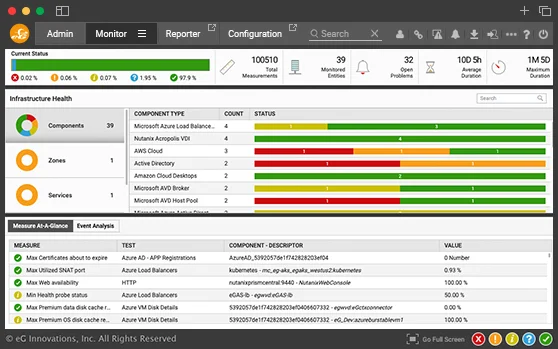
eG Enterprise is a complete Citrix monitoring solution that provides great visibility into the performance and usage of your Citrix NetScalers. With eG Enterprise you can:
- All your NetScalers from one console
- Be alerted to all NetScaler performance anomalies – high traffic, security violations, login errors, load balancing issues, SSL certificate issues, etc.
- Get to the root-cause of application performance problems in one click
- Correlate NetScaler performance with that of the other Citrix tiers
Citrix NetScaler Monitoring Perfected
with eG Enterprise
eG Enterprise is a Citrix Ready certified solution that monitors all aspects of Citrix NetScaler usage and performance. It presents actionable insights to administrators through real-time dashboards, alerts, and performance reports. Using a combination of Citrix NetScaler NITRO APIs, SNMP, and syslog messages, eG Enterprise collects metrics about all aspects of Citrix NetScaler's functioning.
-
NetScaler Gateway
- Audit logs - sent/not sent to syslog server
- Errors
- Login success/failure VPN stats, CGS stats
- MIP and IIP spillover
- SOCKS, STA, ICA, CPS stats
-
Load Balancing
- Virtual server health
- Client and server connections
- Received request/response
- Packets sent/received
- Spillover threshold
- Deferred requests
- Push labels
-
Compression
- TCP compression requests, data, packets, bandwidth
- HTTP compression requests, data, packets, bandwidth
- Decompression ratio
- Decompression errors
-
Integrated Cache
- Hits, misses, 304 hits
- Data served by NetScaler
- Storable/non-storable misses
- Flash cache hits and misses
- Invalidation
- Parameterized caching
-
Security
- AAA stats: authentication failures, sessions, etc.
- Application firewall traffic stats, HTML/XML violation stats, server error response stats
- Application flows
-
Protocols
- DNS
- ICMP
- IP
- NetScaler HTTP
- NetScaler TCP
- NetScaler UDP
- SSL
Answer Key Questions about NetScaler Performance
With eG Enterprise, administrators can get answers at their fingertips for key Citrix NetScaler performance questions across various categories:
| User activity |
|
| Load balancing |
|
| Compression and caching |
|
| Capacity analysis and right-sizing |
|


Monitoring Network Traffic and Security
eG Enterprise auto-discovers VLANs configured and tracks traffic through each VLAN. It also monitors sessions to reverse network address translated (RNAT) servers. Administrators are automatically alerted to issues such as packet drops, packet collisions, bridge loops, discards, errors, stalls, hangs, and more. Administrators also have visibility into the traffic to and from the NetScaler device for different protocols, including IP, TCP, UDP, DNS, HTTP, and SSL.
eG Enterprise helps you ensure secure access to the infrastructure by detecting and alerting on failed authentications, tracking the effectiveness of application firewall profiles configured, and isolating policy labels that are frequently invoked by the NetScaler appliance. Critical errors reported in syslog messages are also flagged.

Analyze Citrix AppFlows through NetScaler
One of the most common challenges with Citrix performance is slowness of access. When slowness is detected, is the issue due to the Citrix infrastructure or could it be caused by a poor network connection from the user end? With eG Enterprise for Citrix NetScaler monitoring, administrators can:
This insight is critical for empowering Citrix administrators and helpdesks to quickly troubleshoot complaints of slowness in minutes. To provide this capability, eG Enterprise can be integrated with Citrix NetScaler ADC Management (Insight/MAS) or it can be configured to receive and process AppFlow exports from the Citrix NetScalers.