



End Email Downtime: Real-Time Email Flow Monitoring with eG Enterprise
Email downtime or email delays can significantly disrupt business operations, making proactive monitoring essential to avoid problems. In today’s hybrid work environments, email remains a critical communication channel for customer interactions, internal collaboration, and workflow approvals. Even brief outages or delays in email delivery can lead to missed opportunities, poor customer experience, SLA (Service Level Agreement) breaches and reputational damage.
Reasons for Email Delays in Office 365
Office 365 (now marketed as Microsoft 365) is one of the most popular office productivity suites. Millions of organizations rely on Office 365 for the critical email services that enable their employees to do their jobs and facilitate key customer interactions. Helpdesk and IT administrators need proactive monitoring in place to automatically detect root cause issues stemming from a diverse range of problems such as:
-
Authentication Delays
Slow or failed authentication with Exchange Online or SMTP servers can delay the start of the mail transaction.
-
Network Latency
High latency between the sender and receiver—especially across regions or through firewalls/proxies—can slow down mail transmission.
-
Mailbox Access Issues
If the sender or receiver’s mailbox is not readily accessible (e.g., due to permissions, size limits, or throttling), delays can occur.
-
Exchange Server Processing Delays
The Exchange service might take longer to queue, route, or deliver the message due to heavy load or internal issues.
-
Spam or Security Filtering
Advanced threat protection tools, antivirus scanning, or spam filters can add extra processing time before delivery.
-
Outlook or Client-Side Issues
If mail appears slow to the end user, it might be caused by client sync issues, cached mode delays, or local network problems.
-
Hybrid Mail Flow Routing
In mixed environments (e.g., O365 to on-prem), extra routing hops between cloud and on-premises servers can introduce additional latency.
-
Transport Queue Backlog
A build-up of messages in transport queues due to temporary failures or heavy load can delay delivery.
-
DNS Resolution Delays
Slow DNS lookups during mail routing can impact how quickly the message finds its next hop.
-
Misconfigured Connectors or Policies
Improper configuration of connectors, rules, or DLP (Data Loss Prevention) policies can introduce processing bottlenecks.
Using custom-built synthetic monitoring within eG Enterprise, organizations can detect delivery issues, authentication failures, or latency spikes before real users are affected. The sending and receipt of emails is simulated via automated “robot” users to continually test email systems even when there may be no real users using the email.
Email Path Synthetic Monitoring with eG Enteprise
For Office 365, the monitoring and continual testing of certain mail exchanges is essential for ensuring reliable and secure email communication. Mail exchanges to monitor should include:
- Internal mail flow within the same Office 365 tenant
- Mail flow between Office 365 and external tenants
- Mail flow within on-premises Exchange servers
- Mail flow between Office 365 and on-premises Exchange server
By continuously monitoring these paths with synthetic tests, IT teams can quickly detect and resolve issues that may impact business communication, before real users encounter issues. This visibility is especially critical in complex, mixed environments where a single failure point can disrupt the entire email flow.
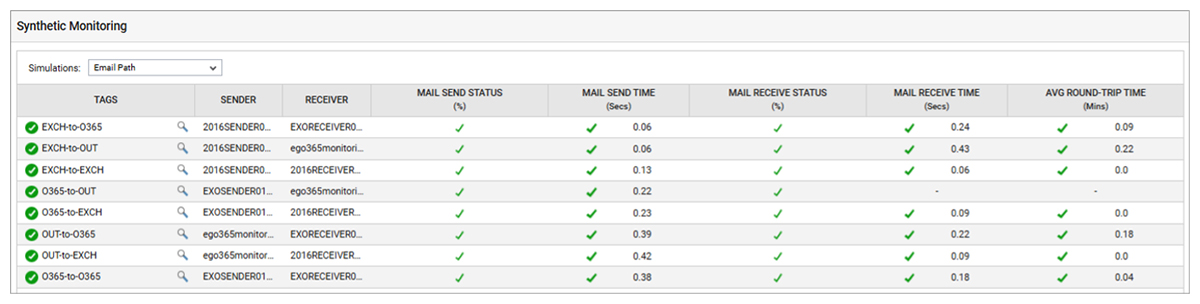
In the below synthetic monitoring dashboard (Figure 1) from eG Enterprise, each simulation tracks the end-to-end performance of email transactions, including mail send/receive status, send and receive times, and average round-trip time.
Mail Flow Simulations – Sender/ Receiver

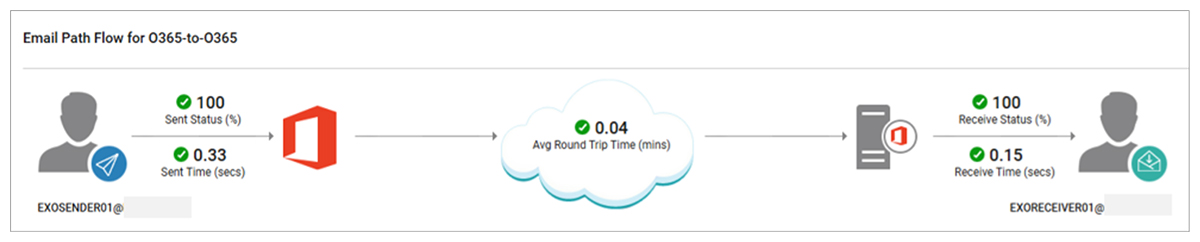
The mail sender detects authentication failures, connection latency, and mailbox accessibility problems, and confirms whether simulated emails are sent successfully. If delays occur, it pinpoints whether they stem from slow service connections or Microsoft processing lags. Figure 3 shows how metrics and events from Mail Sender simulations are presented within the eG Enterprise.

The mail receiver confirms whether the receiver’s mailbox successfully received the simulated email and identifies reasons for failure if not. It also helps pinpoint the cause of slow email reception—whether it’s due to connection delays or slow processing by the Exchange server. Figure 4 shows the eG Enterprise O365 Mail Receiver.
eG Enterprise – Proactive Alerts on Email Delays and Problems
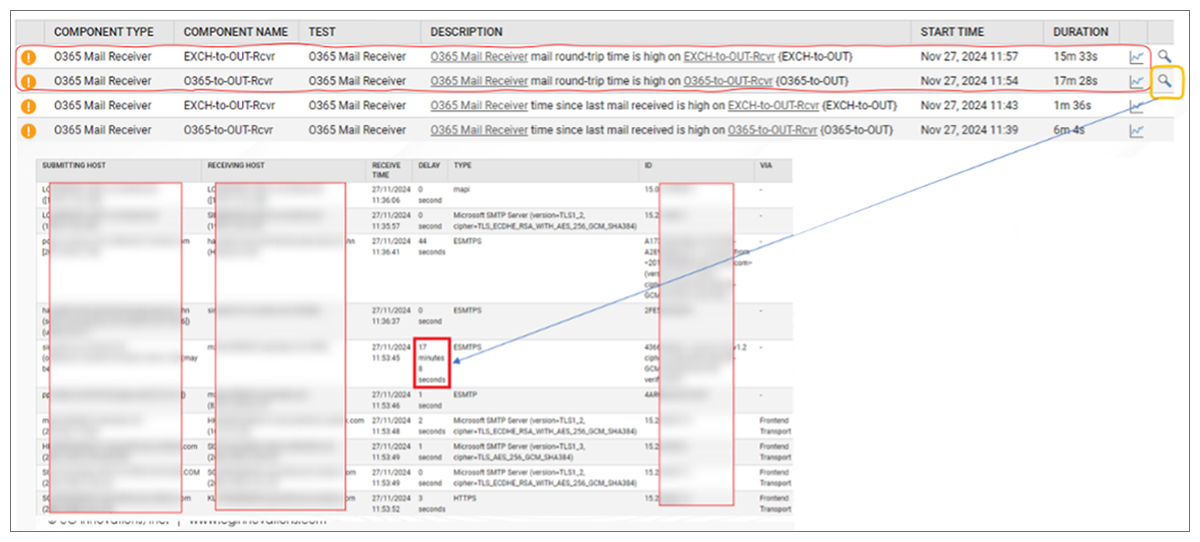
The screenshot below (Figure: 5) highlights a performance issue in Office 365 Mail Receiver components, where alerts indicate high mail round-trip times and delays in receiving emails for specific test paths – On premises Exchange to external tenant and Exchange Online to external tenant. The detailed view below reveals that up to 17 minutes of delay occurred in one instance. Using the detailed diagnostic information, the IT team identified that the cloud hosted secure email gateway was the root cause of the problem.
Best Practices for Monitoring Mail Paths
When using eG Enterprise to monitor email paths for delays or failures, best practices to adopt include:
- Use dedicated sender accounts to avoid interference.
- Choose appropriate TEST frequency and NUMBER OF MESSAGES to balance coverage and resource use.
- Enable secret/certificate-based authentication for heightened security in Office 365.
- Monitor trends over time—sudden jumps or gradual upticks in latency can be early warning signs of problems. Note: eG Enterprise v7.5 includes new analytic capabilities that automatically detect rapid change in metrics and alert IT teams of changes and trends.
Conclusion
eG Enterprise goes beyond just monitoring Office 365—it also supports Exchange on-premises and any SMTP-based mail services. As described, eG provides a powerful, automated solution for continuously simulating and monitoring email performance. Through its Sender/Receiver test framework, it captures critical metrics and diagnostic insights, giving administrators real-time visibility into mail flow health. This proactive approach helps identify and resolve issues before they affect end users, ensuring reliable and uninterrupted email communication.
eG Enterprise is an Observability solution for Modern IT. Monitor digital workspaces,
web applications, SaaS services, cloud and containers from a single pane of glass.


