English


Digital Workspace Monitoring Software Comparison: Top Solution for Enterprise IT
As enterprises adopt hybrid work, IT teams face growing challenges in keeping the digital workspace fast and reliable. Employees access business applications through virtual desktops, SaaS platforms, cloud infrastructure, and physical endpoints, all of which contribute to the overall user experience. Monitoring these environments using disconnected native tools often leaves critical visibility gaps.
Digital Workspace Monitoring closes those gaps. A unified monitoring platform sees every layer of the digital workspace, so IT teams find and fix performance problems before users report them.
What is Digital Workspace Monitoring?
Definition
Digital Workspace Monitoring is the continuous monitoring of all technologies that deliver digital services to employees, including virtual desktops, physical endpoints, applications, networks, cloud infrastructure, identity services, and user devices. It correlates performance data across these components to provide end-to-end visibility into the Digital Employee Experience (DEX).
Unlike traditional infrastructure monitoring, digital workspace monitoring focuses on understanding how technology performance affects end users, allowing IT teams to prioritize issues that have the greatest impact on employees and their ability to work productively.
Why enterprises need digital workspace monitoring
Modern digital workspaces are delivered via platforms such as Citrix, Omnissa Horizon (formerly VMware Horizon), Microsoft Azure Virtual Desktop (AVD), Windows 365, and SaaS applications. Native monitoring tools provide platform-specific insights but rarely offer a complete picture across the entire employee journey.
A unified digital workspace monitoring solution helps enterprises:
- Reduce mean time to resolution (MTTR)
- Improve employee productivity
- Detect issues proactively before users complain
- Gain complete visibility across hybrid environments
- Simplify troubleshooting using correlated analytics
Why Native Citrix, Omnissa and Azure Monitoring Tools Are Not Enough
Native monitoring solutions are designed primarily to monitor their respective platforms. While they provide valuable metrics, they often lack visibility into dependencies outside their own ecosystem.
For example, a slow virtual desktop session may actually be caused by endpoint resource constraints, network latency, identity authentication delays, storage bottlenecks, or backend application issues. Native tools typically cannot correlate these layers automatically.
As enterprises adopt multi-vendor digital workspaces, IT teams require a unified monitoring platform capable of monitoring every component, from endpoint to application, through a single pane of glass.
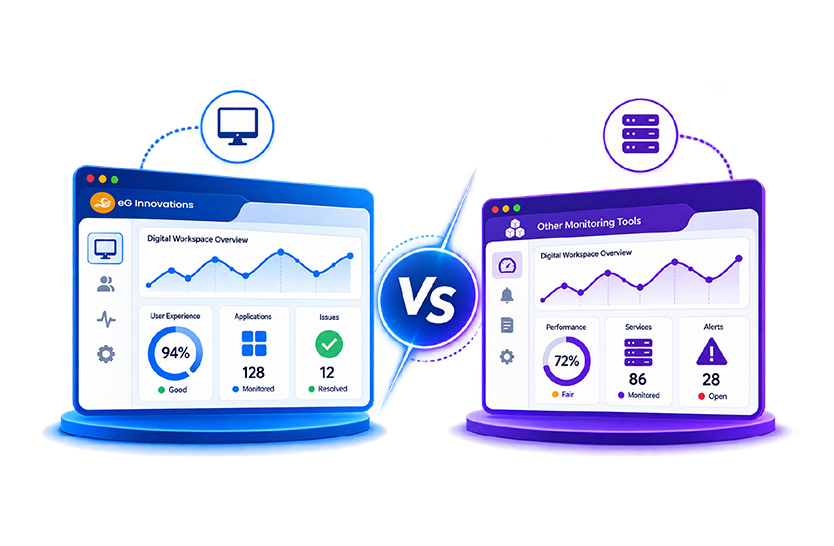
Native tools compared with a unified platform
The gap shows up clearly side by side. This compares two categories of tooling: what a platform’s own admin console reports, and what a unified digital workspace monitoring platform correlates across the whole delivery chain.
Must-Have Features in a Digital Workspace Monitoring Platform
When evaluating Digital Workspace Monitoring software, enterprises should look for capabilities that extend beyond basic infrastructure monitoring.
Digital Employee Experience (DEX) Monitoring
Digital Employee Experience Monitoring measures how employees actually experience IT services by collecting real-time data from endpoints, applications, networks and employee sentiment. It shows IT teams where to act to improve employee productivity.
Application performance
The platform should monitor business-critical applications from the user’s perspective while also tracing backend dependencies that may affect performance.
Login monitoring
Login delays are a persistent drain on employee productivity. Monitoring every stage of the authentication and logon process enables rapid identification of bottlenecks.
Real user monitoring
Real user monitoring captures metrics and signals from actual user sessions, providing visibility into response times, application availability, and user interactions across digital workspaces.
Endpoint monitoring
Comprehensive endpoint monitoring should include CPU, memory, disk utilization, network connectivity, battery health, Wi-Fi quality, and device performance to identify endpoint-related issues quickly.
Synthetic Monitoring
Synthetic monitoring continuously simulates user transactions to validate application availability and performance, even when no users are active. This enables IT teams to detect issues proactively before business operations are affected.
AI-powered root cause analysis
Modern monitoring platforms should automatically correlate metrics across applications, infrastructure, endpoints, and networks to pinpoint the root cause of issues without requiring manual investigation.
Hybrid workforce visibility
Organizations need consistent visibility across on-premises infrastructure, cloud platforms, remote workers, branch offices, and multiple virtualization technologies.
Alerting & automation
Intelligent alerting should prioritize actionable incidents while reducing alert noise. Automated remediation workflows further accelerate issue resolution.
Dashboards and Reporting – Out of the Box
Ready-to-use dashboards and reports enable IT teams to monitor service health, analyze trends, demonstrate SLA compliance, and share meaningful insights with stakeholders without extensive customization.
How to Choose the Right Solution
Selecting the right digital workspace monitoring solution requires evaluating more than feature checklists. Enterprises should prioritize platforms that provide:
- End-to-end visibility across the complete digital workspace.
- Support for Citrix, Omnissa Horizon, Azure Virtual Desktop, Amazon WorkSpaces, Windows 365, and cloud services.
- Built-in Digital Employee Experience (DEX) Monitoring capabilities.
- AI-driven root cause diagnosis.
- Synthetic and real user monitoring.
- Extensive endpoint visibility.
- Scalable architecture suitable for enterprise deployments.
- Ready-to-use dashboards and reports that accelerate time-to-value.
A unified platform reduces operational complexity while improving IT efficiency and employee satisfaction.
Why Enterprises Choose eG Enterprise
Organizations worldwide choose eG Enterprise because it combines infrastructure monitoring, application performance monitoring, endpoint monitoring, and Digital Employee Experience Monitoring into a single intelligent platform.
Endpoint Visibility Beyond Native Tools
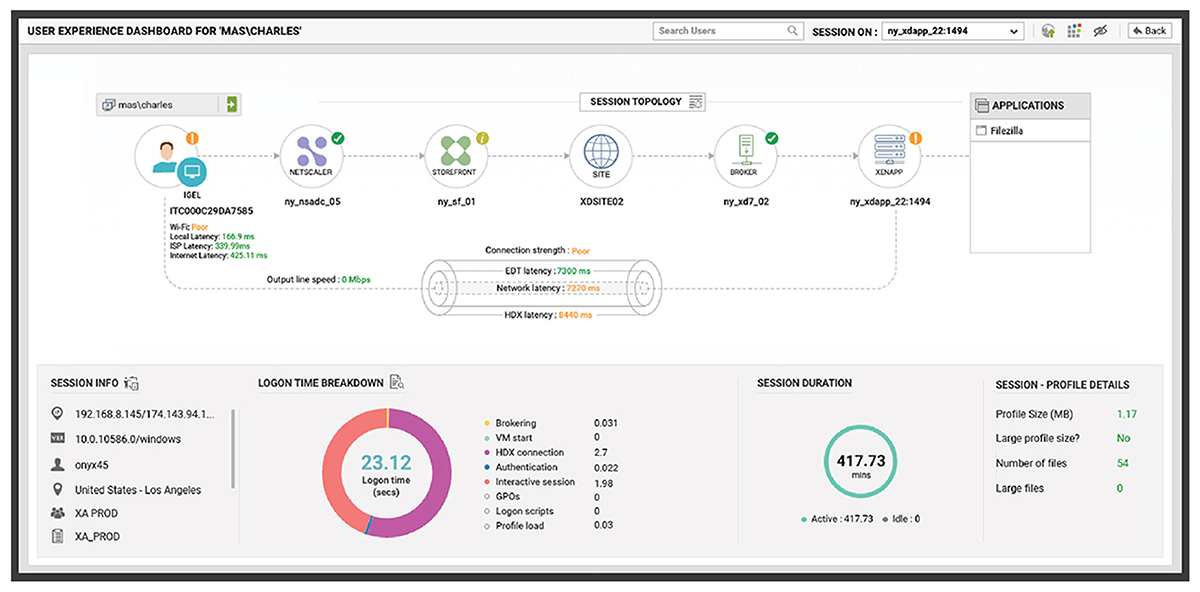
eG Enterprise provides deep visibility into Windows, macOS, IGEL, ThinOS, and ChromeOS endpoints, monitoring device health, resource utilization, network performance, browser experience, and user activity. This allows IT teams to quickly determine whether issues originate from the endpoint, network, virtualization platform, or application.
Synthetic Monitoring for Proactive Issue Detection
eG Enterprise can continuously perform synthetic tests to monitor application availability, login workflows, and critical business transactions. By detecting performance degradation before employees experience disruptions, IT teams can proactively resolve issues and maintain business continuity.
To learn more about the synthetic monitoring capabilities of eG Enterprise, which include full session simulation for any app or desktop, see: Universal Synthetic Monitoring with eG Enterprise.
Ready-to-Use Dashboards for Azure Virtual Desktop
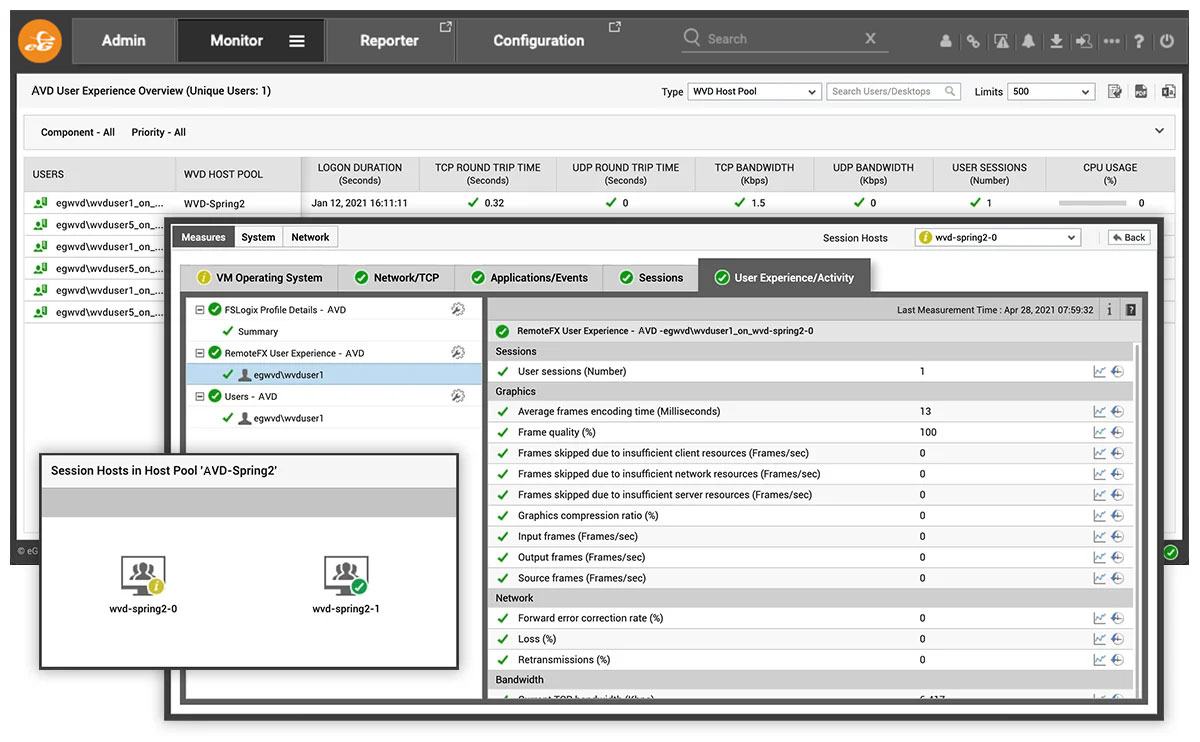
eG Enterprise includes out-of-the-box dashboards specifically designed for Azure Virtual Desktop environments. These dashboards provide comprehensive visibility into session hosts, user sessions, application performance, Azure resources, login times, and infrastructure health, enabling administrators to troubleshoot issues faster without building custom dashboards.
Conclusion
As enterprise digital workspaces become increasingly distributed, relying solely on native monitoring tools creates operational blind spots. A comprehensive Digital Workspace Monitoring platform brings together infrastructure, applications, endpoints, networks, and employee experience into a unified monitoring solution.
With advanced Digital Employee Experience Monitoring, AI-powered root cause analysis, synthetic monitoring, and ready-to-use dashboards, eG Enterprise enables IT teams to deliver consistently high-quality digital experiences while reducing troubleshooting time and improving operational efficiency. To see this against your own estate, book a demo of eG Enterprise or start a free trial.
eG Enterprise is an Observability solution for Modern IT. Monitor digital workspaces,
web applications, SaaS services, cloud and containers from a single pane of glass.
Frequently Asked Questions
Digital workspace monitoring is the continuous observation of applications, virtual desktops, endpoints, cloud services, networks, and user interactions to ensure employees receive a consistent digital experience. It correlates data across the entire technology stack, helping IT teams proactively identify performance issues, accelerate root cause analysis, and minimize business disruption.
Digital Workspace Monitoring provides end-to-end visibility into the complete IT environment supporting employee work, including infrastructure, applications, endpoints, and networks. Digital Employee Experience Monitoring focuses specifically on measuring and improving how employees perceive technology performance through metrics such as login times, application responsiveness, endpoint health, and overall user experience.
The best digital workspace monitoring software should provide unified visibility across Citrix, Omnissa, Azure Virtual Desktop, endpoints, applications, cloud infrastructure, and networks. Solutions like eG Enterprise combine Digital Employee Experience Monitoring, AI-powered root cause analysis, synthetic monitoring, and ready-to-use dashboards to simplify enterprise-wide monitoring and troubleshooting.
Enterprises should look for end-to-end visibility, Digital Employee Experience Monitoring, synthetic and real user monitoring, endpoint monitoring, AI-powered root cause analysis, intelligent alerting, automation, hybrid cloud support, and ready-to-use dashboards. A unified platform should eliminate monitoring silos while accelerating issue detection, diagnosis, and resolution across digital workspaces.
Yes. eG Enterprise provides comprehensive monitoring for Citrix, Omnissa Horizon, Azure Virtual Desktop, Microsoft technologies, physical endpoints, cloud infrastructure, SaaS applications, and supporting networks. Its unified monitoring platform correlates data across these technologies, enabling faster troubleshooting and improved digital employee experiences in hybrid enterprise environments.