English
 Deutsch
 Espanol
 Français
 Portuguese
 中文
 한국어
 日本語



In a traditional Azure-hosted Azure Virtual Desktop deployment, both the AVD service and the session-host compute are based in Azure. This cloud-hosted architecture is why AVD has historically been described primarily as a cloud desktop service.
Microsoft operates the service-side AVD components. These include the web service, connection broker, gateway and resource directory that enable users to discover and connect to their desktops and applications. The organization remains responsible for areas such as its session hosts, operating system images and applications, networking, resiliency, backup and recovery, and user identities and access.
The session hosts are Windows VMs grouped into host pools. Organizations can provide full desktops or published applications from these hosts. A typical Azure-based architecture can also incorporate services such as Microsoft Entra ID and Active Directory Domain Services for identity, Azure Files or Azure NetApp Files for storage, and Log Analytics for monitoring.
The big attraction is that an organization doesn’t have to build and operate all the traditional VDI service infrastructure itself. Microsoft supplies the core AVD service components as a service, while the customer concentrates on its desktop environment and workloads
Why Organisations Are Considering On-Premises Azure Virtual Desktop
For many though the cloud-hosted nature of a traditional AVD deployment presents barriers to adoption. Many have good reasons to hesitate at the prospect of having the desktops and the data within them hosted on Microsoft owned servers in Azure. There can be good reasons to keep virtual desktops, applications and associated data on-premises, including:
- Data sovereignty, security and compliance: Regulatory requirements, data residency rules or internal security policies may require sensitive workloads and data to remain within organization-controlled infrastructure.
- Existing infrastructure and investment: Organizations may already have substantial investments in datacenter capacity, virtualization, storage, networking, GPUs and other specialized hardware that they want to continue using.
- Performance and proximity to applications and data: Keeping virtual desktops close to on-premises applications, databases, file services and other data sources can reduce latency and avoid repeatedly traversing the network between cloud-hosted desktops and on-premises data. Locating session hosts closer to users can also benefit sites with limited or expensive connectivity to the public cloud.
- Control, resilience and economics: Some organizations are hesitant to make critical desktop workloads dependent on Microsoft’s future cloud pricing and Azure resource availability. Particular VM sizes or specialist resources, such as GPU-enabled instances, may not always have the desired capacity available in every Azure region. Organizations with predictable requirements may therefore value owning or controlling infrastructure where they can plan and reserve capacity themselves.
- Business continuity: Where critical applications need to continue operating through network outages.
AVD On-premises Options
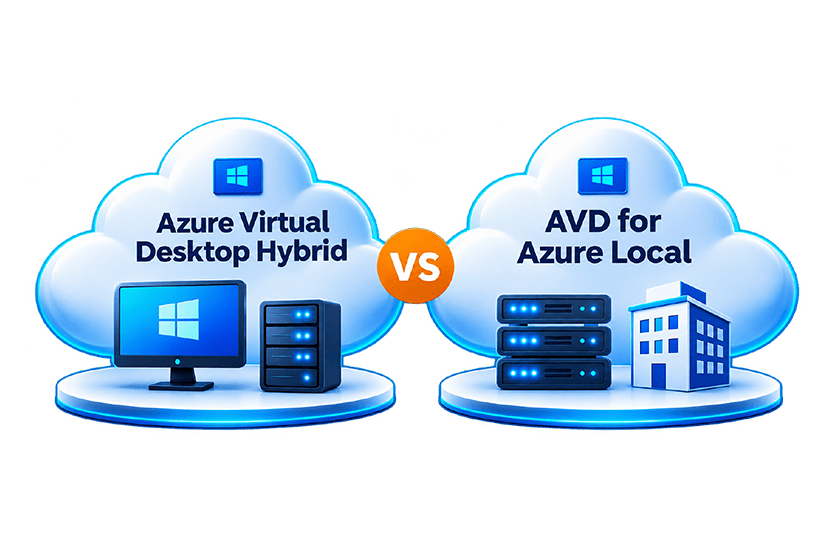
Microsoft has recognized that many organizations have very valid reasons for desiring an on-premises option for running AVD and has introduced two options to fulfil demand, namely:
- AVD on Azure Local
- Azure Virtual Desktop Hybrid
Both options leverage Azure Arc. Azure Arc is a bridge that extends Azure to other environments and other clouds. Azure Local is an infrastructure solution that includes the capabilities of Azure Arc built-in and set up automatically. With Azure Virtual Desktop Hybrid, Azure Arc must be leveraged more directly.
What is Azure Local?
Azure Local was previously known as Azure Stack HCI. Azure Local is hyperconverged infrastructure software that runs directly on bare metal hardware validated by OEM partners. With it, you can run containers, virtual machines (both Linux and Windows VMs), and some Azure services at distributed locations with central management from the cloud, enabled by Azure Arc.
Azure Local can only be run on hardware validated by Microsoft OEM partners, this means that it often requires a dedicated hardware purchase to deploy. Many OEMs will provide their compatible hardware with Azure Local pre-installed. A catalog of validated solutions is provided by Microsoft, see: Azure Local Solutions | Catalog.
What is Azure Virtual Desktop on Azure Local?
Azure Virtual Desktop on Azure Local allows organizations to run AVD session-host VMs on Azure Local infrastructure rather than hosting the compute in the Azure public cloud. Microsoft provides the Azure Local software stack, including Hyper-V virtualization and Storage Spaces Direct, while the physical infrastructure comes from the Azure Local hardware ecosystem. This provides an integrated Microsoft infrastructure platform for on-premises AVD, while AVD service components such as host pools, workspaces and application groups continue to reside in Azure.
What is Azure Virtual Desktop Hybrid?
Azure Virtual Desktop Hybrid (AVD Hybrid) is a relatively new proposition, introduced via a public preview in May 2026.
AVD Hybrid extends Azure Virtual Desktop to an organization’s existing on-premises infrastructure. The AVD service remains hosted and managed in Azure, but the Windows session hosts that deliver users’ desktops and applications run on-premises.
With AVD Hybrid each on-premises session host is connected to Azure using Azure Arc. The Azure Arc Connected Machine agent registers the machine with Azure, and the Azure Virtual Desktop Arc extension installs the AVD components and registers that machine with an AVD host pool. Users then connect through Windows App in the same way as they would to other AVD desktops. Microsoft manages the Azure Virtual Desktop service, while the customer remains responsible for the on-premises machines, networking and hosting infrastructure.
The big attraction of AVD Hybrid is the reuse of existing infrastructure. Organizations can use their current datacenter resources and existing VM provisioning processes rather than having to move the session-host compute into Azure or deploy Azure Local.
Core Differences Overview – Azure Virtual Desktop Hybrid vs. AVD on Azure Local
| Feature | Azure Virtual Desktop on Azure Local | Azure Virtual Desktop Hybrid |
| Underlying Infrastructure | Microsoft Azure Local (version 23H2 or later). | Any preferred on-premises hypervisor (e.g. Hyper-V, VMware vSphere, Nutanix AHV) or physical Windows Server devices. |
| Hardware Requirements | Requires validated, hyperconverged Azure Local hardware. | Reuses existing on-premises servers and storage. |
| Hypervisor | Microsoft Hyper-V, as part of the Azure Local software stack. | Hypervisor-agnostic. Can use the organization’s preferred on-premises hypervisor, provided it supports the required Windows session-host VMs; Microsoft states that customers manage the underlying hosting infrastructure. |
| OS & Multi-Session Support | Supports Windows 11/10 Enterprise multi-session, plus Windows Server (2019–2025). | Does not support Windows 11 or Windows 10 Enterprise multi-session; supports Windows Server (2016–2025) and Windows client VMs as dedicated/headless session hosts. |
| Management & Provisioning | Integrated Azure Local and Azure Arc management with full VM provisioning workflows. | Uses Azure Arc-Enabled Servers to project local VMs/hosts into Azure; does not natively provision or power-manage local VMs. |
| AVD VM Lifecycle, Power Management & Autoscale | Supported (including Start VM on Connect and native scaling). | Not available (AVD Hybrid doesn’t provision or manage VM state; Power Management, Autoscale, Start VM on Connect and Session Host Configuration aren’t supported). |
A significant difference between the two approaches is support for Windows Enterprise multi-session. Microsoft does not support Windows 10 or Windows Enterprise multi-session with AVD Hybrid 11 (see supported OSs in Azure Virtual Desktop Hybrid Overview – Azure Virtual Desktop | Microsoft Learn). AVD on Azure Local supports both. For organizations that require Windows Enterprise multi-session for pooled desktops, AVD on Azure Local is therefore the Microsoft-supported on-premises option of these two architectures.
AVD Hybrid vs. AVD on Azure Local: Which Should You Choose?
The choice largely comes down to whether you want to reuse existing infrastructure or adopt a Microsoft-defined infrastructure platform.
Azure Virtual Desktop Hybrid is likely to be the better fit when you already have significant investment in on-premises servers, storage and virtualization and want to continue using it. Azure Virtual Desktop Hybrid is designed to run AVD session hosts on existing on-premises infrastructure and supports an organization’s preferred hypervisor where it supports the required Windows VMs. The session hosts are connected to Azure through Azure Arc, while the organization continues to manage the underlying machines, networking and hosting infrastructure.
Azure Virtual Desktop on Azure Local is better suited to organizations looking for a more integrated Microsoft infrastructure platform for their on-premises AVD deployment. Session hosts run as VMs on Azure Local, which incorporates technologies including Hyper-V, Azure Arc and Storage Spaces Direct, while AVD service components such as host pools, workspaces and application groups remain in Azure.
One important consideration is Windows multi-session support. Azure Virtual Desktop on Azure Local supports Windows 10 and Windows 11 Enterprise multi-session, whereas these multi-session client operating systems aren’t included in Microsoft’s current supported-OS list for Azure Virtual Desktop Hybrid.
In simple terms: choose AVD Hybrid when maximizing reuse of existing on-premises infrastructure is the priority; consider AVD on Azure Local when you want the benefits of running desktops locally but prefer an integrated Microsoft infrastructure stack and require capabilities such as Windows 10/11 Enterprise multi-session.
Monitoring AVD Wherever You Choose to Deploy It
Whether AVD session hosts run in Azure, on Azure Local or on other on-premises infrastructure, effective troubleshooting requires visibility beyond the AVD service itself. eG Enterprise combines purpose-built Azure Virtual Desktop monitoring with broad monitoring coverage across virtualization, servers, storage, networking, physical hardware and datacenter technologies. This allows IT teams to correlate AVD availability, session performance, logon experience and end-user experience with the health and performance of the infrastructure supporting the desktops. eG Enterprise provides purpose-built end-to-end monitoring and root-cause analysis for Azure Virtual Desktop environments, giving IT teams visibility across the different tiers that contribute to AVD availability, performance and user experience. This allows organizations to maintain a consistent approach to AVD monitoring as they adopt cloud, Azure Local or hybrid deployment models.
For AVD on Azure Local, eG Enterprise extends this visibility into the local infrastructure supporting the desktops. It can monitor the Azure Local service, clusters and VMs alongside the physical Hyper-V nodes and AVD session hosts, helping administrators correlate infrastructure performance with session and user experience.
Rather than troubleshooting the AVD service, virtualization or Azure infrastructure, session hosts and user experience as separate silos, administrators can use eG Enterprise to identify the tier associated with a slowdown and accelerate root-cause analysis.
Next Steps
If you are looking to monitor or troubleshoot an AVD deployment, then do consider the out-of-the-box ready-made monitoring solution provided by eG Enterprise. To see it against your own Amazon deployment, eG Innovations offers a free trial and a live demo with an engineer.
eG Enterprise is an Observability solution for Modern IT. Monitor digital workspaces,
web applications, SaaS services, cloud and containers from a single pane of glass.
Frequently Asked Questions
Yes. Azure Virtual Desktop can now deliver desktops and applications from session hosts running on-premises. Microsoft offers two approaches: Azure Virtual Desktop for Azure Local and Azure Virtual Desktop Hybrid. In both cases, the Azure Virtual Desktop service remains in Azure while session-host compute can reside within the organization's own infrastructure.
AVD for Azure Local runs the session hosts on Microsoft's Azure Local infrastructure platform. AVD Hybrid instead extends AVD to existing on-premises infrastructure by connecting Windows session hosts to Azure using Azure Arc.
AVD for Azure Local runs session hosts on Microsoft Azure Local infrastructure. AVD Hybrid allows organizations to connect supported Windows session hosts running on existing on-premises infrastructure to Azure Virtual Desktop using Azure Arc. The main difference is therefore the underlying infrastructure: Azure Local provides a Microsoft-defined infrastructure stack, while AVD Hybrid is designed around reuse of existing infrastructure.
Running Azure Virtual Desktop session hosts on-premises can help organizations keep desktops and data closer to existing applications and data, retain greater control over infrastructure capacity, reuse existing datacenter investments, and address data residency or compliance requirements. It can also reduce latency where users, applications and data are primarily located on-premises.
Neither option is inherently better. AVD Hybrid is likely to suit organizations that want to reuse existing servers, storage and virtualization infrastructure. AVD for Azure Local is better suited to organizations that want an integrated Microsoft infrastructure platform and capabilities such as Windows 10/11 Enterprise multi-session. The best choice depends on existing infrastructure, operating system requirements and how much infrastructure integration and lifecycle management you require.
No. Azure Virtual Desktop Hybrid does not require Azure Local. It is specifically designed to extend Azure Virtual Desktop to existing on-premises infrastructure, with session hosts connected to Azure through Azure Arc.
Yes. Each AVD Hybrid session host must be Azure Arc-enabled. Azure Arc connects the on-premises machine to Azure, while the Azure Virtual Desktop Arc extension installs the necessary AVD components and registers the machine with an AVD host pool.
Yes, provided the hypervisor supports the required Windows virtual machines. This is a key distinction from AVD for Azure Local, where Microsoft Hyper-V forms part of the Azure Local infrastructure stack.
Not necessarily. One of the main attractions of AVD Hybrid is the ability to reuse existing datacenter infrastructure. Organizations remain responsible for provisioning and managing the machines, networking and underlying hosting environment.
Azure Local must run on hardware validated for the platform. Organizations can purchase validated Azure Local systems from Microsoft hardware partners or use suitable existing hardware where it meets Microsoft's requirements.
No. Microsoft does not currently support Windows 10 Enterprise multi-session or Windows 11 Enterprise multi-session with Azure Virtual Desktop Hybrid. AVD Hybrid supports single-session Windows 10 and Windows 11 Enterprise, alongside supported Windows Server operating systems. Organizations requiring Windows Enterprise multi-session for an on-premises AVD deployment should therefore consider AVD for Azure Local.
No. Microsoft states that AVD Hybrid does not manage virtual-machine state, so Power Management, Autoscale, Start VM on Connect and Session Host Configuration are not supported. Organizations remain responsible for deploying and managing their on-premises session hosts using their own infrastructure management tools or processes.