How Does eG Enterprise Monitor Omnissa Horizon Desktops?
eG Enterprise monitors Omnissa Horizon desktops in an agentless manner.
Pre-Requisites for monitoring Omnissa Horizon Desktops
-
For internal monitoring of the individual Omnissa Horizon desktops on the cloud, a light-weight eG VM Agent has to be installed on each of the Omnissa Horizon desktops.
Typically, when monitoring the Omnissa Horizon desktops on hypervisors such as VMware vSphere, Citrix Hypervisor, etc., the eG remote agent installed on a remote Windows/Linux host in the environment communicates with the hypervisor to automatically discover the IP address and host name of every virtual desktop on that hypervisor. With this information, the remote agent then polls the eG VM Agent on each Omnissa Horizon desktop for inside view metrics. The eG VM Agent is bundled with the commands and executables necessary for capturing inside view metrics. Every time the remote agent requests the eG VM agent for metrics, the eG VM Agent automatically runs the built-in commands/exes for metrics collection. Once the metrics are collected, the remote agent then pulls these metrics from the eG VM Agent on each desktop and reports them to the eG manager.
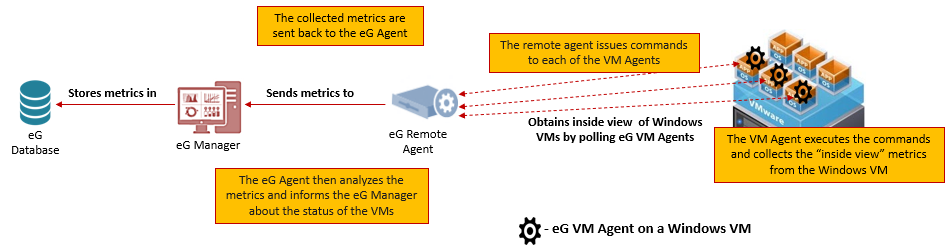
Figure 1 : The eG Remote Agent - eG VM Agent communication when monitoring desktops on a hypervisor
In the case of a Omnissa Horizon desktop too, an eG remote agent on a remote Windows/Linux host is used for monitoring. However, unlike the hypervisor scenario, here, the remote agent does not initiate any communication with the eG VM Agent on the individual Omnissa Horizon desktops on the cloud. This is because, this remote agent has no knowledge of the hypervisor on which the omnissa desktops are operating. Therefore, it can neither discover the IP address/host name of the cloud desktops, nor can it communicate with them to collect the 'inside view' metrics.
This is why, the eG VM Agent on a Omnissa Horizon desktop has been specifically engineered to initiate all communication. To establish this communication, the eG VM agent should first know which remote agent it needs to connect to and which Omnissa Horizon Desktop Group component it has to monitor. In order to feed this information to the eG VM agent, you can do one of the following:
-
Configure the eG VM Agent with the IP address of the eG remote agent and the nick name of the Omnissa Horizon Desktop Group component it needs to monitor. This is the recommended approach. To know how to achieve this, refer to Configuring the eG VM Agent to Communicate with the eG Remote Agent.
-
Alternatively, you can configure the eG VM Agent with the IP address/port number of the eG manager with which it should communicate. To know how to achieve this, refer to Configuring the eG VM Agent to Communicate with the eG Manager.
If you choose this approach, then the eG VM agent will download the details of the remote agent and Omnissa Horizon Desktop Group component from the eG manager itself. Take this route, only under the following circumstances:
-
If you be will changing the remote agent for a VM agent dynamically - i.e., using the eG manager itself, and/or;
-
If you want to auto-upgrade the eG VM Agent from the eG manager.
-
Once the eG VM agent has all the information required for communicating with the eG remote agent, it does the following:
-
Collects 'inside view' metrics from the Omnissa Horizon desktop it is deployed on;
-
Caches the metrics locally;
-
Connects to the eG remote agent that has been assigned to the 'Omnissa Horizon Desktop Group' component it monitors
-
Pushes the cached metrics to that remote agent via TCP
Upon receipt of the 'inside view' metrics, the remote agent sends the metrics to the eG manager.
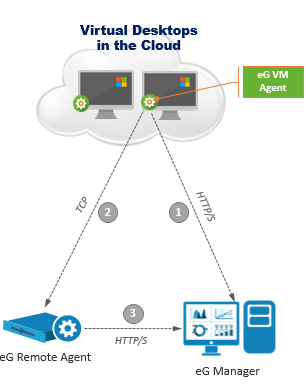
Figure 2 : The eG VM Agent - eG Remote Agent communication when monitoring desktops on the cloud
-
-
When monitoring Omnissa Horizon Desktops, the remote agent needs to be in the same subnet as that of the eG VM Agent or accessible on the local network of the eG VM Agent.
-
Ensure that the eG VM Agent communicates with the IP address of the remote agent directly and that the communication is not via a NAT or port forward.