English


What is Kerberos?
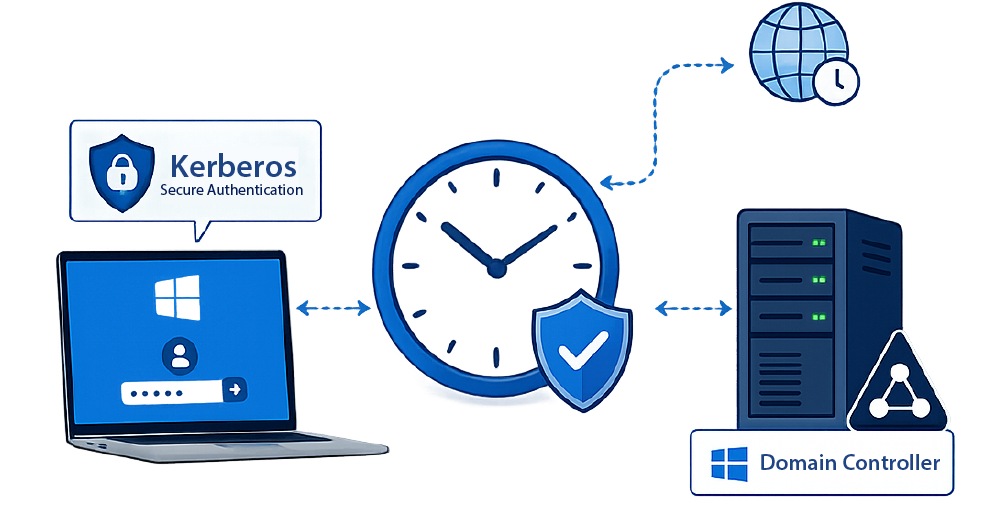
Kerberos is a secure network authentication protocol that allows users and systems to prove their identity over a network without sending passwords in plain text. It is widely used in enterprise environments (for example, in Windows domains) to enable single sign-on (SSO).
At its core, Kerberos uses a trusted authority called the Key Distribution Center (KDC) to issue encrypted “tickets” that verify identity.
How Kerberos works
When a user logs in, their device sends a request to the KDC’s Authentication Server. Instead of transmitting the password directly, the system uses it to encrypt a request. If the credentials are valid, the KDC returns a Ticket Granting Ticket (TGT). This ticket proves the user’s identity but cannot be read or altered by the user.
When the user wants to access a service (such as a file server or email system), their device sends the TGT to the Ticket Granting Server (another part of the KDC). The server then issues a service ticket for that specific application.
The user presents this service ticket to the target server. Because the ticket is encrypted and trusted, the server can validate it and grant access—without requiring the user to enter their password again.
The Importance of Time Synchronization in Kerberos Authentication
Time synchronization is critical for Kerberos authentication because the protocol relies heavily on timestamps to verify identity and prevent attacks.
Kerberos tickets—both the Ticket Granting Ticket (TGT) and service tickets—contain timestamps that indicate when they were issued and when they expire. When a client presents a ticket to a server, the server checks the timestamp to ensure the ticket is still valid and not being reused maliciously. This mechanism protects against replay attacks, where an attacker might try to capture and reuse a valid authentication message.
For this system to work, all machines involved—the client, the Key Distribution Center (KDC), and the target server—must have closely synchronized clocks. If there is too much time difference (known as clock skew), the server may reject a valid ticket because it appears to be expired or not yet valid.
In most Kerberos environments, the acceptable clock skew is typically 5 minutes (300 seconds). If systems drift beyond this, authentication failures can occur even when credentials are correct.
Because of this, organizations rely on time synchronization protocols such as Network Time Protocol to keep all systems aligned.
Time Synchronization in Windows Domains
The Windows Time service (W32Time) is a core Windows service responsible for synchronizing the system clock on computers within a Windows environment, especially in Active Directory domains.
The W32Time service ensures that all machines (clients, servers, and domain controllers) maintain consistent time, typically within a few minutes of each other.
In a Windows domain hierarchy, time synchronization follows a structured model. Domain-joined computers automatically sync their clocks with a domain controller. Domain controllers, in turn, synchronize with the Primary Domain Controller (PDC) Emulator, which acts as the authoritative time source for the domain. The PDC Emulator is usually configured to sync with an external, reliable time source such as an NTP server.
The service uses the Network Time Protocol or a simplified variant to perform synchronization.
If the Windows Time service is not functioning correctly, systems can experience authentication failures, particularly with Kerberos, as well as issues with logging, replication, and scheduled tasks.
To learn more about W32Time, see: Windows Time Service (W32Time) | Microsoft Learn.
Symptoms of Time Synchronization Problems Within Windows Domains
Time synchronization issues within a Windows domain can lead to a range of operational and security problems.
- Authentication failures are a common symptom. When system clocks differ significantly, users may be unable to log in or access network resources because authentication mechanisms rely on consistent timestamps.
- Event log discrepancies can also occur, where timestamps appear incorrect or out of sequence. This makes troubleshooting difficult and complicates security investigations, as correlating events across systems becomes unreliable.
- Kerberos authentication failures are particularly critical. Since Kerberos depends on tightly synchronized time, clock skew beyond acceptable limits can cause ticket validation to fail, blocking access to services.
- Active Directory replication issues may arise when domain controllers are out of sync. Time differences can disrupt replication processes, leading to inconsistent or outdated directory data across the environment.
- Certificate validation errors can also occur. SSL/TLS certificates rely on accurate system time, and discrepancies may result in failed handshakes or warnings about invalid or expired certificates.
Case Study – Time Synchronization Issues Prevent Users Logging In to Citrix VDI
Pankaj Katoch, a Technical Architect at HCLTech who specializes in Citrix solutions recently published a deep-dive into how he troubleshooted an issue prevent users from logging into Citrix for several hours. You can read his full post, here: (14) Post | Feed | LinkedIn.
It’s an insightful read as it details step-by-step how he investigated the issue and eliminated other possible root-causes before identifying Kerberos time drift as the culprit. Logs from the Delivery Controller revealed that two domain controllers had a time difference of 7 minutes (remember that Kerberos tickets require a default time sync within 5 minutes).
Pankaj also details how he fixed the issue and tips for authentication troubleshooting. Overall the key takeaway is that time synchronization really matters in Windows domains including where Windows is leveraged on VDI/DaaS platforms such as Citrix.

Automatic Monitoring of Time Synchronization with eG Enterprise
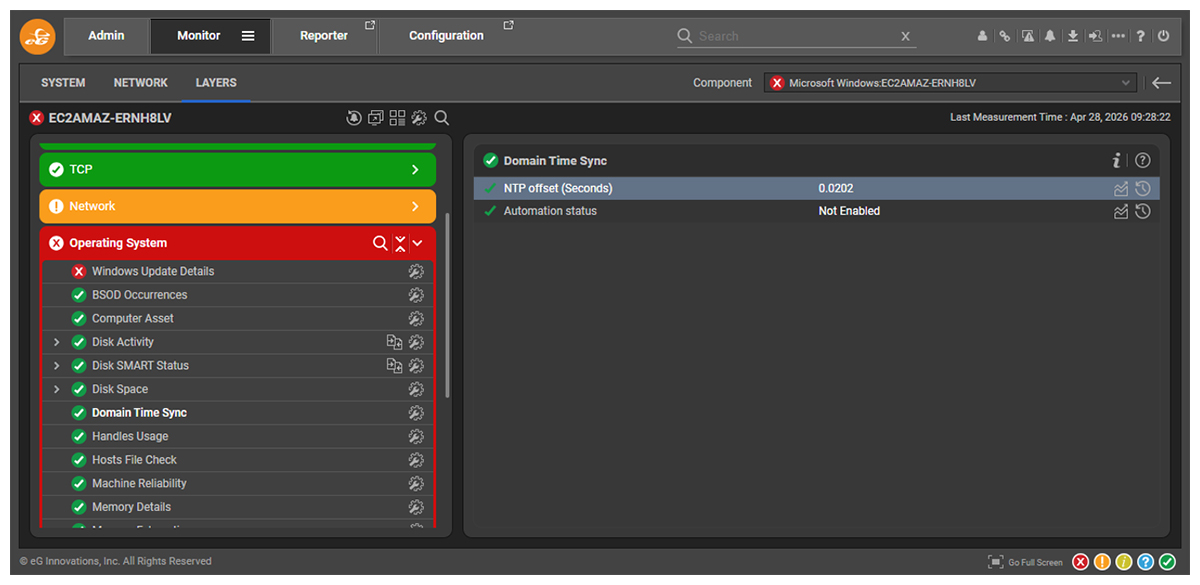
eG Enterprise includes automatic monitoring and alerting for time synchronization in Windows domains. Out-of-the-box eG Enterprise will continuously check the NTP offset of Windows systems and raise alerts if significant drift occurs under the “Domain Time Sync” test.
As shown in Figure 1, eG Enterprise continuously monitors the “NTP Offset”.
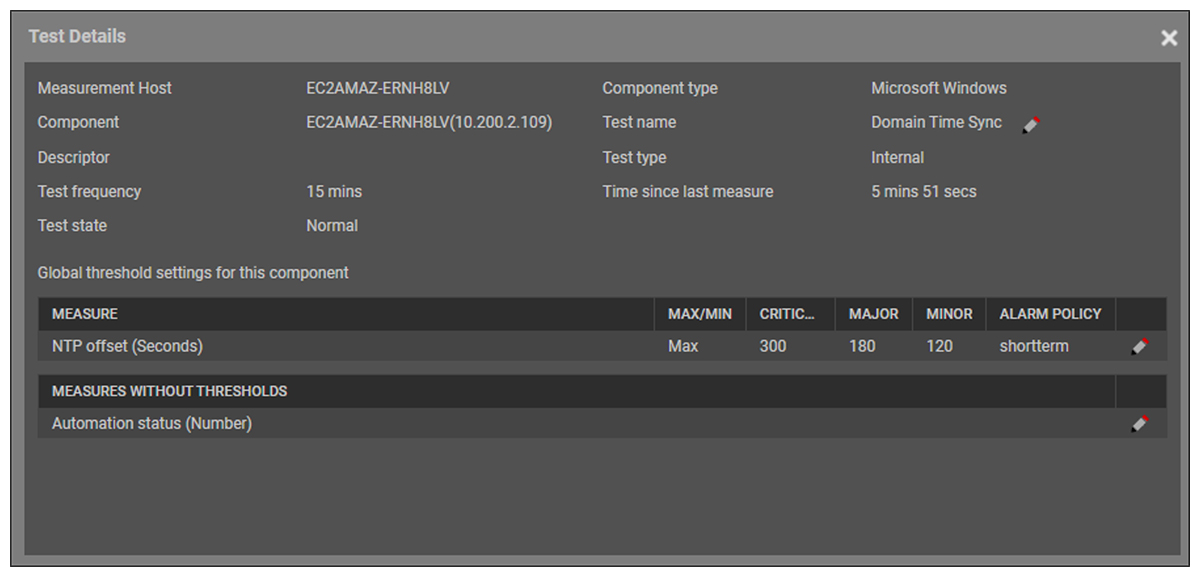
Out-of-the-box eG Enterprise is configured to proactively raise alarms if the NTP Offset exceeds certain thresholds. The defaults for various alert severities are shown in Figure 2. A minor alert is raised by default when the drift reaches 2 minutes (120 seconds) which is a drift significantly indicative of an issue but low enough to pre-empt consequences that will impact services and end users.
Summary
Time synchronization drift in Windows domains can cause widespread and difficult-to-diagnose issues including Kerberos authentication failures, Active Directory replication problems, certificate errors, and user login disruptions in platforms such as Citrix VDI.
Proactively monitoring NTP offset and clock drift with automated alerting helps organizations detect problems early, avoid outages, reduce troubleshooting time, and maintain reliable authentication and service availability.
eG Enterprise is an Observability solution for Modern IT. Monitor digital workspaces,
web applications, SaaS services, cloud and containers from a single pane of glass.