English
 Deutsch
 Espanol
 Français
 Portuguese
 中文
中文 한국어
한국어 日本語
日本語


Entra ID is the new name for Azure Active Directory (Azure AD), Microsoft’s cloud-based identity and access management service. This rebranding, announced in July 2023, is part of Microsoft’s broader Entra product family, which focuses on securing access to digital resources and managing identities in a comprehensive way. The change from Azure AD to Entra ID did not alter the core functionality but signified its integration into a larger suite of identity and security products under the Microsoft Entra umbrella.
These types of name changes are always problematic for documentation teams at Microsoft partners. We must decide when (and indeed if) to change the nomenclature – users often continue to use the old names for a while (in the case of NetScaler, many users never stopped using the original name) and of course it takes a while for product GUIs to reflect the changes.

In the case of renaming Azure AD to Entra ID it makes a lot of sense to us in the documentation team. While working through the backlog of Azure AD documentation and content that needs to be updated to reflect the name change, I’ve found some of the updates and Microsoft strategy around the rebrand genuinely interesting. As a writer, I’ve found that the tone and associations of the language changes around the rebrand have added insights. Here are some thoughts about the changes.
What Is Microsoft Entra ID and How Does It Work?
Let’s cover the basics. Entra ID (formerly Azure AD) is a cloud-based service that provides organizations with features including:
- Identity and Access Management (IAM): It helps manage user identities and controls access to apps, services, and resources securely.
- Single Sign-On (SSO): Users can sign in once and gain access to various applications without needing to log in repeatedly.
- Conditional Access: IT admins can define policies that grant or restrict access based on conditions such as user location or device status.
- Multi-factor Authentication (MFA): Adds an additional layer of security by requiring two or more verification methods for access.
- B2B and B2C services: Enables organizations to manage external partners (B2B) and consumer-facing apps (B2C).
- Seamless integration with Microsoft 365 and other Azure services: It powers authentication and access control for Microsoft services such as Outlook, Teams, SharePoint and Azure Virtual Desktop (AVD).
From a documentation perspective, Azure AD content has historically been very similar to that of on-prem Active Directory – mostly described as a directory of users (somewhat like a legacy paper telephone number book). The language and workflows documented usually describe human users and how they log onto services such as virtual desktops.

How Microsoft Entra ID Has Evolved Since Azure AD
Since Azure AD was rebranded as Entra ID, the evolution has been more about expanding Microsoft’s vision for a unified identity and access solution rather than changing the core technology. Here are a few ways in which Entra ID has evolved:
#1 – Integration with Microsoft Entra Suite
Entra ID is now part of the larger Microsoft Entra family, which includes additional new identity-related products such as:

- Entra Permissions Management: Helps organizations manage permissions across cloud environments – including multi-cloud environments and non-Microsoft clouds, e.g. AWS / Google’s GCP. See: Microsoft Entra Permissions Management | Microsoft Security. The terminology around “permissions” and “identities” moves away from just users to include workloads. Identities are things that might be users or workloads, things that perform actions and request and consume resources across cloud infrastructures.
- Entra Verified ID: Offers decentralized identity capabilities, enabling users to control their digital identities securely. See: Microsoft Entra Verified ID | Microsoft Security. Entra Verified ID supports passwordless authentication technologies such as biometric verification (facial / selfie recognition – Face Check) and FIDO2 security keys.
- Entra Workload ID: Provides identity and access management for cloud workloads, such as apps and virtual machines. See: Microsoft Entra Workload ID | Microsoft Security for more details.
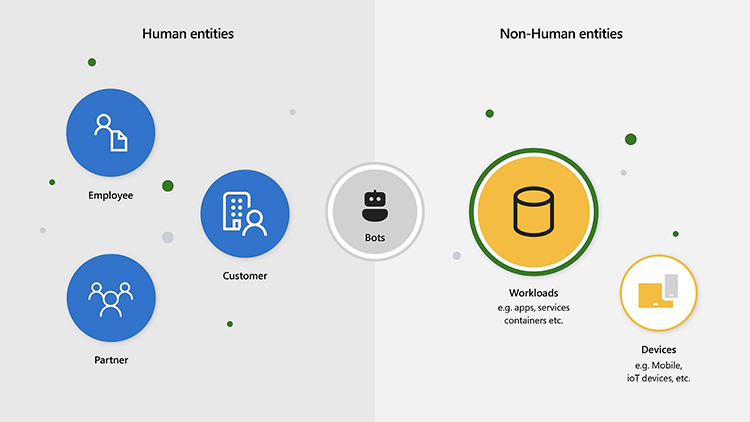
I found that the language and workflows around Entra Workload ID demonstrate why a move away from the concept of an “Active Directory” of “users” towards language around “ID” makes sense. The documentation around Entra Workload ID introduces concepts around human entities (customers, employees, partners), and non-human entities (workloads, apps, devices).
#2 – Broader Focus on Identity Security
Microsoft has also shifted its focus from just managing users and access to a more holistic identity security approach. Entra ID is now a core component of this strategy, providing stronger security controls such as:
- Zero Trust architecture: Enforces least-privilege access policies and continuous verification of user identities, devices, and applications.
- AI-powered threat detection: Built-in AI capabilities help detect and mitigate identity threats.
#3 – Simplified Branding and “Not Just for Azure” Messaging
By renaming Azure AD to Entra ID, Microsoft aimed to simplify branding and align its identity management solutions under a single unified name. This will hopefully make it easier for customers to understand the broader scope of Entra’s offerings. The change also emphasizes that identity is now central to securing cloud resources, hybrid environments, and remote workforces.
It also makes it clear that Entra ID is suitable for use with non-Azure based environments and non-Microsoft technologies. For example, Entra ID can be used to access Google Workspaces and Google Cloud – see: Microsoft Entra ID (formerly Azure AD) user provisioning and single sign-on | Cloud Architecture Center | Google Cloud.
The more general umbrella of “Entra” makes far more sense than “Azure” branding when the product and services can be used in scenarios with no links to or dependencies upon Azure. Azure AD always had played a critical role in identity management across hybrid and multi-cloud environments, as well as software-as-a-service apps and remote work scenarios so the “Azure” label never did make complete sense.
#4 – Continued Support and Feature Enhancements
While the name has changed, the features and functionalities remain the same, ensuring continuity for organizations already using Azure AD. Additionally, Microsoft continues to enhance Entra ID with new capabilities, such as:
- Improved self-service identity management tools.
- Enhanced monitoring and reporting to give IT admins more visibility into identity risks.
You can find the release notes detailing recent enhancements for Entra ID, here: What’s new? Release notes – Microsoft Entra | Microsoft Learn.
Why Microsoft Renamed Azure AD to Entra ID
The rebranding of Azure Active Directory (Azure AD) to Entra ID signifies Microsoft’s vision to make identity security more central to enterprise strategies in cloud-first, containerized and hybrid IT environments. Azure AD was probably primarily seen as a directory service of human users for Microsoft 365, AVD and Azure; Entra ID now signals that the service is part of a much broader identity and access management solution, focusing on modern security frameworks like Zero Trust.
By integrating into the Microsoft Entra suite, Entra ID now fits into a more expansive portfolio of products aimed at managing not only users but also permissions, workloads, non-human entities and decentralized identities, addressing the growing complexity of identity in cloud, microservices and hybrid IT landscapes.
For more details and Microsoft’s own take on the rebrand – see: New name for Azure Active Directory – Microsoft Entra | Microsoft Learn.
Key Takeaways on Microsoft Entra ID
As eG Enterprise is one of the most popular choices for monitoring Azure AD / Entra ID, we have a vast library of content and documentation covering how to monitor and troubleshoot AD. I can only apologize that it will take us a little while to update it all!
At least in this case, as a documentation team, we can see value in the change. It is the rebranding initiatives purely for marketing purposes that make documentation writers weep.
Microsoft Entra ID vs Azure Active Directory
Microsoft Entra ID and Azure Active Directory (Azure AD) are the same core identity service—the difference is primarily branding.
In July 2023, Microsoft renamed Azure Active Directory (Azure AD) to Microsoft Entra ID to better reflect that it’s an identity platform used across cloud and on-premises environments, not just Azure.
eG Enterprise is an Observability solution for Modern IT. Monitor digital workspaces,
web applications, SaaS services, cloud and containers from a single pane of glass.
- Is Entra ID the same as Azure AD?
- What’s changed after rebranding?
- New capabilities in Entra ID
- Entra Suite components
eG Enterprise is an Observability solution for Modern IT. Monitor digital workspaces,
web applications, SaaS services, cloud and containers from a single pane of glass.
Related Information
Frequently Asked Questions
Microsoft Entra ID is Microsoft's cloud-based Identity and Access Management (IAM) service that helps organizations securely manage and authenticate identities for users, applications, devices, and workloads. Formerly known as Azure Active Directory (Azure AD), Entra ID provides capabilities such as Single Sign-On (SSO), Multi-Factor Authentication (MFA), Conditional Access, identity governance, and access control across Microsoft 365, Azure, third-party SaaS applications, and hybrid or multi-cloud environments. As part of Microsoft's broader Entra family, it plays a central role in Zero Trust security by ensuring that only verified identities can access organizational resources, while enabling administrators to manage permissions, monitor identity risks, and enforce security policies from a centralized platform.
Yes. Microsoft Entra ID is essentially the same service that was previously known as Azure Active Directory (Azure AD).
In July 2023, Microsoft renamed Azure AD to Microsoft Entra ID as part of the broader Microsoft Entra identity product family. The rebranding did not change the core functionality, APIs, licensing, architecture, or existing deployments. Organizations using Azure AD automatically transitioned to the new name without needing to migrate or reconfigure their environments.
The name change was intended to better reflect the service's role beyond Azure, since it manages identities and access across Microsoft 365, Azure, third-party applications, hybrid environments, and multi-cloud platforms—not just Azure resources.
Microsoft Entra ID is Microsoft's cloud-based identity and access management service. It provides the following features:
- Single sign-on authentication
- Conditional Access
- Passwordless and multifactor authentication
- Automated user provisioning
- And many more features that enable enterprises to protect and automate identity processes at scale
Microsoft Entra ID improves security by providing centralized identity and access management, strong authentication controls, risk-based access policies, and continuous monitoring of user sign-ins. Rather than relying solely on network perimeters, Entra ID follows a modern Zero Trust approach where every user, device, and application access request is verified before access is granted.
Organizations typically have many more applications and services than they do employees. Because these programs frequently communicate with databases and cloud services, they represent a large area of risk if their access keys (passwords or secrets) are stolen or leaked.
Microsoft Entra Workload ID is an identity service designed for non-human "workloads" (such as apps, services, scripts, and containers). Just as a username identifies a human, a workload identity authenticates software so it can securely access cloud data and resources.
Microsoft Entra Verified ID is a credential verification service based on open decentralized identity (DID) standards. Organizations can issue verifiable credentials — digital signatures that prove the validity of information — to users, who store the credentials on their personal devices and present them when needed.
For example, a recent college graduate can ask the university to issue a digital diploma to their DID, then present it to a potential employer who can independently verify the issuer, issuance time, and status.
Yes, the Entra portfolio supports MFA. You can learn more about support for multi-factor authentication in Entra, here: Microsoft Entra multifactor authentication overview - Microsoft Entra ID | Microsoft Learn.
Despite its origins in Azure, Microsoft Entra ID is not limited to Azure resources. It is a standalone cloud identity and access management platform that can authenticate users to Microsoft services, third-party SaaS applications, on-premises applications, non-Microsoft clouds, virtual desktops, VPNs, and custom business applications. For many organizations, Entra ID serves as the central identity provider across their entire IT environment, regardless of where applications are hosted.
Entra ID is a key component of Microsoft's Zero Trust architecture. Rather than assuming users inside a corporate network are trustworthy, Entra ID continuously validates:
- Who the user is
- What device they are using
- Where they are connecting from
- What resources they are attempting to access
- Whether risk factors are present
Access decisions are made based on real-time context rather than network location alone.
Microsoft provide a guide which explains how independent software vendors (ISVs) and technology partners can integrate with Microsoft Entra ID to create secure Zero Trust solutions for customers, see: Zero Trust for Identity integration overview | Microsoft Learn.