One Platform. Total Cloud Awareness.

Start Monitoring Smarter

Boost Digital Workspace Performance. Monitor Sessions, Logins & Latency with Ease!

Learn More

Observability for Modern IT.

Read the Solution Brief

Azure Virtual Desktop: From Best Practices to Peak Performance.

Register Now
    • Become a Partner
    • Channel Partners
    • MSP Partners
    • Technology Partners
    • Register Opportunity
  • Documentation
  • Blog
  • Contact Us
  • English
  • Deutsch
  • Espanol
  • Français
  • Portuguese
  • 中文
  • 한국어
  • 日本語
eG Innovations
  • English
  • Deutsch
  • Espanol
  • Français
  • Portuguese
  • 中文
  • 한국어
  • 日本語
eG Innovations
  • Platforms
    Platforms
    • Digital Workspace Tools
    • Application Performance Management
    • End User Experience Monitoring
    • IT Infrastructure Monitoring
    • Hybrid Cloud Monitoring
    • Product Overview
    • How It Works
    • Monitoring as SaaS
    • Supported Technologies
    • Why eG Enterprise?
    • What's New
    • All Features
    • Enterprise Application Monitoring
  • Solutions
    • Digital Workspace Monitoring
      • Citrix Monitoring
      • Citrix Cloud Monitoring
      • Omnissa Horizon Monitoring
      • Windows 365 Cloud PCs
      • AVD Monitoring
      • Amazon WorkSpaces Monitoring
      • Amazon AppStream Monitoring
      • Microsoft RDS Monitoring
      • VDI Monitoring
      • Nerdio Integration
      • Dizzion Frame Monitoring
    • Endpoint Monitoring
      • Digital Employee Experience (DEX)
      • Physical Desktop Monitoring
      • Microsoft Intune Monitoring
      • IGEL Monitoring
      • Dell Wyse Device Monitoring
      • ChromeOS Device Monitoring
    • Application Monitoring
      • Java APM
      • .NET Monitoring
      • PHP APM
      • Node.js APM
    • Cloud Monitoring
      • AWS Monitoring
      • Azure Monitoring
      • Alibaba Monitoring
      • Google Cloud Platform (GCP) Monitoring
    • Container Monitoring
      • Red Hat OpenShift Monitoring
      • Kubernetes Monitoring
      • Docker Monitoring
      • Podman Monitoring
      • VMware Tanzu Monitoring
      • Rancher Monitoring
      • Amazon EKS Monitoring
      • Microsoft AKS Monitoring
    • Virtualization Monitoring
      • VMware ESX Monitoring
      • Hyper-V Monitoring
      • Nutanix AHV Monitoring
      • RHEV Monitoring
      • Solaris LDoms Monitoring
      • Oracle VM Monitoring
      • XenServer Monitoring
    • Web Server Monitoring
      • Microsoft IIS Monitoring
      • Apache Monitoring
      • Nginx Monitoring
    • App Server Monitoring
      • Tomcat Monitoring
      • WebLogic Monitoring
      • WebSphere Monitoring
      • JBoss Monitoring
      • SAP NetWeaver AS Monitoring
      • JEUS Monitoring
      • Jetty Monitoring
    • Database Monitoring
      • SQL Server Monitoring
      • Oracle Database Monitoring
      • MySQL Monitoring
      • Sybase Monitoring
      • MongoDB Monitoring
      • MariaDB Monitoring
      • PostgreSQL Monitoring
      • SAP HANA Monitoring
      • IBM DB2 Monitoring
      • Azure SQL Monitoring
      • Snowflake Monitoring
      • Redis Monitoring
      • Aurora Database Monitoring
      • DynamoDB Monitoring
      • Couchbase Monitoring
    • SaaS/Enterprise Monitoring
      • Office 365 Monitoring
      • SharePoint Monitoring
      • Microsoft Exchange Monitoring
      • SAP Monitoring
      • PeopleSoft Monitoring
      • AllScripts Monitoring
      • Moodle Monitoring
      • Cerner Monitoring
    • Infrastructure Monitoring
      • Active Directory Monitoring
      • Azure AD Monitoring
      • Network Monitoring
      • Storage Monitoring
      • Citrix ADC Monitoring
    • Server Monitoring
      • Windows Server Monitoring
      • Linux Server Monitoring
      • Solaris Server monitoring
      • HP-UX Server Monitoring
      • IBM AIX Server Monitoring
      • Server Hardware Monitoring
    • Middleware Monitoring
      • Message Queue Monitoring
      • Apache Kafka Monitoring
      • Mosquitto MQTT Monitoring
      • Apache ActiveMQ Monitoring
    • Vendor solutions
      • Microsoft Monitoring
      • Red Hat Monitoring
    • Industry solutions
      • Healthcare
      • Education
      • Government
      • Banking & Finance
      • Credit Unions
      • Manufacturing
      • Retail
      • MSPs
  • Pricing
  • About
    About
    • About Us
    • Customers
    • Product Support
    • Press Releases
    • Events
    • Awards
  • Resources
    Resources
    • Solution Briefs
    • Case Studies
    • White Papers
    • Expert Reviews
    • E-Books
    • Webinars
    • Demos
    • Videos
    • Infographics
    • Glossary
    • FAQs
  • Platforms
  • Pricing
  • About
  • Resources
Book a demoStart 30-Day Free Trial
  • Partners
    • Become a Partner
    • Channel Partners
    • MSP Partners
    • Technology Partners
    • Register Opportunity
  • Documentation
  • Blog
  • Contact Us
  • Blog
  • Detecting and Alerting Account Lockouts
    in Active Directory Servers

Detecting and Alerting Account Lockouts
in Active Directory Servers

Arun Srinivas
Arun Srinivas
Published on: July 17, 2014
Last updated on: August 23, 2022

IN THIS BLOG POST

  • What are Active Directory Servers?
  • Lockouts of User Accounts in Active Directory
  • Active Directory Accounts can be locked in Numerous Ways
  • Troubleshooting Active Directory Account Lockouts with eG Enterprise
  • Why use eG Enterprise for Monitoring Account Lockouts

What are Active Directory Servers?

Active Directory (AD) servers are not often seen as one of the most critical applications in an infrastructure, simply because they often work well. However, if a problem happens in the AD system, it will leave behind a lot of unhappy users. A number of routine tasks you perform in your enterprise network rely on AD. When you log into your desktop, you are authenticated by AD. The scripts that execute when you login are controlled by AD. The files you access can be authenticated by AD. Hence, a blip in your AD servers can severely impact the user experience. Therefore, the Active Directory servers need to be monitored carefully and continuously.

Lockouts of User Accounts in Active Directory

One of the common problems that AD administrators have to deal with is lockouts of user accounts. AD servers often have an account lockout policy set. When a user logs in multiple times and does not enter the right credentials, the account is locked out as a precaution against a brute force. Often an AD administrator has to manually unlock the account.
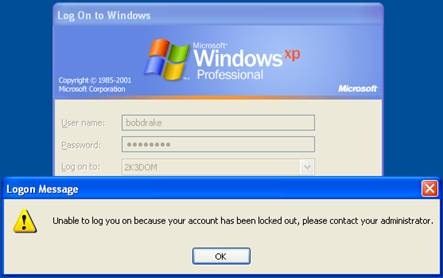
Account lockout example

In many cases, account lockouts can happen because of user mistakes (e.g., a user forgetting his/her password, or not typing the password correctly). However, the most frustrating cases of account lockouts are the ones when a user entered the right credentials, yet the account was locked out. In such situations, Active Directory administrators often struggle to figure out what is going on.

Active Directory Accounts can be locked in Numerous Ways

There are many situations in which an account can be locked out without the user knowing:

  • Sometimes certain Windows services and scheduled tasks can be configured to run with the privileges of a specific user account. When that account’s credential is changed, an administrator must manually make the changes in the Windows services and scheduled tasks configuration as well. If this is not done the corresponding Windows services and scheduled tasks will fail to execute, and they will also cause incorrect logins to happen.
  • Persistent file shares on a system may be configured with user credentials. If these credentials are not updated, they can result in incorrect logins.
  • Many a times, programs authenticate using Active Directory. For instance, a Citrix XenApp server is configured to use a specific user account when accessing its backend datastore. If the credentials of this account are modified, every time the Citrix server contacts its datastore, an invalid login will be registered in Active Directory.
  • Many organizations implement Active Directory in a redundant configuration. If replication across Active Directory servers is not working correctly, one of the AD servers could have the old credentials for a user account. When the user logs in, this can result in a login failure.
  • Users these days access their systems from multiple devices. Password information is stored in each of these devices. When a user changes his password, all of the devices have to be updated with the new password. If the changes are not done correctly on all the devices, invalid logins will occur.

Troubleshooting Active Directory Account Lockouts with eG Enterprise

While many organizations proactively monitor their critical applications – web servers, databases, middleware servers, etc., Active Directory monitoring is often done re-actively, after users complain. As I mentioned earlier, Active Directory issues are often very disruptive. The longer the diagnosis takes, the greater the loss in user productivity.

Most organizations adopt a manual, time-consuming process for handling user lockouts. There are a number of detailed tools available for diagnosis of such problems. Often, such diagnosis has to be done by the experts. If a malicious attack happens on the Active Directory system, many a time, the operations team becomes aware of an account lockout issue only after it is too late.

eG Enterprise provides an automatic and simple way to monitor account lockouts in Active Directory. The AD monitoring system detects the accounts that are currently locked out. It can also be configured to detect and report on any new account lockout events.  Alerts will be triggered to administrators as soon as an account lockout is detected. Critically, the alerts are detailed enough, providing administrators with information as to why the lockout happened –which device did the user connect from and which domain did he/she log into. Administrators can also get detailed reports on accounts locked during a specified period.
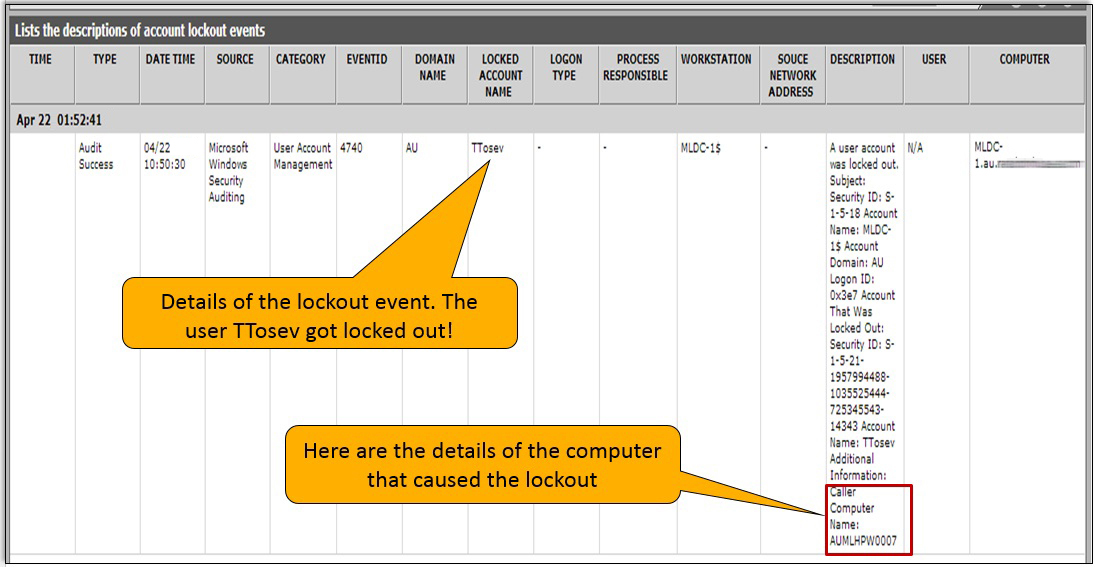
Account lockout details are important to problem resolution

In addition to alerting administrators and providing a detailed report on user lockout events, eG Enterprise also monitors other aspects of Active Directory performance. For instance, in the above example, the AD monitoring system detected replication failures between AD servers that were causing the account lockouts.
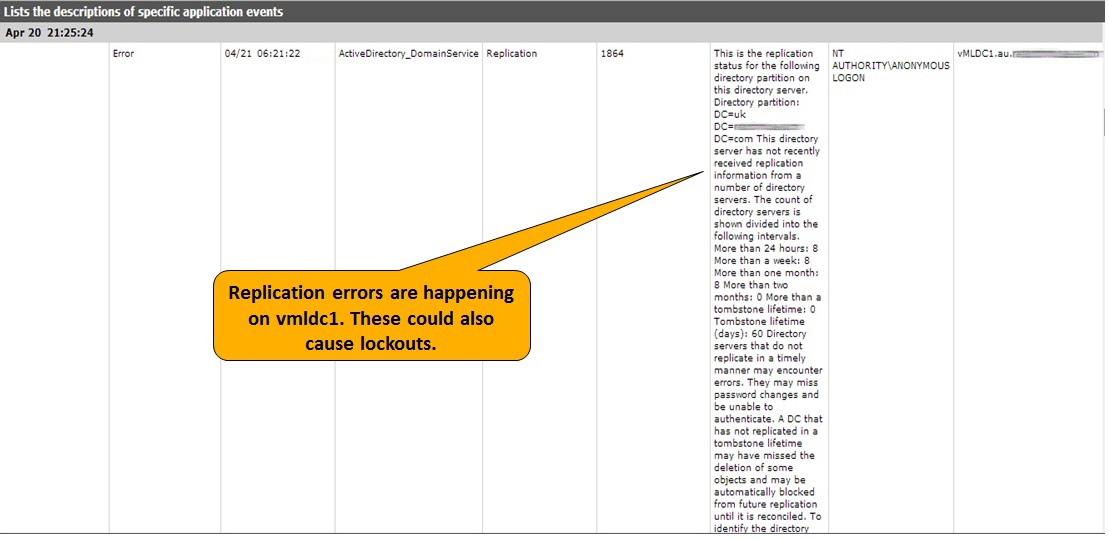
Replication errors can also cause lockouts.

Why use eG Enterprise for Monitoring Account Lockouts

Microsoft provides tools that administrators can use to detect and manage Active Directory account lockouts. The table below summarizes how eG Enterprise can simplify account lockout detection and alerting:

Feature
eG Enterprise
Microsoft Tools
Automatically detects account lockouts as soon as they occur tick delete No, tools have to be run manually for detecting account lockouts
Proactively alerts administrators about account lockouts via email/SMS, before users complains tick delete Administrators are not proactively alerted because of which administrators become aware of an account lockout issue only after it is too late.
Automatically find the source of account lockouts – Windows services and scheduled tasks using wrong credentials, Replication failure and a particular Active Directory server having wrong credentials, etc. tick delete No, manual routine investigation configuring for each specific situation must be performed.
Monitor multiple domains and domain controller at the same time tick delete No, must connect to each domain controller manually.

Comprehensive monitoring and diagnosis of Active Directory servers provides several benefits. Given how critical Active Directory is to the functioning of any IT infrastructure, proactive monitoring is a must. With the right Active Directory monitoring capabilities in place, administrators can detect and fix problems quickly – often well before users notice and complain. This greatly improves user productivity and satisfaction.


eG Enterprise is an Observability solution for Modern IT. Monitor digital workspaces,
web applications, SaaS services, cloud and containers from a single pane of glass.

Free Trial  See the platform

Related Blogs

SSL/TLS Certificate Lifetimes to Reduce to 47 Days
Application Performance Monitoring (APM)

SSL/TLS certificate lifetimes to reduce to 47 days

Ramesh Subramaniam
by Ramesh Subramaniam
February 19, 2026
Redefining Application Management Services – the AIOps Way
Application Performance Monitoring (APM)

Redefining application management services – the AIOps way

Swaminathan J
by Swaminathan J
January 29, 2026
What Is DEX? Benefits & Business Impact
Digital Workspace Monitoring

What is DEX? benefits & business impact

Rachel Berry
by Rachel Berry
December 18, 2025
Discover, Diagnose, and Resolve IT Performance
Issues with Full Stack Observability
Get Started

Contact

eG Innovations Pvt Ltd. 2nd Floor, Rayala Techno Park, 144/7, Rajiv Gandhi Salai (OMR), Kottivakkam, Chennai 600 041, India.

+91 44 4263 9553, +91 44 4263 9566

Platform

  • Digital Workspace
  • Application Performance Monitoring
  • Enterprise Application Monitoring
  • Digital Experience
  • Infrastructure
  • Cloud

Solutions

  • Healthcare
  • Banking
  • Government
  • Manufacturing
  • Education

Resources

  • Blog
  • Case studies
  • Glossary
  • Documentation
  • Webinars

Company

  • About
  • Awards
  • Partners
  • Careers
  • Contact
inf▶X
eG Innovations
  • Terms of Use
  • Privacy Policy
  • Your Data Rights
  • Information Security

© 2026 eG Innovations. All rights reserved.