Why MFA is Critical for Synthetic Monitoring & Remote Access
Learn how MFA and TOTP-based authentication improve security for synthetic monitoring in Azure Virtual Desktop (AVD) environments. Today, I’ll cover some of the basics of monitoring Multi-Factor Authentication and why ensuring MFA is implemented is essential, particularly in environments where remote access is possible. I’ll cover some recent, specific case studies where a lack of MFA has led to security breaches and the mechanisms the bad actors used.
Finally, I will also cover some tips and MFA best practices including how to ensure synthetic monitoring and simulated testing does not become an Achilles’ heel and weak point in your AVD monitoring strategy.
What is Multi-Factor Authentication (MFA)?
The CISA states that MFA (Multi-Factor Authentication) prevents unauthorized access to your data and applications by requiring a second method of verifying your identity, making you much more secure.
By “a second method”, this means at least one secondary method to verify identity. 2-FA (Two Factor Authentication) is a sub-genre of using 2 methods but MFA is a broader church that can encompass the use of a combination of two or more methods for verifying identity.
Why MFA is Essential for Azure Virtual Desktop Security
Historically, many organizations relied on a kind of implied form of MFA. User accounts were primarily protected by a password, a degree of secondary protection was provided by the fact that users were expected to access resources from on-premises hardware connected to private networks. Anyone using the password could be assumed to be literally within the building.
Multi-Factor Authentication (MFA) is now essential for remote access because it strengthens security in environments where traditional perimeter defenses such as office firewalls can no longer provide implied protection.
Common Password Attack Methods & Security Risks
I’ll cover some recent case study of breaches that will equip you with data points and resources around which you can formulate an MFA strategy but first let’s recap on some of the nomenclature around mechanisms that compromise passwords. Passwords can be compromised in many ways, common methods include:
- Phishing attacks: Trick users into revealing passwords via fake emails or websites.
- Keylogging malware: Records keystrokes to capture login credentials.
- Credential stuffing: Uses leaked credentials from one site to access others.
- Brute force attacks: Repeatedly guesses passwords until one works.
- Password reuse across sites: A breach on one site compromises others.
- Social engineering: Manipulates users into giving away their passwords.
- Data breaches/leaks: Exposes large databases of passwords.
- Shoulder surfing: A bad actor observes users typing passwords in public.
- Insecure password storage: Stores passwords in plain text or weakly hashed formats.
- Man-in-the-middle (MITM) attacks: Intercepts credentials during transmission.
Real-World Security Breaches Caused by Missing MFA
The postmortem-like analysis of several high-profile breaches that could have been avoided if MFA was in-place have raised awareness of the need for IT administrators to identify systems that are not enforcing MFA.
1. The British Library ransomware attack (Oct 2023)
Attackers accessed a Terminal Services server used by third-party contractors on which no MFA was enforced, leading to a 600 GB data leak. The British Library have been incredibly transparent and published their in-depth analysis, many summary articles have been written such as – Third-Party Breach and Missing MFA Led to British Library Attack – Infosecurity Magazine. It is however worth reading the Library’s own full report, available here: bl.uk/home/british-library-cyber-incident-review-8-march-2024.pdf/.
Key points:
- The Library were unable to ascertain for sure how the passwords were compromised, mooting – “The most likely source of the attack is therefore the compromise of privileged account credentials, possibly via a phishing or spear-phishing attack or a brute force attack where passwords are repeatedly tried against a user’s account.”
- The Library’s own report concluded: “Multi-factor authentication needs to be in place on all internet-facing endpoints, regardless of any technical difficulties in doing so. The Library had MFA in place for all end-user technologies, but not on certain supplier endpoints.”
2. British Airways Data Breach – 2018
Attackers used stolen credentials from a Swissport (third-party cargo handling contractor) employee, which lacked MFA protection. They accessed a Citrix environment and eventually compromised domain admin credentials stored in plaintext.
The absence of multi-factor authentication allowed attackers to use those credentials without any second layer of defense. The hackers then installed a custom skimming script that captured the personal and payment card data (including CVV codes) of approximately 380,000 customers.
In October 2020 the UK Information Commissioner’s Office (ICO) fined British Airways £20 million for breaches of General Data Protection Regulations related to the breach. A legal claim by customers who had been affected by the breach was settled out of court in 2021.
Interestingly, the logging and storing of the credit card details (including, in most cases, CVV codes) was not an intended design feature of British Airways’ systems and was not required for any particular business purpose. This was a test feature inadvertently left running through “human error”.
A fuller analysis can be read, here: British Airways data breach – Wikipedia.
3. Microsoft corporate breach (Late 2023/Jan 2024)
Russian‑aligned group Midnight Blizzard compromised a legacy test tenant account without MFA, gaining access to senior exec emails. The initial breach was achieved through a low-volume password spraying technique.
Midnight Blizzard leveraged their initial access to identify and compromise a legacy test OAuth application that had elevated access to the Microsoft corporate environment. The actor created additional malicious OAuth applications.
Read more: Midnight Blizzard: Guidance for responders on nation-state attack | Microsoft Security Blog.
Security Risks of Operating Without MFA
Beyond the lack of MFA, other significant factors can be seen in the few examples I’ve highlighted. We see:
- Missing MFA means easy initial access with stolen credentials
- A lack of MFA allows attacks via mechanism such as password spraying
- Third-party contractor accounts treated as less of a risk than others with external access
- Legacy test systems and accounts are often overlooked
How MFA Improves Synthetic Monitoring in AVD
Synthetic monitoring is a proactive method of monitoring application and service performance by simulating user interactions or transactions at regular intervals from specific locations.
By regularly probing logons and user workflows with robot users periodically, administrators can discover issues before real users are impacted.
eG Enterprise offers a full range of synthetic monitoring features for AVD from a logon simulator to full-session multi-app workflow simulators. To protect your systems we offer a range of options for implementing MFA when using synthetic monitoring for AVD or the other digital workspace technologies supported by eG Enterprise.
How to Use TOTP (Time-Based One-Time Password) for Two-Factor Authentication in AVD Environments
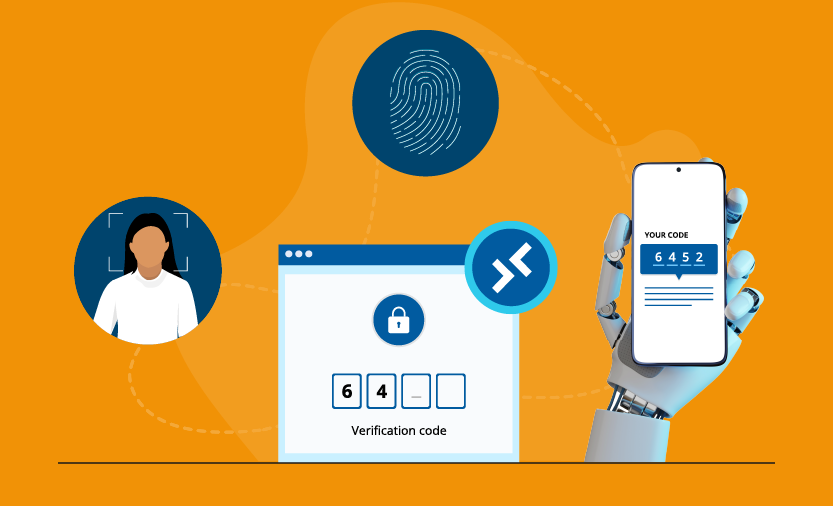
Two-Factor Authentication (2FA) adds an extra layer of account protection by requiring two distinct forms of authentication. Time-Based One-Time Password (TOTP) is one of the most commonly used 2FA methods, generating dynamic 6-digit codes that typically change every 30 seconds. These TOTP codes are used alongside standard user credentials to enable secure access to your AVD environment.
In Azure Virtual Desktop (AVD) environments, TOTP-based authentication is referred to as “OATH software tokens” within Microsoft Entra ID (formerly Azure AD).
How to Configure TOTP Authentication for AVD Logon Simulation
In a few simple steps you can protect your synthetic monitoring systems, simply:
- Register your Microsoft AVD logon simulation endpoint as an application in Microsoft Entra ID (formerly Azure AD).
- Obtain the secret key from your registered endpoint.
- Choose an authenticator app that supports TOTP, such as Microsoft Authenticator, Google Authenticator, etc.
- Add your secret key to the authenticator app by manually entering it or scanning the QR code.
- TOTP codes generated by your authenticator app can be used to log in to your Microsoft Azure Virtual Desktop (AVD) environment.
TOTP-Based 2FA Configuration in eG Enterprise
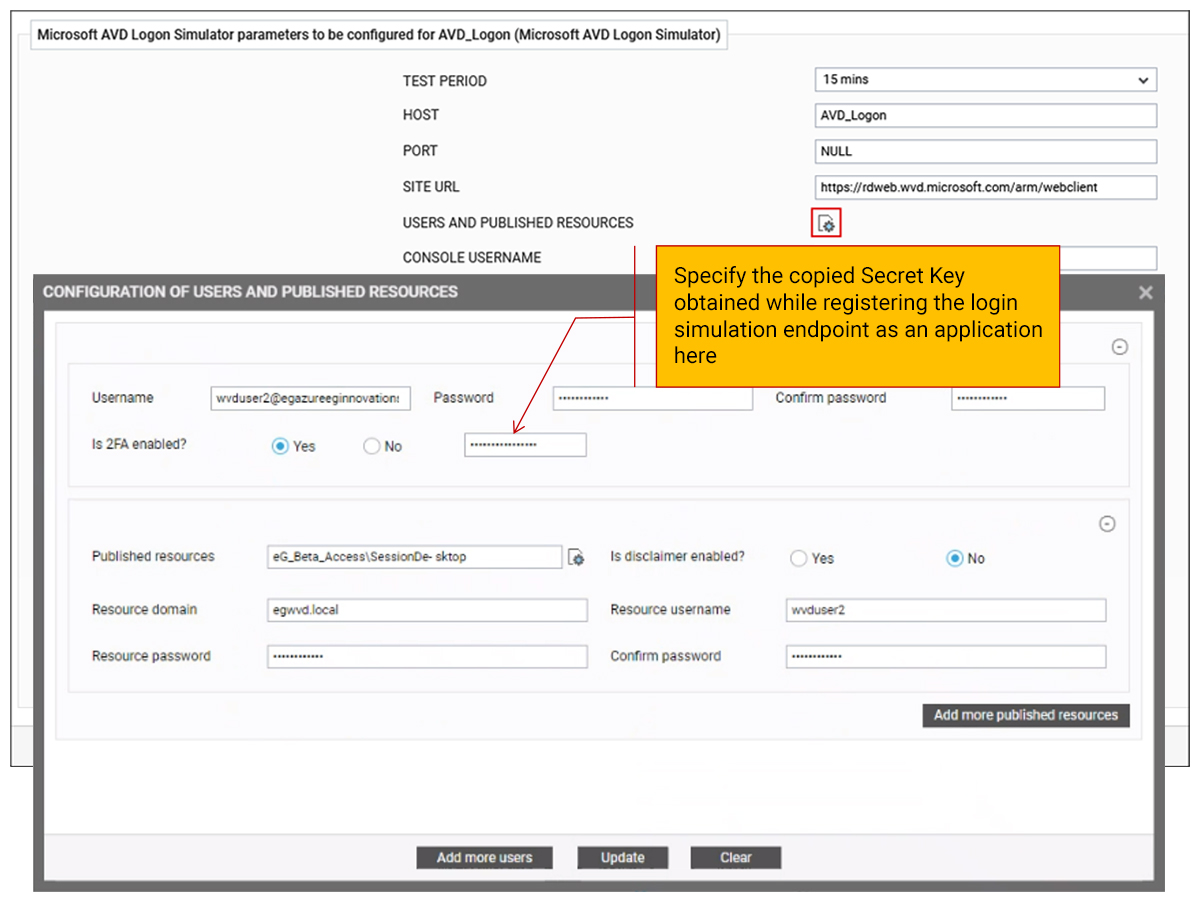
During simulation, the Microsoft AVD Logon Simulator automatically generates the TOTP using the shared secret key and the current time. This TOTP is submitted along with the user credentials during the login process. After successful authentication, the simulator reports the total time taken to complete the login process. If authentication fails due to MFA service outages, connectivity issues, time synchronization errors, or other causes, the simulator triggers alarms with supporting screenshots for further analysis.
Using the graphical view of the simulation process shown below, administrators can clearly identify which step in the logon sequence caused failures or slowness. This facilitates the precise isolation of specific failure or delay stages in the simulation—whether during login, enumeration, session establishment, application launch, or logoff.
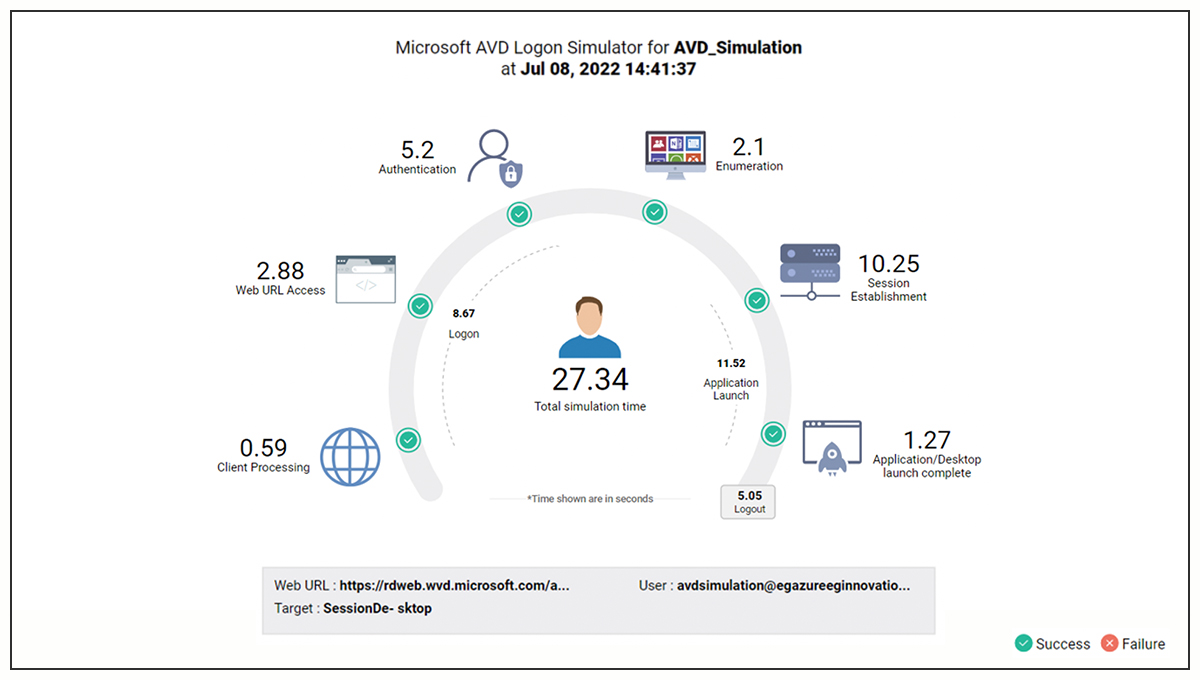

Learn more about synthetic monitoring for AVD and Azure DaaS, see: Synthetic Monitoring of Microsoft Azure DaaS | eG Innovations.
Benefits of MFA for Synthetic Monitoring
Multi-Factor Authentication (MFA) strengthens synthetic monitoring by ensuring that automated logon and user journey tests remain secure while still validating real-world user experience. It prevents synthetic monitoring accounts from becoming weak points in the security chain.
Key benefits include:
- Stronger security for monitoring accounts: Ensures synthetic test credentials are protected from unauthorized access.
- Accurate real-world testing: Validates actual user logon flows, including MFA steps, as employees experience them.
- Improved compliance and governance: Supports security best practices by enforcing MFA across all access paths.
- End-to-end AVD visibility: Ensures synthetic monitoring reflects full Azure Virtual Desktop login journeys, including secure authentication steps.
Why Choose eG Enterprise for AVD Synthetic Monitoring
eG Enterprise includes an industry leading comprehensive portfolio of synthetic monitoring tools for AVD. From protocol simulators, a purpose-built logon simulator and a web app simulator to the flagship eG Universal Simulator that can perform full-session simulations of complex user workflows.
The eG Enterprise Universal Simulator extends synthetic monitoring beyond traditional web applications, allowing organizations to proactively test and validate real user workflows across web, desktop, VDI, Citrix, SAP, and other thick- and thin-client applications.
The simple cost-effective licensing model for eG Enterprise’s synthetic monitoring makes it highly competitive. The eG Enterprise Universal Simulator is licensed per playback station (endpoint), not per application, script, or transaction. This allows organizations to monitor unlimited business workflows from a single licensed endpoint, simplifying deployment and reducing synthetic monitoring costs.
eG Enterprise is an Observability solution for Modern IT. Monitor digital workspaces,
web applications, SaaS services, cloud and containers from a single pane of glass.
Frequently Asked Questions
MFA (Multi-Factor Authentication) in Azure Virtual Desktop (AVD) is a security layer that requires users to provide a second form of identity verification—such as a mobile app prompt, biometrics, or hardware token—in addition to their username and password when accessing virtual desktops and remote app. You can learn more about enforcing Entra MFA for AVD, here: Enforce Microsoft Entra multifactor authentication for Azure Virtual Desktop using Conditional Access - Azure - Azure Virtual Desktop | Microsoft Learn.
Multi-factor authentication (MFA) is important for synthetic monitoring because modern digital workplaces, such as Azure Virtual Desktop (AVD), increasingly require MFA as a standard security control. If synthetic monitoring doesn’t support MFA it will not test the realistic user workflow of using an app or virtual desktop.
Time-Based One-Time Password (TOTP) authentication is a form of Multi-Factor Authentication (MFA) that generates a temporary, unique code that expires after a short period—typically 30 seconds. Users enter this code, along with their username and password, to verify their identity during login. TOTP codes are generated by an authentication app such as Microsoft Authenticator or Google Authenticator using a shared secret and the current time. Because the code changes continuously and can only be used once, it provides a stronger layer of security than passwords alone. TOTP is widely used to secure cloud services, VPNs, and virtual desktop platforms such as Azure Virtual Desktop, helping protect against phishing, credential theft, and unauthorized account access.What is TOTP authentication?
eG Enterprise supports MFA-based synthetic monitoring of Azure Virtual Desktop (AVD) by enabling synthetic login simulations that can successfully navigate modern authentication workflows, including Microsoft multi-factor authentication (MFA). This allows organizations to continuously test the complete AVD user login experience, not just basic application availability. Support is enabled via the use of an authenticator app that supports TOTP, such as Microsoft Authenticator, Google Authenticator, etc.
Without Multi-Factor Authentication (MFA), user accounts are protected only by passwords, which can be compromised through phishing attacks, credential theft, password spraying, brute-force attacks, malware, and password reuse across multiple services. If an attacker obtains valid credentials, they can often gain immediate access to applications, virtual desktops, cloud services, and sensitive business data without any additional verification. In Azure Virtual Desktop (AVD) and other remote access environments, the absence of MFA significantly increases the risk of unauthorized access, account takeover, data breaches, ransomware attacks, and lateral movement within the network. MFA adds an additional layer of security by requiring a second form of verification, making it far more difficult for attackers to exploit stolen credentials even if passwords are compromised.
Yes, in eG Enterprise you simply need to register the simulation endpoint as an application in Microsoft Entra ID.