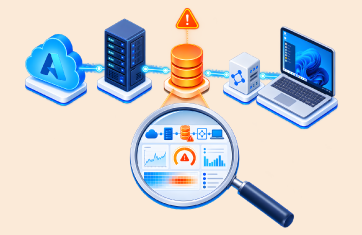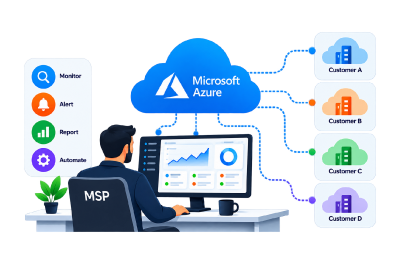
 Azure monitoring looks straightforward when managing a single environment. Azure Monitor, Log Analytics, Azure Monitor Agent and Azure Policy provide a comprehensive set of tools for collecting and analysing telemetry. For a Managed Service Provider (MSP), however, the challenge changes significantly when the service needs to support dozens or hundreds of customers.
The MSP needs to onboard customers efficiently, monitor different Azure subscriptions and resource types, maintain customer separation, control monitoring costs and provide consistent dashboards, alerts and reports. A recent discussion among sysadmins illustrates the practical challenge: an MSP building a native Azure monitoring service was asking whether Log Analytics workspaces should sit in the MSP’s subscription or in each customer’s subscription, and how monitoring could be deployed at scale rather than through manual configuration.
The Challenge of Delivering Azure Monitoring at Scale
Microsoft provides Azure Lighthouse to help service providers manage delegated resources across multiple customer tenants. An MSP can onboard customers and manage delegated subscriptions or resource groups from its own tenant without having to switch into every customer’s tenant. See: Monitor delegated resources at scale – Azure Lighthouse | Microsoft Learn.
For Azure Monitor specifically, Microsoft recommends placing Log Analytics workspaces in customer tenants for most MSP scenarios, particularly where data residency, ownership and customer isolation are important considerations. Azure Policy can then be used to deploy diagnostic settings and logging configurations across customer subscriptions. MSPs can subsequently query data across customer workspaces and use Azure Workbooks to analyze information across multiple customers.
In reality while cross-workspace queries are supported, permissions still need to be configured correctly and the operational complexity of cross-workspace queries is demonstrated in the documentation on the subject, see: azure-monitor-docs/articles/azure-monitor/logs/cross-workspace-query.md at main · MicrosoftDocs/azure-monitor-docs · GitHub.
This provides a powerful native Azure architecture, but it also creates operational complexity. The MSP has to manage workspaces, policies, data collection, queries, dashboards, alerts and customer access across multiple environments. At scale, the monitoring service itself becomes something the MSP needs to operate and maintain.

Designing Azure Monitoring for MSP Scale
Building an Azure monitoring service involves more than simply enabling Azure Monitor. MSPs need to make architectural decisions around workspace design, data retention, alerting and operational ownership that can have a significant impact on both service quality and profitability.
Workspace Architecture Considerations
One of the first decisions is where monitoring data should reside. Microsoft typically recommends creating Log Analytics workspaces within each customer tenant, helping to maintain data ownership, compliance boundaries and tenant isolation. Azure Lighthouse can then be used to manage those environments centrally while allowing MSPs to query and analyze data across multiple customer workspaces.
This model works well for customer separation, but it also introduces operational challenges. Instead of managing a single monitoring repository, MSPs may need to manage dozens or hundreds of individual workspaces, each with its own permissions, retention policies, alert rules and data collection settings.
As customer numbers grow, maintaining consistency becomes increasingly important. Standardized Azure Policy assignments, Data Collection Rules (DCRs), Azure Monitor Agent deployments and onboarding templates help ensure that every new customer receives the same monitoring baseline regardless of the size of their Azure environment.
Managing Monitoring Costs for Azure
Monitoring costs are often overlooked when launching a managed service but can become one of the largest operational expenses as customer environments expand.
Azure Monitor pricing is largely driven by the volume of data ingested into Log Analytics workspaces. Diagnostic logs, performance metrics, security events, application telemetry and custom logs can quickly generate substantial data volumes if collection policies are not carefully controlled.
MSPs therefore need to balance visibility against cost. Common strategies include:
- Collecting only the diagnostic categories required for operational monitoring.
- Adjusting retention periods based on customer requirements.
- Separating operational and compliance-driven data where necessary.
- Regularly reviewing high-volume data sources and noisy telemetry streams.
- Using standard monitoring policies to avoid unnecessary data collection across customer estates.
Without governance, monitoring costs can increase faster than customer revenue, especially when monitoring is bundled as part of a managed service offering.
Azure Alerting at Scale
Alerting presents a different challenge. An alerting model that works well for a single customer may become unmanageable when multiplied across dozens of tenants.
MSPs need to avoid creating thousands of individual alerts that generate duplicate notifications and contribute to alert fatigue. Instead, alerting strategies should be designed around service impact, business relevance and operational workflows.
Successful MSP monitoring services typically standardize alert definitions so that:
- Similar Azure resources use consistent thresholds.
- Alert severity is aligned with service impact.
- Notifications are routed to the correct operational teams.
- Customers receive alerts appropriate to their service tier.
- Escalation procedures remain consistent across the customer base.
Alert tuning is also critical. Excessive alert noise reduces operational efficiency and can undermine customer confidence in the service. A mature monitoring practice focuses on actionable alerts that identify genuine service risks rather than every potential performance fluctuation.
From Monitoring Tools to Monitoring Operations
At small scale, Azure Monitor components such as Azure Monitor, Log Analytics, Azure Policy and Workbooks provide the capabilities needed to collect and analyze monitoring data. At MSP scale, however, the challenge becomes operationalizing those components across multiple customers while maintaining consistency, efficiency and profitability.
The monitoring architecture therefore needs to support repeatable onboarding, controlled costs, standardized alerting and secure multi-tenant operations, transforming monitoring from a technical implementation into a scalable managed service.
Some of the challenges for MSPs looking to deploy Azure Monitor at scale have been discussed on Reddit, see: How do MSPs deliver Azure Monitor as a managed service at scale – Log Analytics Workspace in your subscription or customer’s subscription? : r/sysadmin.
What MSPs Need From an Azure Monitoring Platform
An MSP-focused monitoring platform needs to solve more than data collection. It needs to make the monitoring service itself scalable.
Multi-tenancy is fundamental. Each customer’s infrastructure and monitoring data must be securely segregated, while the MSP’s operations team needs a consolidated view across all customers. eG Enterprise provides this architecture, allowing multiple customer environments to be monitored from a single console while providing customers with restricted views of their own infrastructure.
Customer onboarding can also be streamlined. eG Enterprise supports tenant self-provisioning and predefined monitoring templates, helping MSPs standardize how new customers are brought into the service rather than configuring every environment individually.
Monitor Azure Without Creating Another Monitoring Silo
One of the advantages of using eG Enterprise for Azure monitoring is that Azure does not have to become a separate monitoring silo. eG Enterprise can consolidate Azure monitoring with monitoring for additional infrastructure, applications and end-user computing technologies within a single operational platform.
eG Enterprise monitors Azure subscriptions agentlessly, using Azure Resource Manager REST APIs and information from Azure logs sent to Log Analytics workspaces. This provides visibility into Azure resources and services while allowing the same monitoring platform to cover the customer’s wider IT environment. Learn more about eG Enterprise’s capabilities for Azure monitoring, see: Azure Monitoring Tool for Cloud Performance.
That matters for MSPs because customers rarely have an Azure-only environment. An Azure VM might depend on Active Directory, a database, storage, a network device, an application server or a digital workspace. eG Enterprise can bring over 650+ technologies into the same monitoring environment, using both agent-based and agentless monitoring.
The result is a move from monitoring individual Azure resources to monitoring the service that the customer actually consumes.
Reducing Azure Monitor Costs with eG Enterprise
For MSPs, monitoring cost control is not simply a technical concern. It directly affects service profitability. Azure Monitor and Log Analytics provide powerful observability capabilities, but costs can increase rapidly when large volumes of diagnostic logs, performance data and application telemetry are continuously ingested into Log Analytics workspaces.
This is where eG Enterprise takes a different approach.
Rather than relying exclusively on large-scale log ingestion, for services such as Azure Virtual Desktop (AVD), eG Enterprise uses purpose-built monitoring agents and optimized data collection mechanisms designed to gather only the metrics and performance data needed for effective monitoring and troubleshooting. By analyzing performance data closer to the source, eG Enterprise can often reduce the volume of information that needs to be forwarded into Azure Log Analytics.
For MSPs managing multiple customer environments, this can provide several benefits:
- Lower Log Analytics ingestion costs by reducing unnecessary data collection.
- Greater control over which telemetry is retained for operational monitoring.
- Reduced storage and retention costs across customer environments.
- Improved signal-to-noise ratio by focusing on actionable monitoring data rather than collecting every available log stream.
- Better cost predictability when onboarding additional customers.
The benefit becomes more significant as customer estates grow. An MSP monitoring hundreds of Azure resources across multiple tenants may find that indiscriminate data collection creates escalating Azure Monitor costs that are difficult to recover through standard managed service pricing models.
Turn Azure Monitoring into a Managed Service
MSPs can use eG Enterprise to create a repeatable monitoring service covering infrastructure, applications, cloud services, networks and digital workspaces. The platform provides a unified MSP console, tenant-specific views, dashboards, alerts and historical reporting. Standardized reports can be delivered to customers while the MSP retains an overarching operational view.
This creates opportunities to package monitoring into service tiers. For example, an MSP could offer basic Azure infrastructure monitoring, then add application monitoring, digital workspace monitoring, synthetic testing, capacity planning and performance reporting as higher-value services.
Reporting is particularly important because it gives the MSP something tangible to demonstrate to customers. Instead of simply responding to incidents, the MSP can show availability, performance trends, resource utilization, capacity requirements and service health over time. eG Enterprise provides live and historical reporting and analytics that can be exposed on a tenant-specific basis.
Why eG Enterprise for Azure MSP Monitoring?
The objective is not to replace Azure-native monitoring capabilities, but to provide a commercially viable multi-tenant operational layer for MSP service delivery.
eG Enterprise combines Azure monitoring with multi-tenant architecture, secure customer separation, automated tenant provisioning, dashboards, reporting, agent and agentless collection, capacity planning and monitoring across the broader IT environment.
For an MSP, that means one monitoring platform can support multiple customers without requiring a separate monitoring deployment for every tenant. Customers get visibility into their own environments, while the MSP gets a centralized view for managing the entire service.
Most importantly, the MSP can turn monitoring data into a recurring managed service rather than treating monitoring as an internal operational tool. As customer environments become more complex, additional monitoring, reporting and optimization services can be added without creating a new monitoring architecture for every customer.
Licensing Designed to Support MSPs
eG Enterprise’s consumable, pay-per-use licensing model offered to partner MSPs is designed to align monitoring costs with the way MSPs deliver and charge for managed services. MSPs can start with the monitoring capacity they need and scale consumption up or down as customers, workloads and technologies grow or change, rather than committing to large upfront licence purchases. Monthly billing and usage tracking can also align eG Enterprise costs with the MSP’s own recurring-revenue model.
Learn more about eG Enterprise features for MSPs: Multi-Tenant MSP Monitoring | eG Innovations or find out about our partner program, see: Grow revenue by joining the eG Innovations Partner Program.
For MSPs looking to deliver Azure monitoring at scale, eG Enterprise provides the multi-tenant architecture, automation and broad technology coverage needed to turn Azure observability into a repeatable cost-effective managed service.
eG Enterprise is an Observability solution for Modern IT. Monitor digital workspaces,
web applications, SaaS services, cloud and containers from a single pane of glass.
Frequently Asked Questions
MSPs commonly use Azure Lighthouse to manage delegated Azure subscriptions and resource groups across multiple customer tenants from a central management tenant. This allows service providers to monitor and manage customer environments without maintaining separate administrative accounts for each tenant.
MSPs looking to offer value-added Monitoring-as-a-Service (MaaS) often choose purpose built monitoring platforms such as eG Enterprise
Microsoft generally recommends placing Log Analytics workspaces in each customer tenant to maintain data ownership, compliance boundaries and tenant isolation. MSPs can then use Azure Lighthouse, Azure Monitor and Azure Workbooks to manage and analyse monitoring data across multiple customers.
For most managed service scenarios, Microsoft recommends deploying Log Analytics workspaces within customer tenants. This helps keep monitoring data under the customer's control while allowing MSPs to access the data through delegated administration using Azure Lighthouse.
Common challenges include:
- Managing multiple Log Analytics workspaces
- Tenant onboarding and provisioning
- Monitoring cost control and predictability
- Alert standardisation
- Dashboard and report creation
- Cross-tenant visibility
- Customer data separation
- Scaling monitoring operations across hundreds of customer environments
Azure Lighthouse is Microsoft's delegated resource management framework. It allows MSPs to manage Azure resources across multiple customer tenants from a single management tenant, simplifying administration and monitoring at scale.
MSPs can reduce Azure Monitor costs by:
- Limiting unnecessary diagnostic log collection
- Optimising data retention periods
- Reducing noisy telemetry sources
- Standardising monitoring policies
- Using monitoring platforms that minimise data ingestion into Log Analytics
Because Azure Monitor pricing is heavily influenced by data ingestion volume, controlling telemetry collection is often critical for service profitability.
Azure Monitor and Log Analytics costs are largely driven by the volume of monitoring data collected and retained. As customer environments grow, large quantities of performance metrics, diagnostic logs and application telemetry can significantly increase monitoring costs if data collection is not managed carefully.
eG Enterprise uses purpose-built monitoring agents and optimised data collection techniques that focus on gathering actionable performance data rather than sending every available metric and log to Azure Log Analytics.
For services such as Azure Virtual Desktop (AVD), this can help reduce Log Analytics ingestion volumes while still providing detailed performance and user experience monitoring.
Multi-tenant Azure monitoring is the ability to monitor multiple customer environments from a single monitoring platform while maintaining strict separation of customer data, dashboards, reports and permissions.
This capability is essential for MSPs delivering monitoring as a managed service.
Important capabilities include:
- Multi-tenancy
- Secure customer separation
- Centralised operations dashboards
- Automated onboarding
- Alert management
- Reporting and SLA tracking
- Capacity planning
- Cost optimisation
- Application and infrastructure monitoring
- Support for hybrid and multi-cloud environments
MSPs typically use:
- Azure Policy
- Azure Monitor Agent
- Data Collection Rules (DCRs)
- Monitoring templates
- Standardised alert definitions
- Automated onboarding workflows
These help ensure every customer receives a consistent monitoring service.
Successful MSPs standardise alerts around service impact rather than creating unique alerts for every environment. This approach helps reduce alert fatigue, improves operational efficiency and ensures consistent service delivery across customers.
The best Azure monitoring platform for an MSP depends on the service provider's requirements. Key considerations include multi-tenancy, customer separation, scalability, Azure cost optimisation, reporting, automation, Azure Virtual Desktop monitoring and support for hybrid environments. MSP-focused platforms such as eG Enterprise are designed specifically to address these managed service requirements.
Yes. Many MSPs offer Azure Virtual Desktop monitoring services that include:
- Session performance monitoring
- User experience monitoring
- Logon performance analysis
- Capacity planning
- Availability monitoring
- Infrastructure performance monitoring
- SLA reporting
These services can be packaged as premium managed service offerings.
Learn more about how eG Enterprise is enabling MSPs monitor AVD, see: AVD Monitoring for MSPs (Managed Service Providers) | eG Innovations.
Yes. Many MSPs package Azure monitoring as a recurring managed service that includes monitoring, alerting, reporting, capacity planning, optimisation recommendations and performance reviews. This transforms monitoring from an internal operational activity into a customer-facing service that generates recurring revenue.
Common reports include:
- Availability reports
- SLA reports
- Capacity planning reports
- Azure resource utilisation reports
- Performance trend reports
- End-user experience reports
- Executive summary reports
- Service health reports
These reports help demonstrate the value delivered by the monitoring service.
MSPs use eG Enterprise because it combines:
- Azure monitoring
- Multi-tenant architecture
- Customer isolation
- Automated onboarding
- Cost-efficient data collection
- Infrastructure monitoring
- Application performance monitoring
- Digital workspace monitoring
- Capacity planning
- Reporting and analytics
within a single platform designed for managed service delivery.