English
 Deutsch
 Espanol
 Français
 Portuguese
 中文
中文 한국어
한국어 日本語
日本語
Amazon AppStream 2.0 Monitoring Software

Get deep visibility into the performance of your Amazon AppStream 2.0 deployments with eG Enterprise. Get proactive alerts, instant diagnosis and historical reporting on AWS usage/ performance and user sessions.
Trusted by leading companies




Amazon AppStream 2.0 Monitoring Overview
Monitor Amazon AppStream 2.0 performance, user experience, application delivery, session activity, and AWS dependencies from a single platform. eG Enterprise provides real-time visibility, proactive alerts, synthetic monitoring, historical reporting, and automated root-cause diagnostics for AppStream 2.0 environments.
Monitor Amazon AppStream 2.0 performance, user experience, application delivery, session activity, and AWS dependencies from a single platform. eG Enterprise provides real-time visibility, proactive alerts, synthetic monitoring, historical reporting, and automated root-cause diagnostics for AppStream 2.0 environments.
What is Amazon AppStream 2.0?
Keep the existing explanation of AppStream 2.0 and its use cases. This gives the page an informational foundation before moving into the monitoring solution.
Amazon AppStream 2.0 allows organizations to publish individual applications that are then streamed to end users on any device using an HTML5 browser, providing those applications as SaaS (Software as a Service). The advantages of AppStream 2.0 include:

- Support access from a wide range of devices including tablets, thin clients, and workstations, including BYOD (bring your own device) and operating systems like Windows PC, Linux, Chromebooks and Macs.
- Ease the maintenance and lifecycle management of applications through a single centrally managed version of each application.
- Support bespoke and legacy applications that require custom configurations (specific hardware, certain driver versions, and so on) and simply do not work when published to vanilla VDI (Virtual Desktop Infrastructure) or DaaS (Desktop as a Service) desktops.
- Offer graphically demanding 3D applications such as AEC/CAD or VFX products as SaaS to customers.
Keep the existing explanation of AppStream 2.0 and its use cases. This gives the page an informational foundation before moving into the monitoring solution.
Amazon AppStream 2.0 allows organizations to publish individual applications that are then streamed to end users on any device using an HTML5 browser, providing those applications as SaaS (Software as a Service). The advantages of AppStream 2.0 include:
- Support access from a wide range of devices including tablets, thin clients, and workstations, including BYOD (bring your own device) and operating systems like Windows PC, Linux, Chromebooks and Macs.
- Ease the maintenance and lifecycle management of applications through a single centrally managed version of each application.
- Support bespoke and legacy applications that require custom configurations (specific hardware, certain driver versions, and so on) and simply do not work when published to vanilla VDI (Virtual Desktop Infrastructure) or DaaS (Desktop as a Service) desktops.
- Offer graphically demanding 3D applications such as AEC/CAD or VFX products as SaaS to customers.
Amazon AppStream 2.0 Monitoring Challenges
There are many challenges for monitoring AppStream 2.0:
- AWS does not provide a native monitoring console to track issues with AppStream 2.0.
- Setting up Amazon CloudWatch metrics is manual and time-consuming.
- Even synthetic checks for AppStream 2.0 monitoring are not available.
- Amazon CloudWatch provides limited metrics, not specialized for application monitoring needs.
- Most 3rd party monitoring tools lack support for AWS AppStream 2.0.
- It is not simple for customers to troubleshoot Amazon AppStream 2.0 issues. The process of raising tickets with AWS support requires the user to submit the right information and supporting data.
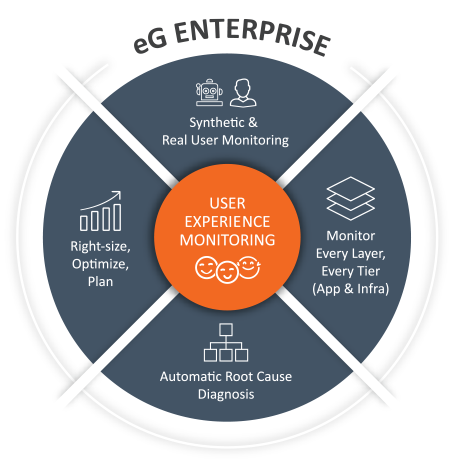
What AppStream admins need is visibility into all aspects of user experience including logon time, application launch time, screen latency, resource usage, session failures, bandwidth used and more. They also need in-depth reporting for compliance, auditing, planning, optimization and more. eG Enterprise overcomes many limitations, gaps and challenges of native Amazon AppStream 2.0 monitoring, providing organizations with complete visibility into all aspects of digital application delivery.
Amazon AppStream 2.0 Monitoring Platform
Position eG Enterprise clearly as the monitoring platform. Cover user experience, AWS infrastructure, protocol performance, anomaly detection, root-cause analysis and reporting.
Get a 360-degree view of Amazon AppStream user experience, availability, performance, and usage.
- Monitor user experience using a combination of synthetic and real user monitoring (RUM).
- Track the performance of all the tiers involved in supporting application delivery including the local network, the WAN, and AWS access and infrastructure. Monitor and report on all aspects of application usage and delivery and access protocol performance.
- Auto-baseline the infrastructure. Built-in automatic root-cause diagnosis technology allows the source of problems to be detected in minutes. AIOps driven anomaly detection.
- Leverage built-in reports and analytics for compliance reporting, usage tracking, and for scaling the Amazon AppStream 2.0 deployment cost effectively.
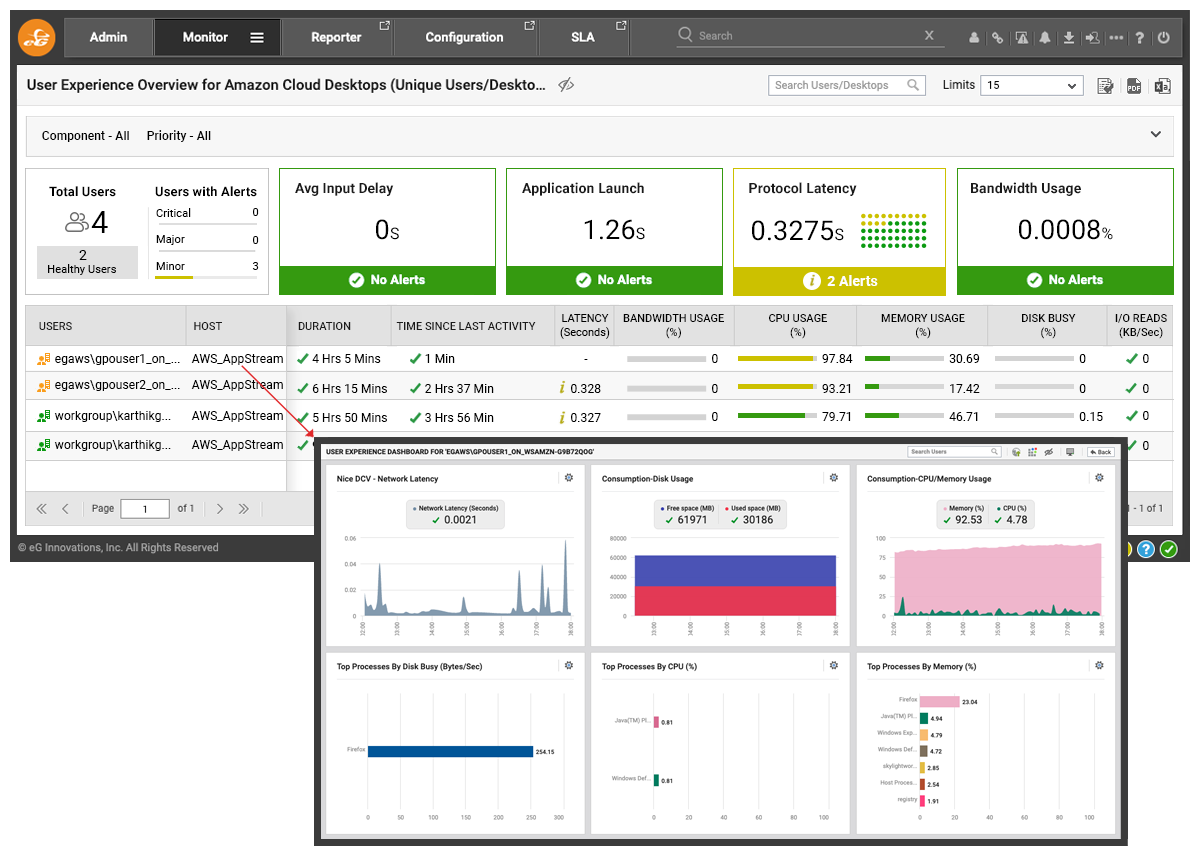
Amazon AppStream User Experience Monitoring
Keep launch time, user input delay, protocol latency, browser/URL usage, frame rate, bandwidth and active/idle time.
- Track all aspects of the experience seen by real users.
- Track launch time for each application and alert if the operating system takes excessive time to respond to user inputs (user input delay).
- Monitor protocol latencies for each user session.
- Track URLs accessed and correlate to browser resource usage patterns, allowing for rapid troubleshooting.
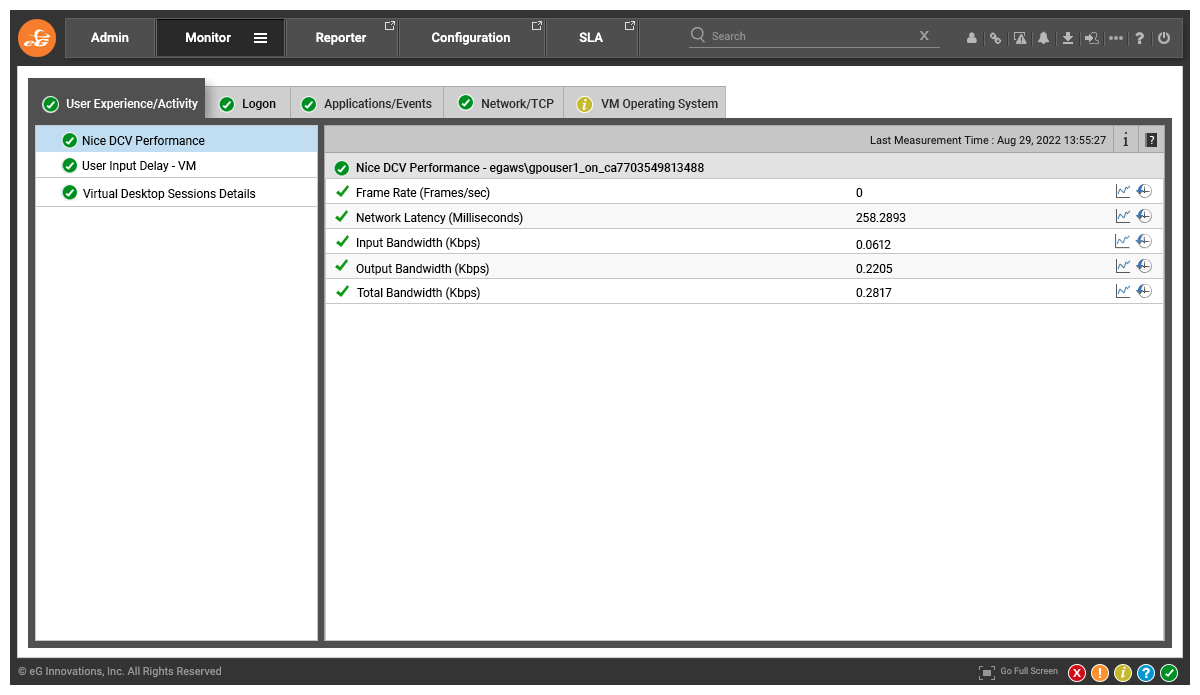
- Monitor protocol latencies for each user session. Report on NICE DCV metrics including frame rate, network latency and bandwidth usage etc.
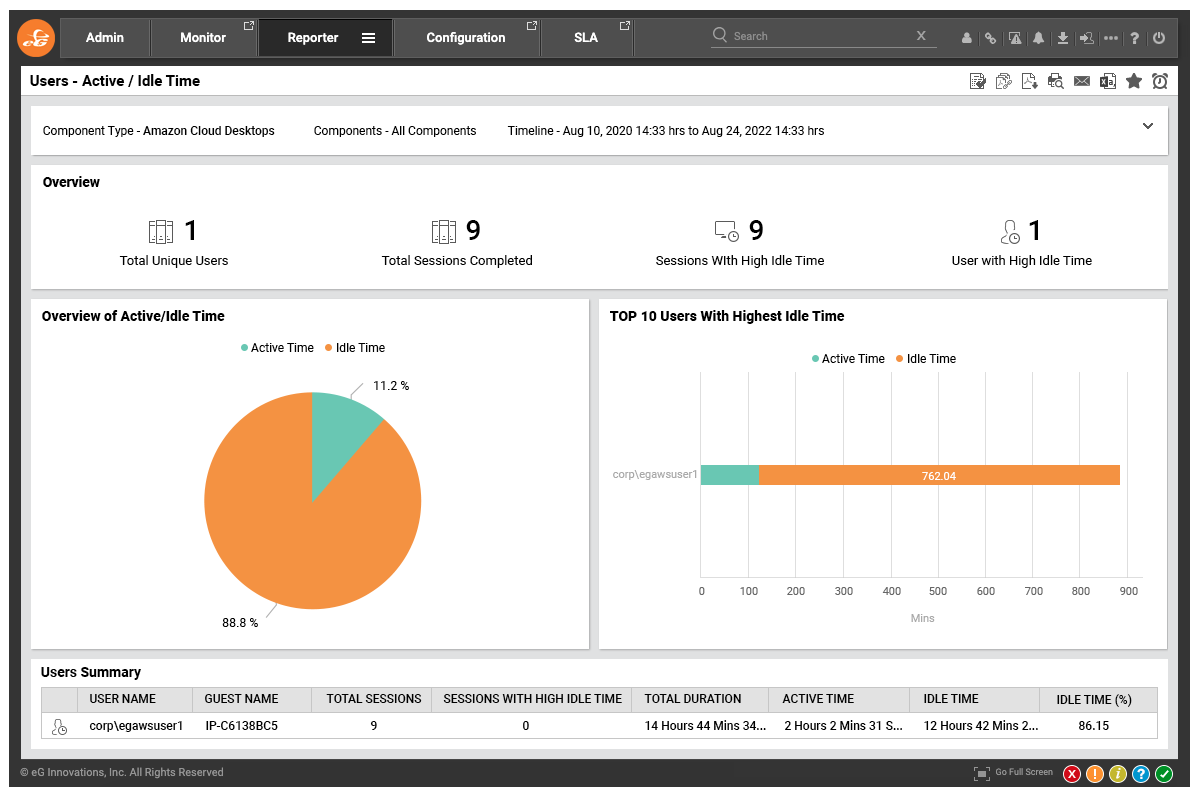
- Monitor active and idle time to understand employee work patterns and application usage patterns.
Amazon AppStream 2.0 Protocol Performance Monitoring
Focus on NICE DCV metrics such as network latency, frame rate and bandwidth at the individual session level.
AppStream 2.0 leverages a proprietary Amazon protocol using technologies acquired from the NICE DCV acquisition. Since the acquisition, Amazon has invested heavily in this protocol, including some industry leading work on audio synchronization, particularly relevant for rich media and VFX editing like applications. eG Enterprise supports deep monitoring and alerting for NICE DCV alongside all other major protocols, including:
- KPIs and metrics that provide an indicator of real user performance: network latency, frame rate and bandwidth used.
- Metrics are reported for each desktop/user session enabling rapid help and service desk service.
Amazon AppStream 2.0 Synthetic Monitoring
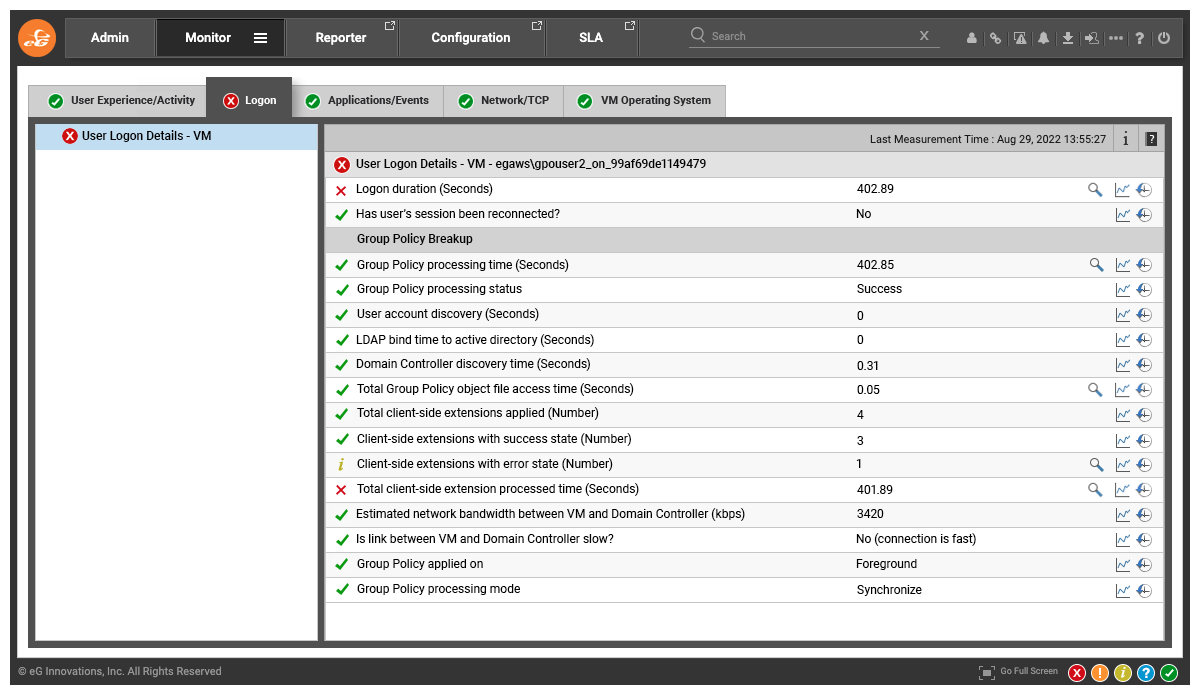
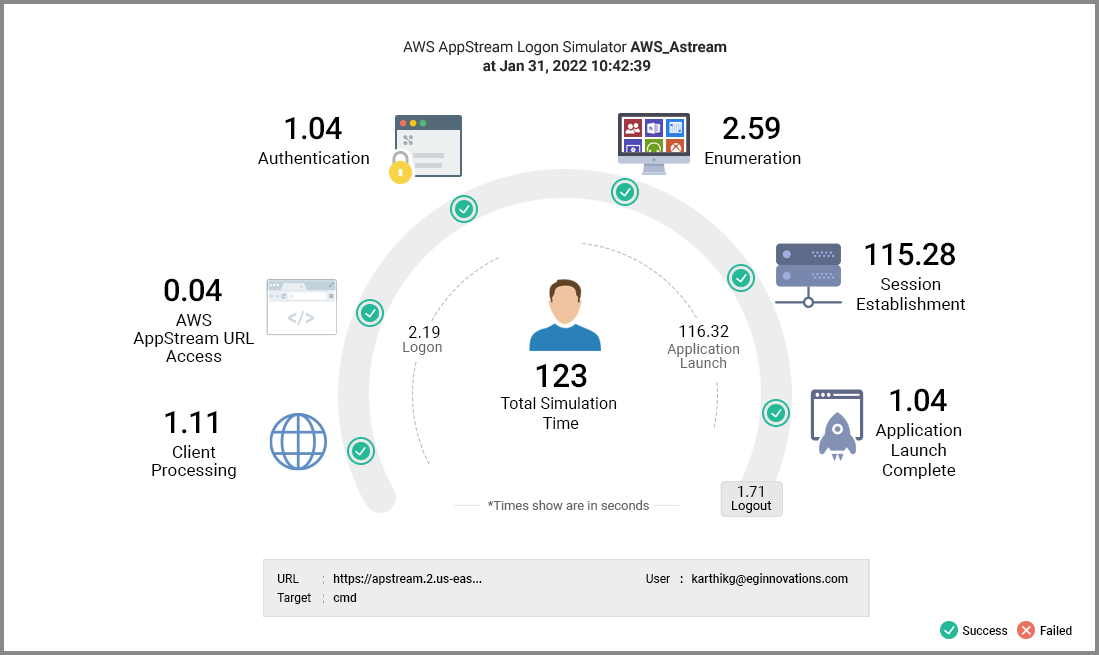
With a purpose-built logon simulator for AppStream 2.0, track desktop availability and logon performance from any location 24x7. Measure time taken for every step of the logon process from browser access, authentication, session establishment to desktop launch. Be the first to know about issues and troubleshoot whether you need to fix the problem or escalate to AWS.
Use Full Session Simulation to go beyond logon. Simulate real users accessing AppStream 2.0 delivered applications 24x7 to ensure applications and the underlying infrastructure are not only available but also performant.
Report on compliance to SLAs and compare historical performance across locations and applications.
Amazon AppStream Monitoring Dashboards and Analytics
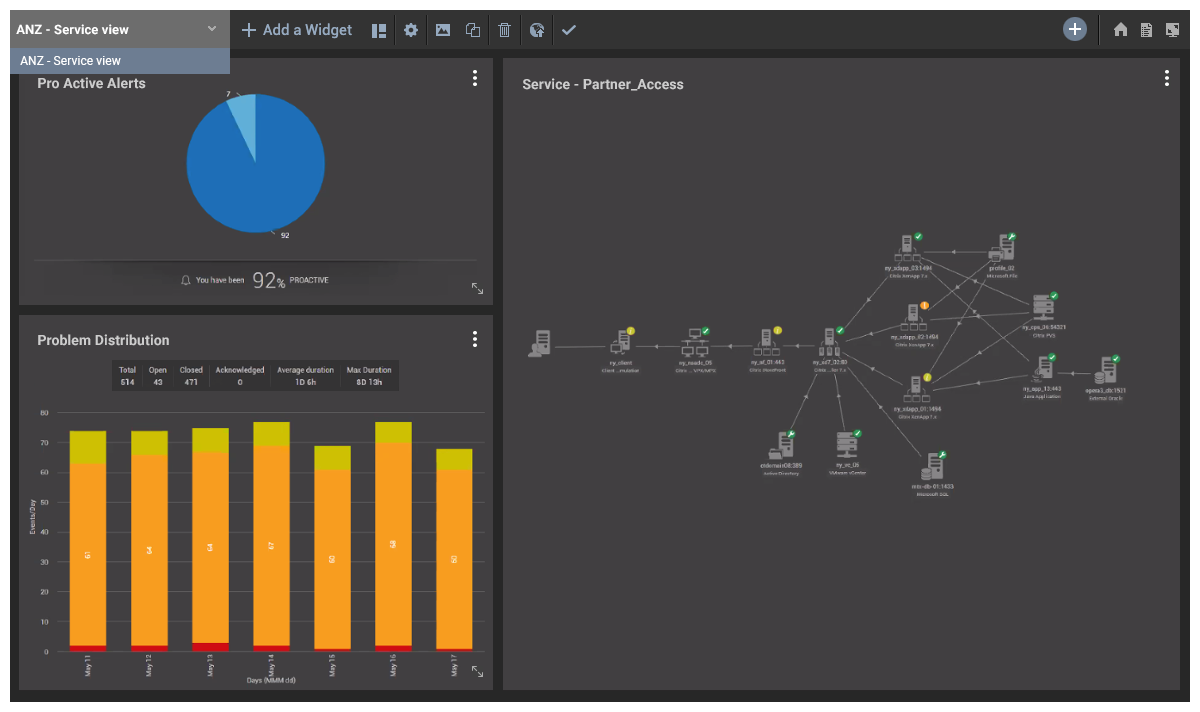
Explain real-time dashboards, topology views, historical reporting, help-desk views and mobile access.
Using a lightweight agent on each virtual desktop, track all aspects of the experience seen by real users.
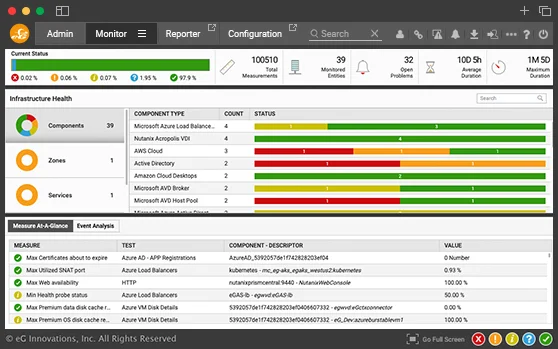
- Out-of-the box interactive dashboards provide thorough overviews with color-coded overlays alerting of detected issues.
- Rich auto-discovered topology maps allow complex application and infrastructure dependencies to be visualized.
- Out-of-the-box live and historical reports designed for a wide-range of users in an organization ensure transparency.
- Kiosk / TV-screen and help desk specific views.
- Mobile apps for iOS and Android allow access to the monitoring platform overviews on smartphones and tablets whilst on-the-move.
Amazon AppStream 2.0 Performance Reporting and Optimization
- Monitor and report on application access and usage for compliance reporting and trending.
- Track and report on who logged in, for how long and what applications they used.
- Identify the top resource consuming users and what applications they use.
- Analyze application usage patterns and identify potential areas for optimizing resource usage and reduce billing.
- Improve security by identifying dormant and orphaned resources and dormant users.
- Forecast and plan for future capacity needs. Identify if additional CPU/memory resources are required for specific users.
Summary of eG Enterprise Capabilities for
Amazon AppStream 2.0 and WorkSpaces
eG Enterprise offers an unrivalled range of features beyond the scope of native CloudWatch for both AppStream 2.0 and WorkSpaces.
| Amazon WorkSpaces | Amazon AppStream 2.0 | |
|---|---|---|
| Logon simulation |  |
|
| Full session simulation | |
|
| AWS CloudWatch-based usage metrics | |
|
| Resource usage inside the desktop with diagnosis | |
|
| Logon time monitoring with breakdown | |
|
| App launch time monitoring | |
|
| Protocol metrics | |
|
| Browser / URL monitoring | |
|
| Active / Idle time monitoring | |
|
| Input delay/lag monitoring | |
|
| User search | |
|
| Historical reports on usage, performance, etc. | |
|
End-to-end AWS Performance
Monitoring Delivered
Monitor your AppStream 2.0 and AWS WorkSpaces within the context of a single pane of glass view of your AWS application and infrastructure monitoring for all your AWS Services. This is particularly useful in ensuring that administrators and help desk can successfully raise issues with Amazon associated with dependent AWS services.
Cloud infrastructures have unique requirements compared to on-premises deployments. eG Enterprise is a cloud-ready performance monitoring solution.
 |
Auto-discover instances, volumes, databases, applications, and other AWS services being used. |
 |
Start AWS Monitoring in minutes with no manual intervention. |
 |
Out-of-the-box monitoring and analytics for most popular AWS services. |
 |
Pre-built AWS monitoring dashboards to track key performance indicators for all application tiers and cloud services. |
 |
Auto-baseline your infrastructure and get alerted about excessive usage patterns or anomalies. |
more...