




Why should you monitor PowerShell?…. PowerShell is a powerful automation tool, however its capabilities also make it a prime target for exploitation by cyber attackers. Implementing a robust, automated PowerShell monitoring solution is now essential to detect and prevent exploitation attacks before they compromise your systems. PowerShell is a powerful scripting tool that can automate tasks and manage systems, but its flexibility also makes it a target for abuse.
Why PowerShell Monitoring is Critical for Enterprise Security
- PowerShell is often exploited to execute malicious scripts. Hence, observability on which PowerShell scripts are run, and tracking when they are run, is an important part of a Digital Operational Resilience Strategy (in the EU this could include meeting regulatory standards such as DORA).
- PowerShell execution policies are a safety feature that controls the conditions under which PowerShell loads configuration files and runs scripts.
- The ability to monitor PowerShell execution policy settings is important because it helps ensure that only authorized scripts are run.
- The execution policy of a PowerShell script can be: AllSigned, ByPass, RemoteSigned, Restricted, Unrestricted.
I covered the basics of PowerShell Exploitation recently in another article, see: Detecting PowerShell Exploitation | eG Innovations. This article covers specific advance, proactive monitoring capabilities for enterprise use cases. The earlier article covers a broader range of techniques you can use to safeguard your organization from PowerShell vulnerabilities.
Understanding PowerShell Execution Policies
| Restricted | No scripts are allowed to run (default in most Windows systems). |
| AllSigned | Only scripts signed by a trusted publisher can be run. |
| RemoteSigned | Scripts downloaded from the internet must be signed by a trusted publisher, but locally created scripts can run without a signature. |
| Unrestricted | All scripts can run, but a warning is given for downloaded scripts. |
| Bypass | No restrictions; all scripts run without warnings. |
Analyzing PowerShell executions can highlight potential vulnerabilities with applications executing on a system.
How eG Enterpise Monitors and Alerts on PowerShell Vulnerabilities
eG Enterprise will track:
- The systems PowerShell execution policy e.g. RemoteSigned
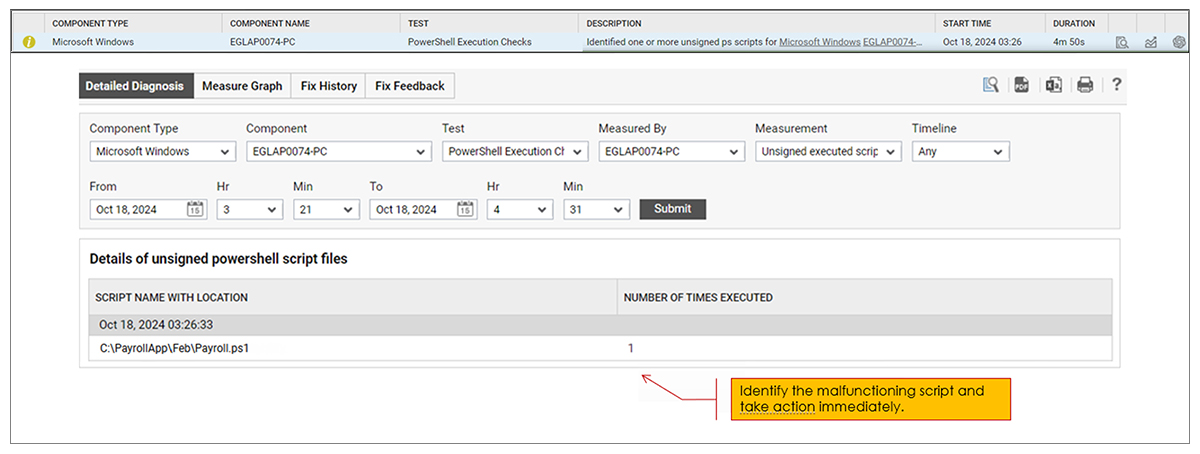
- How many PowerShell scripts were executed during the last measurement period that were unsigned (detailed diagnostics are collected that will report what these scripts are)
- Whether any PowerShell scripts were executed with an unrestricted execution policy and detailed diagnostics of which ones these were (if any)
- Whether any PowerShell scripts were executed with a bypass execution policy and detailed diagnostics of which these were
- Whether any PowerShell scripts were executed with a remote signed execution policy and detailed diagnostics identifying them

PowerShell Security Auditing & Compliance Reporting
eG Enterprise includes out-of-the-box reports on PowerShell executions, no query languages required. As with all eG Enterprise reports these can be scheduled and automatically archived or distributed to those with the appropriate permissions for audit and stakeholder visibility purposes.
Reports can be generated on both live and historical data as needed too.
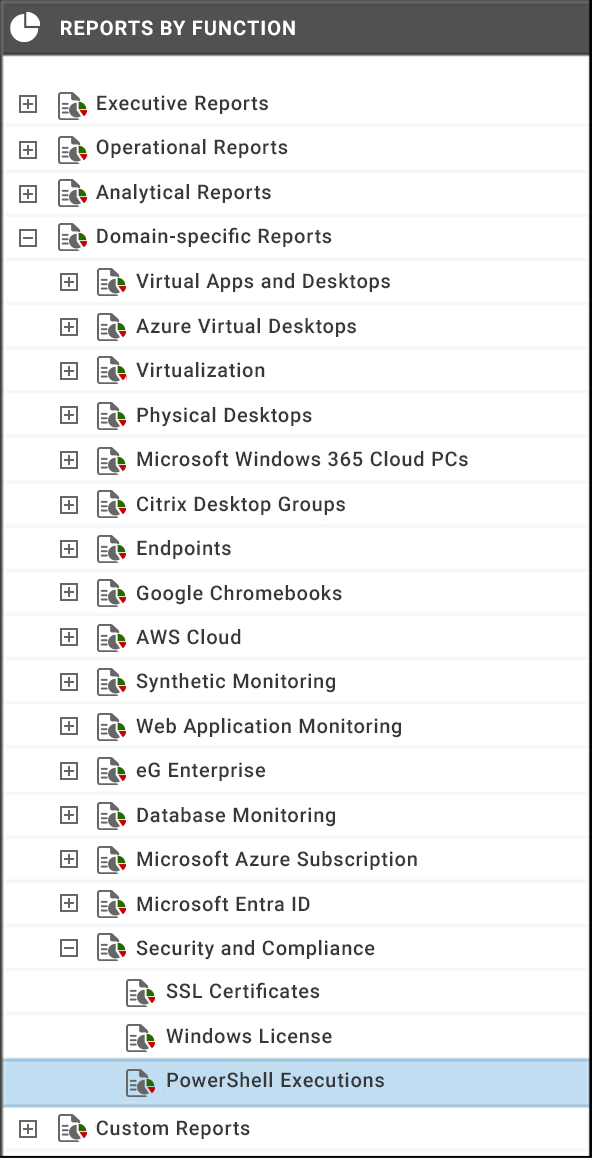
PowerShell Execution reports can be combined with other reports via “booklet” functionality to provide comprehensive regular reports covering multiple domains/functionality areas. This prevents stakeholders receiving multiple disparate documents or reports.

A Comprehensive PowerShell Security Strategy
Of course, monitoring and auditing PowerShell execution and execution policies is only one part of a robust PowerShell risk management strategy. I’ve written before about other steps you can take to ensure you are protected from vulnerabilities associated with PowerShell. Please see: Detecting PowerShell Exploitation | eG Innovations for more detailed information.
Common PowerShell Security Risks Organizations Face
PowerShell is a legitimate administration tool, but it is also frequently abused by attackers because it can run powerful commands, download content, and operate inside normal Windows workflows. That makes monitoring PowerShell activity essential for spotting abuse early and reducing the chance of a successful attack.
Unsigned script execution
Unsigned scripts are risky because they can be modified or disguised before execution, especially when users rely on scripts from email, shared folders, or external sources. In well-managed environments, script execution should be tightly controlled and monitored so that only trusted, approved scripts are allowed to run.
Bypass execution policies
PowerShell execution policies are designed to influence how scripts run, but they are not a complete security boundary. Attackers can use built-in switches or alternative invocation methods to bypass policy restrictions, which is why organizations should treat execution policy as one layer of control rather than a standalone defense.
Malicious remote scripts
Remote scripts are a common delivery method for malware, credential stealers, and post-exploitation tools because they can be fetched and executed quickly. Monitoring for script download activity, unusual command-line usage, and suspicious parent-child process behavior helps identify these attacks before they spread.
Credential theft attempts
PowerShell is often used in credential harvesting workflows because it can access system resources, query directories, and interact with local security context. Attackers may try to extract secrets from memory, token stores, or scripts that contain embedded credentials, making it important to watch for suspicious PowerShell sessions and privileged command usage.
Lateral movement attacks
Once an attacker gains a foothold, PowerShell is frequently used to move laterally across hosts and extend access. This is especially dangerous in environments where administrative privilege is broad, because one compromised account can quickly turn into wider domain-level access.
eG Enterprise is an Observability solution for Modern IT. Monitor digital workspaces,
web applications, SaaS services, cloud and containers from a single pane of glass.
Learn More About a Few Other Ways to Proactively Secure and Protect Your IT Systems:
Frequently Asked Questions
PowerShell monitoring is the process of tracking PowerShell activity to identify suspicious commands, risky script execution, policy changes, and signs of abuse. It helps security and operations teams detect exploitation attempts and operational issues earlier.
Attackers use PowerShell because it is built into Windows, can execute powerful commands, and often blends in with legitimate administrative activity. It also supports automation, remote execution, and in-memory techniques that can make malicious actions harder to spot.
PowerShell execution policies are a Windows control that influences whether scripts can run and under what conditions. They are meant to help manage script usage, but they are not a complete security control on their own.
Restricted prevents script execution, while Bypass removes policy enforcement for the session or command invocation. Since Bypass can be used to run scripts without the normal policy checks, it should be monitored closely in enterprise environments.
You can detect malicious activity by looking for abnormal command lines, unexpected script downloads, unusual use of execution policy overrides, encoded commands, and suspicious PowerShell parent processes. Correlating these signals with alerts and user context makes detection more effective.
Security audits improve compliance by creating a record of who ran what, when it ran, and whether policy or privilege controls were bypassed. This helps teams demonstrate control over administrative scripting and strengthens internal governance.
Yes. eG Enterprise pffers PowerShell execution checks and troubleshooting, and it can assess whether script execution is enabled or restricted on monitored systems. That makes it useful for tracking policy drift and identifying configurations that could increase risk.
Organizations can reduce risk by restricting script execution, enforcing signed scripts where appropriate, limiting privilege, monitoring execution policy changes, and alerting on suspicious PowerShell behavior. Combining prevention controls with continuous monitoring gives the best protection against exploitation.