In the hospitality industry, every second counts—especially when it comes to online bookings. Recently, I’ve been working with a hospitality customer who relies on eG Innovations SaaS to monitor the performance of their booking website. Like many modern sites, theirs is powered by numerous plugins and external third‑party services, each playing a crucial role in delivering a smooth booking experience while also introducing potential points of delay. We had already implemented Real User Monitoring (RUM), which gave us valuable insights into actual user interactions and performance bottlenecks. Yet, despite the data, there was still a gap: numbers alone couldn’t always convey what the user really felt. For the web team, being able to see the delay—almost like watching a screen recording of the user’s journey—would offer a far more intuitive understanding of performance issues.
That need sparked the idea for a new enhancement to our Real User Monitoring module. And in our latest release, we’re excited to deliver exactly that.
Session Replay is a new feature for eG Enterprise that captures and replays user interactions within an application, showing exactly how users experience it. eG Real User Monitoring treats user connections to a web site/web application from the same client IP address and via the same browser as a single session.
At any point in time, web service managers should be able to keep track of these sessions and accurately identify those that are currently live and those that are inactive. eG Enterprise empowers administrators to rapidly isolate slow sessions and error-prone ones, so they can pinpoint which user sessions are adversely impacting the overall user satisfaction with the target application and why.
The new Session Replay features record events such as clicks on a page, scrolls, and page changes by tracking DOM updates rather than creating a video, saving storage space. The collected data is then replayed in sequence to recreate each session.
Session Replay helps teams diagnose issues, enhance UX, and support users more effectively. Privacy safeguards and efficient data handling ensure compliance with minimal impact on app performance.
Session Replay in eG Enterprise
A new tab has been added to the left-hand side of the Real User Monitoring Dashboard within eG Enterprise, this tab accesses the Session Details for the pages and sites monitored by eG Enterprise, as shown in Figure 1.
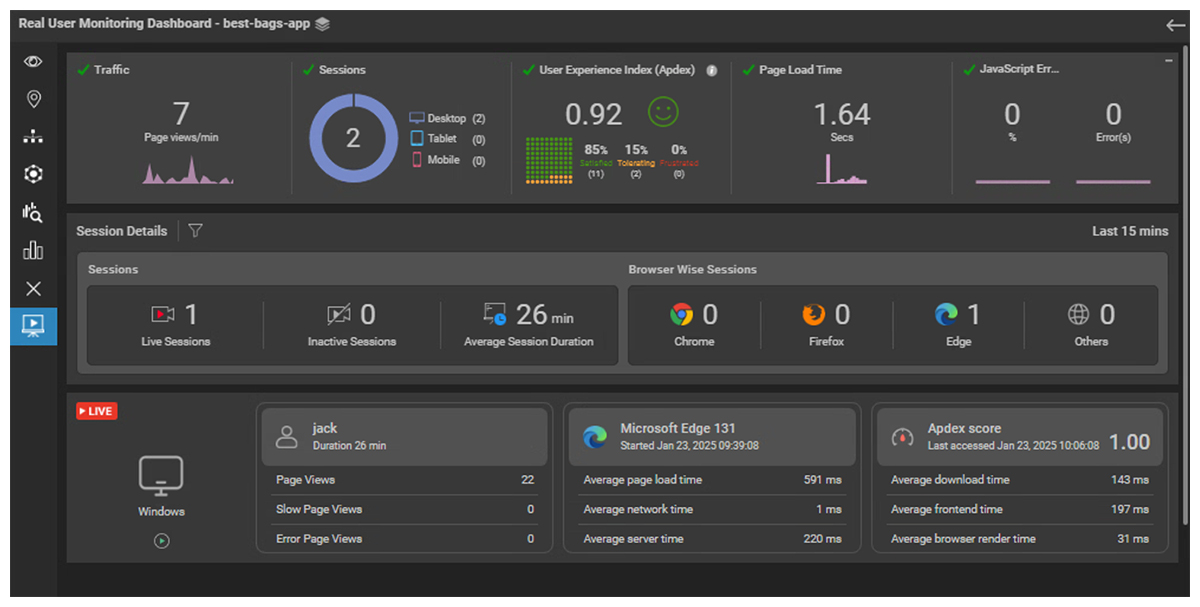
The filter icon next to “Session Details” in Figure 1 can be clicked on to open the session filters available, as shown in Figure 2.
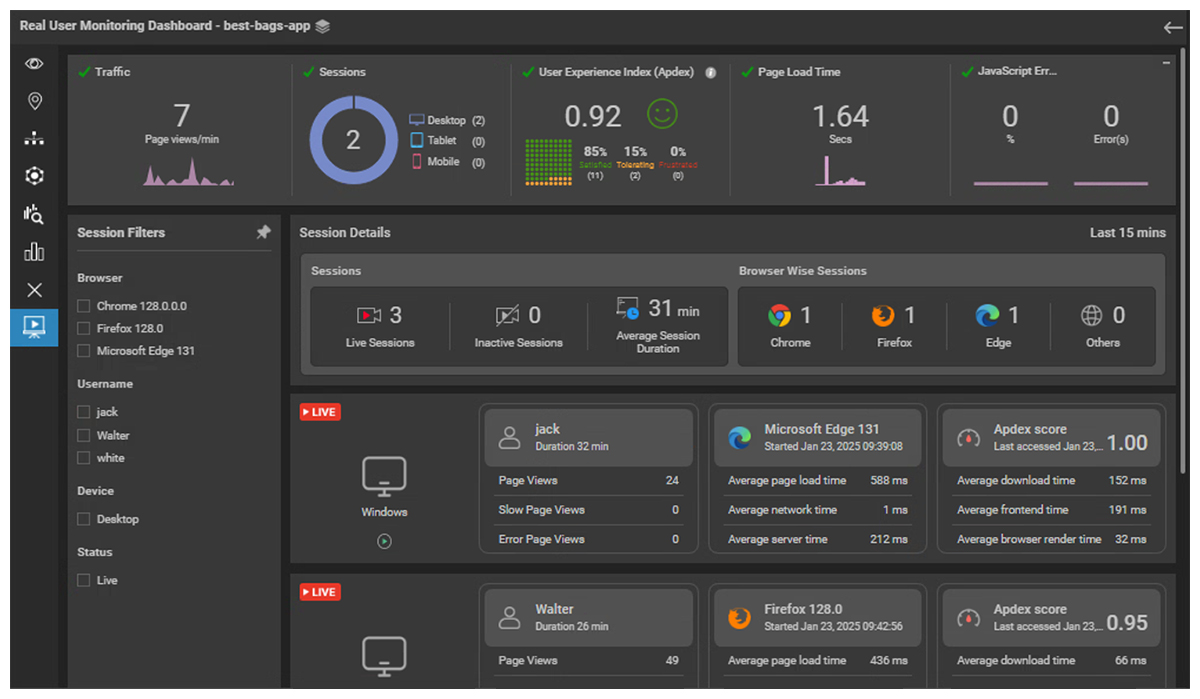
In Figure 2, you can see the session filters available that allow the IT teams to target specific qualities of sessions that are of interest. Sessions can be filtered by:
- Browser: to target whether the user journey and experience is dependent upon the choice of browser or specific version of that browser.
- Username: to identify specific user experience issues. This is especially useful if an individual user reports that they have issues with a site.
- Device: IT teams can segment the user experience according to whether the user is using a desktop device or a tablet or a mobile device.
- Live Status: allowing IT staff to analyze real time live sessions separately from inactive historical one.
For each session, a summary of properties including response times and Apdex score properties allows administrators to quickly identify sessions with performance issues. When an individual session is selected, deeper per session diagnostics, plus the session “recording” will be provided. For example, selecting the first session shown in Figure 2 attributed to user “jack” will yield the view shown in Figure 3.
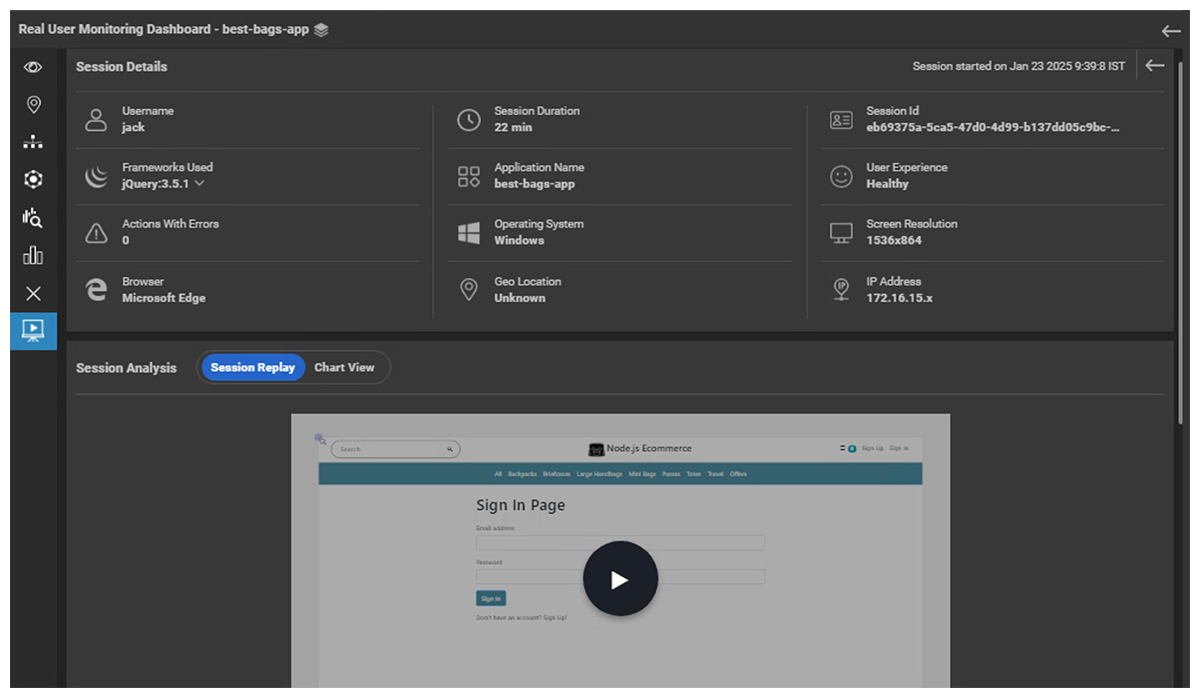
Anonymous sessions can be recorded when sites do not support specific user accounts.
Below the session replay pane, a session timeline is also provided (see Figure 4).
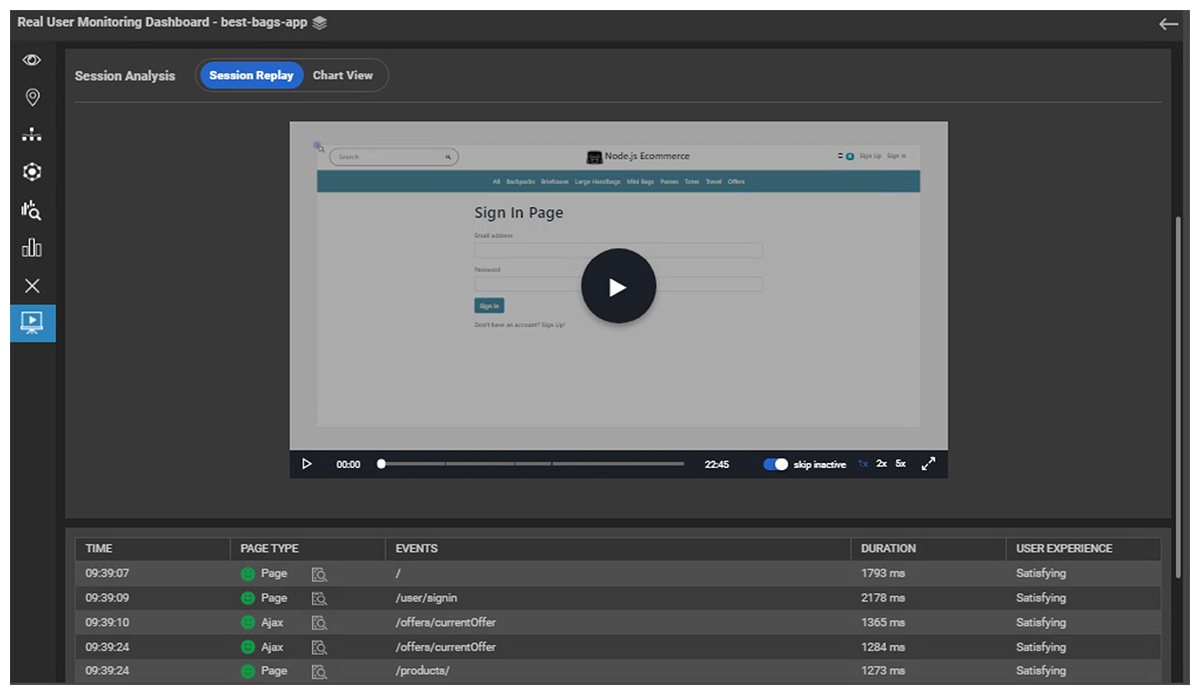
Note: In Figure 4 you can see the replay bar under the replay window, this can be used to move to a section of interest in the replay “video”; by default the “skip inactive” button is turned on upon this bar so that sections of inactivity are automatically trimmed in the replay. Controls are also present to allow the playback speed to be speeded up for rapid skim viewing.
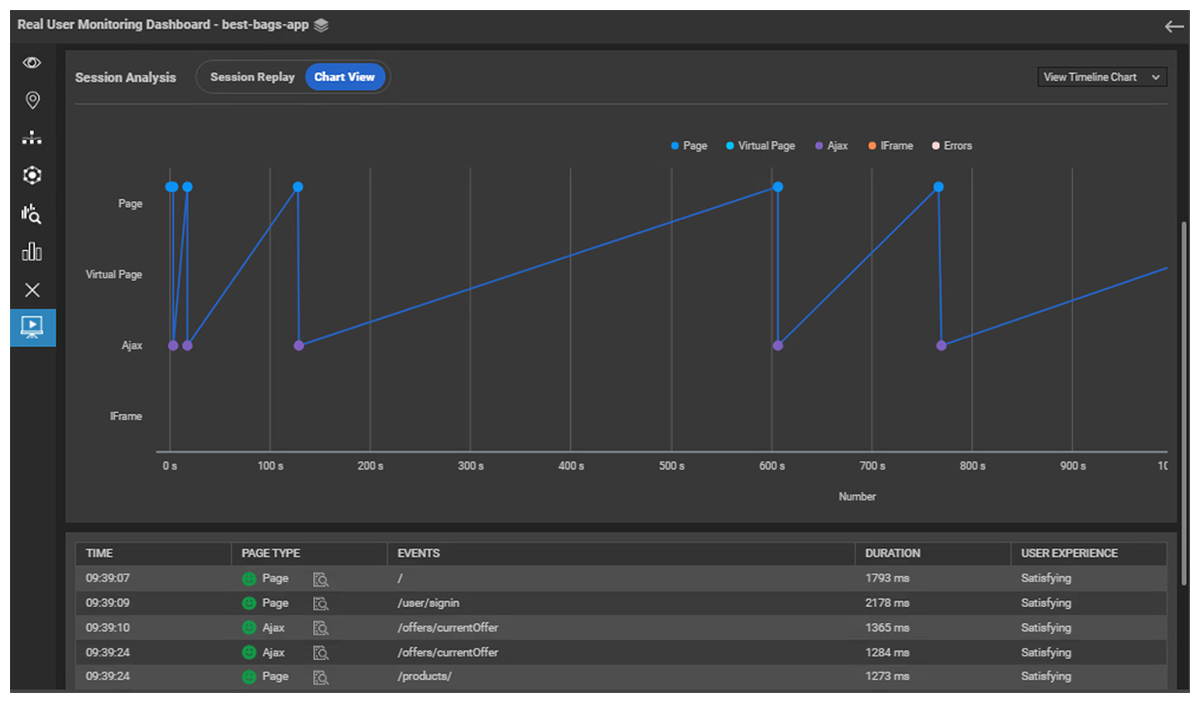
A “Chart View” is also available that allows the administrator to explore the timeline of the session, see Figure 5.
Benefits of and Use Cases for Session Replay
This new feature offers opportunities for IT teams to proactively improve the user experience of the websites and pages they offer. Benefits and opportunities include:
- Enhanced Correlation and Debugging: Using Session Replay quickly identify the root cause of bugs or crashes by replaying user actions. Reducing time spent reproducing issues helps QA and development teams accurately reproduce and diagnose bugs.
- Improved UX: Spot usability issues, effects of third-party scripts/plugins and optimize workflows based on real interactions by observing real user behavior, UX designers can find areas of friction or confusion.
- Customer Support: Support teams can replay sessions to understand user-reported issues without needing additional details from the user.
- Proactive Incident Management: Correlate user actions with system metrics to identify triggers for downtime or performance bottlenecks.
- Faster Issue Resolution: Visualize what users were trying to achieve, simplifying communication between support and engineering.
- Edge Case Discovery: Detect rare and unusual user behaviors or scenarios that lead to unexpected bugs.
Session Replay is just one of a number of new features added to enhance Real User Monitoring within eG Enterprise in our latest release V7.5.
eG Enterprise is an Observability solution for Modern IT. Monitor digital workspaces,
web applications, SaaS services, cloud and containers from a single pane of glass.
Frequently Asked Questions
Session Replay in Real User Monitoring (RUM) is a feature that captures and reconstructs a user's interactions with a website or web application, allowing IT teams to see exactly how the application was experienced from the user's perspective.
Session Replay in eG Enterprise works by capturing and reconstructing user interactions within a web application so administrators can visually replay a user's journey and understand exactly what they experienced. How it works:
- Session Identification: eG Real User Monitoring (RUM) groups connections from the same client IP address and browser into a single user session. Sessions can be tracked as either live (active) or inactive (historical).
-
Event Capture: Instead of recording a video, Session Replay captures user interaction events such as:
- Clicks Scrolling activity
- Page navigation
- DOM (Document Object Model) updates and changes
- Efficient Data Storage: Because only user actions and page changes are recorded, rather than a full video stream, storage requirements are significantly reduced while still preserving the complete user journey.
- Session Reconstruction: The captured events are stored in sequence and then replayed to recreate exactly how the user interacted with the website or application.
-
Session Analysis: Administrators can filter sessions by:
- Browser
- Username
- Device type (desktop, tablet, mobile)
- Live or inactive status
Session summaries include performance metrics such as response times and Apdex scores, helping teams quickly identify problematic sessions.
-
Replay and Diagnostics: Selecting a session opens a replay window where administrators can watch the user's interactions. Replay controls allow users to:
- Jump to specific points in the session
- Skip inactive periods automatically
- Adjust playback speed
A session timeline and chart view provide additional insight into the user's journey and performance issues.
The new Session Replay features record events such as clicks on a page, scrolls, and page changes. In eG Enterprise, Session Replay records user actions such as:
- Mouse clicks
- Page scrolling
- Page navigation and changes
- Dynamic page updates (DOM changes)
Traditional Real User Monitoring (RUM) focuses on collecting and analyzing performance data from real users as they interact with an application. It provides metrics such as page load times, response times, error rates, and Apdex scores, helping IT teams understand the overall health and performance of a website or application.
Session Replay builds upon RUM by adding a visual dimension to that data. Instead of only showing performance metrics, it reconstructs and replays the actual user journey, allowing administrators to see exactly what the user experienced on the screen.
Both complement each other to give a unified overview of user experience.
The new Session Replay features record events such as clicks on a page, scrolls, and page changes by tracking DOM updates rather than creating a video, saving storage space. The collected data is then replayed in sequence to recreate each session.
Session Replay helps troubleshoot website performance issues by allowing IT teams to visualize exactly how users experienced an application, rather than relying solely on performance metrics and logs.
Yes. Session Replay can help identify browser-specific performance problems by allowing administrators to filter and analyze sessions based on the browser being used.
Within eG Enterprise, sessions can be filtered by browser type and version, enabling IT teams to compare user experiences across different browsers. This makes it easier to determine whether performance issues, rendering problems, or application errors are affecting users of a particular browser.
Session Replay improves customer support by allowing support teams to see exactly what a user experienced during a session.
Instead of relying on user descriptions or reproducing issues manually, support staff can replay the user's journey to understand the actions taken, where problems occurred, and how they impacted the experience. This helps teams diagnose issues faster, reduce troubleshooting time, and provide more accurate resolutions, leading to improved customer satisfaction.